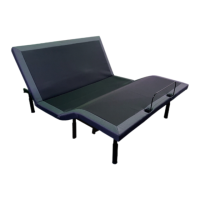
This document is the Owner's Manual for The Independence® Bed by Customatic® Technologies, model number CUSIN01. It provides comprehensive information on the bed's installation, operation, safety precautions, troubleshooting, and warranty.
Function Description:
The Independence® Bed is an adjustable bed system designed for in-home use, offering various positions and features to enhance comfort and assist users with mobility. Its primary function is to provide an adjustable sleeping surface that can be manipulated to different head and foot elevations, as well as unique rotational and seating modes. The bed is equipped with motors that control these adjustments, and it can be operated via a wired remote control or a smart device app. A key feature is its ability to rotate, allowing users to exit the bed more easily, and it includes an emergency power-down feature for use during power failures.
Important Technical Specifications:
- Model Number: CUSIN01
- Weight Limitation: Up to 500 lbs (when weight is distributed evenly across head and foot sections). Note: The available weight limit may be less depending on the mattress size and model.
- Input Transformer Voltage: AC 120V 60HZ
- Output Voltage: DC24V 3A
- Lift Motor Duty Cycle: NOT designed to operate continuously for more than three (3) minutes over a thirty (30) minute time period, or approximately 10% duty cycle. Exceeding these limits can shorten product life and void the warranty.
- Power Supply: Requires a working electrical outlet. A surge protector (not included) is highly recommended for optimal safety.
- Emergency Power Down: Uses two (2) 9V batteries (single-use only) in the power supply unit to lower head and foot sections to a flat position during a power failure.
- Connectivity: Features two (2) USB ports for charging tech devices, and can connect to smart devices (iOS or Android) via the Independence mobile app using Bluetooth®.
Usage Features:
The Independence Bed offers four distinct modes/positions:
- Bed Mode: The bed is in a flat, non-rotated position, allowing free adjustment of the head and foot sections.
- Rotate Mode: The head section is halfway up, and the foot section is raised to its full height before the bed rotates (left or right, depending on setup). In this mode, only Rotate Stand, Rotate Sleep, and Seat Up buttons are functional.
- Seating Mode: The bed is in an upright, chair-like position with the head section up and the foot section down on the side. This mode typically follows Rotate Mode.
- Seat Up Mode: The bed is in an upright position, leaning slightly forward to assist the user in standing up or getting off the bed. This mode typically follows Seating Mode.
The wired remote control includes buttons for:
- Head Position Adjustments (Head Up/Head Down): To raise or lower the head section (functional only in Bed Mode).
- Foot Position Adjustments (Foot Up/Foot Down): To raise or lower the foot section (functional only in Bed Mode).
- Bed Rotation Adjustments (Rotate Stand/Rotate Sleep): Rotate Stand raises head/foot sections and rotates the bed; Rotate Sleep returns the bed to Bed Mode.
- Seat Up Adjustment: Moves the head section to lean forward for standing assistance (functional in Rotate or Seating Modes). Can be pressed three times quickly for automatic Seat Up Mode.
- Seat Down Adjustment: Moves the seat back to a comfortable sitting position (Seating Mode). Can be pressed three times quickly to automatically return the bed to a flat position (Auto-Flat function), functional in Rotate or Seating Modes.
Other usage features include:
- USB Ports: Two conveniently located USB ports near the head section for charging devices.
- Under Bed Light: Automatically turns on when the bed begins to rotate, staying on for three minutes to provide safe illumination in dimly lit rooms.
- Adjustable Rotation Direction: The bed's rotation direction (left or right) can be changed post-installation by adjusting the rotation motor and stopper.
- Smart Device Control: The bed can be controlled via the Independence mobile app on iOS or Android devices, offering an alternative to the wired remote.
Maintenance Features:
- User-Serviceable Parts: The bed is specifically designed for no user maintenance. Opening or tampering with the control box, motors, or hand controls (except the battery compartment) will void the warranty. Repairs and part replacements must be conducted by authorized personnel.
- Cleaning: Always unplug the bed from the electrical outlet before cleaning.
- Troubleshooting Guide: The manual provides a detailed troubleshooting section for common issues, including remote control LED error codes, unresponsive remote, head/foot section malfunctions, squeaking, and stuttering. Solutions often involve checking connections, power cycling, or performing a system reset.
- System Reset: If the LED on the remote blinks slowly or rapidly, a system reset is needed. This is done by unplugging and re-plugging the power cord, then quickly pressing the "Seat Down" button three times. This returns the bed to a flat position and resets motor operation for safety.
- Lubrication (for squeaking): If the bed squeaks, specific pins, nuts, bolts, or white bushings can be lubricated with grease (lithium or spray lubricant, obtainable from Customatic's Customer Care Center).
- Mattress Protector: Strongly recommended (not included) to protect the mattress from spills, stains, and fluids, which are not covered under warranty.
Warranty and Registration:
The product comes with a limited warranty:
- 2-Year Period for Labor: Labor for warranty repairs is covered for the first two years.
- 2-Year Period for All Components: Covers the bed frame, electronics, electrical components, drive motors, WiFi module, power supply, power cords, and massage motors for two years.
- 10-Year Period for Bed Frame: Covers the metal structure of the bed frame (excluding cover, side rails, decking, legs, and other attachments) for ten years, prorated from year 3 to 10.
- 10-Year Warranty Period for Foam Mattress: Covers defects in material and workmanship for ten years under normal use.
- Warranty Exclusions: Does not cover ordinary wear and tear, damage not caused by a covered defect, failure to comply with the user manual, unauthorized modifications, use of non-Customatic parts, misuse, abuse, or environmental exposure.
- Claims Process: Requires contacting Customatic customer service, providing proof of purchase and timely registration, and identifying the defect.
- Registration: A warranty registration form is provided in the manual and can be filled out online or mailed.

 Need help?
 General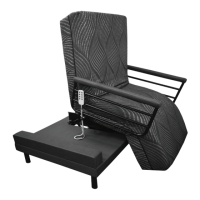

 To Next Page