I.B. 29C892B
Page 3
Effective 8/99
SECTION 2: HARDWARE DESCRIPTION
2-1 GENERAL
The purpose of this section is to familiarize the reader
with OPTIMizer hardware, its nomenclature, and any
applicable specifications. The information presented is
divided into the following three sections:
• Package and External Connections
• Operator Panel
• Specification Summary
Notice: Integral to the OPTIMizer Hand Held Program-
mer is the ability to lock out changes to a
breaker’s settings through the use of a pass-
word. The correct password must be entered
to proceed with setpoint changes, baud rate
changes or the initiation of a test. The pass-
word entry field contains four digits that can be
changed. The factory installed password 1000
can be used until a new password is selected
by the user.
THIS IS A SOPHISTICATED PIECE OF ELECTRICAL
EQUIPMENT. AS SUCH, IT SHOULD BE HANDLED
CAREFULLY AT ALL TIMES TO AVOID POSSIBLE
DEVICE DAMAGE.
2-2 PACKAGE AND EXTERNAL CONNECTIONS
The OPTIMizer Hand Held Programmer is packaged in
a high strength plastic housing with approximate dimen-
sions of 5.75 inches by 3.5 inches by 1.25 inches. An
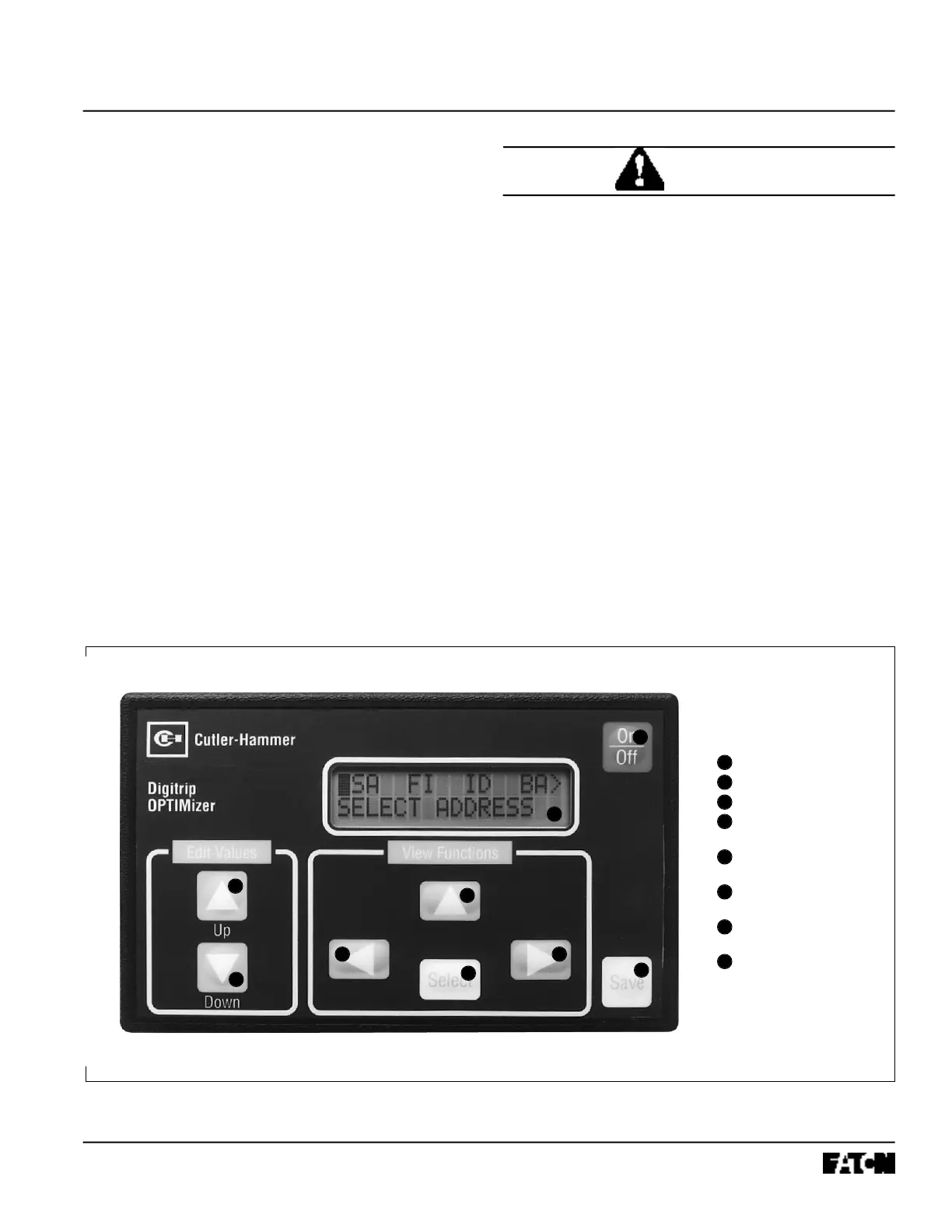
operator panel with a display and associated pushbut-
tons are located on the front of the device (Figure 2-1).
External connections are made on the top of the hand
held programmer (Figure 2-2). A top hinged protective
cover is provided to protect external connections from
the entrance of foreign matter. The protective cover is
opened through the use of a thumb nail notch (Figure 2-
3). A storage case holds the hand held programmer and
its phone type connection cord.
Figure 2-1 OPTIMizer Operator Panel
1
2
3
4
8
7
6 5
1
2
3
4
8
7
6
5
7
On/Off Pushbutton
Save Pushbutton
Select Pushbutton
View Functions
Up-Arrow Pushbutton
Right-Arrow
Pushbutton
Left-Arrow
Pushbutton
Edit Values Up and
Down Pushbuttons
Liquid Crystal Display
CAUTION



 To Next Page