Need help?
Do you have a question about the Cyber Acoustics AC-5812 and is the answer not in the manual?
Describes the indicator light colors (Green for normal, Red for muted mic) for operation status.
Explains how to toggle the microphone on or off, indicated by LED color.
Details how to increase or decrease the audio volume using the controller buttons.
Describes how to mute or unmute the speaker output using the controller.
Identifies the 3.5mm audio jack for alternative audio connection.
Details technical aspects including sensitivity, frequency response, and impedance.
Lists compatible operating systems and optimal operating temperature range.
Addresses issues with automatic headset setup on Windows 7, 8, and 10 via USB.
Details troubleshooting steps for automatic headset setup on Mac systems.
Provides solutions for issues where the headset has no sound or the microphone is not functioning.
Provides essential instructions for safe operation and handling of the headset.
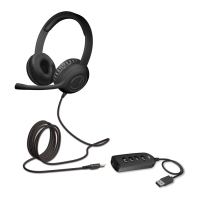
The AC-5812 USB Controller & Headset is a versatile audio solution designed for clear communication and enjoyable music listening. This device is ideal for use with various internet communication platforms such as Skype and Zoom, as well as other online calls. Its plug-and-play functionality ensures ease of use, allowing users to quickly connect and begin using the headset without complex setup procedures.
The headset itself features a 3.5mm audio jack, providing broad compatibility with a range of devices. While primarily designed for use with the included USB controller, the 3.5mm audio jack allows the headset to be directly connected to smartphones, tablets, and other devices that support a 3.5mm audio connection. This dual connectivity option enhances its flexibility, making it suitable for both computer-based communication and mobile audio needs.
The USB controller is a key component of this system, providing intuitive controls for managing audio and microphone functions. It connects to your computer via a USB Type A connector. The controller is designed to be automatically recognized and installed by your computer's operating system, ensuring a seamless plug-and-play experience.
To begin using the AC-5812, first connect the headset's 3.5mm audio jack into the designated port on the USB controller. Once the headset is securely connected to the controller, plug the USB cable from the controller into an available USB Type A port on your computer. The USB connection is plug-and-play, meaning your computer should automatically detect and install the necessary drivers for the AC-5812. This eliminates the need for manual driver installation, simplifying the setup process. As mentioned, the 3.5mm audio jack on the headset also allows for direct connection to smartphones, tablets, and other devices, offering flexibility beyond the USB controller.
The USB controller features a series of clearly labeled buttons for easy management of audio and microphone settings:
The light indicator on the USB controller provides immediate feedback on the microphone's status. When the microphone is in normal operation (i.e., unmuted), the indicator light will be lit green. If the microphone is muted, the light will turn red. This visual indicator is a helpful feature for users to quickly check if their microphone is active during calls or recordings.
The AC-5812 USB Controller & Headset is optimized for a variety of uses:
While the manual does not explicitly detail maintenance features, general best practices for electronic devices apply to ensure the longevity and optimal performance of the AC-5812 USB Controller & Headset.
The AC-5812 USB Controller & Headset is designed for reliability and user-friendliness, making it a practical choice for individuals requiring a flexible and high-quality audio solution for communication and entertainment.
 General
| Type | Over-Ear |
|---|---|
| Connectivity Technology | Wired |
| Microphone | Yes |
| Microphone Type | Omnidirectional |
| Frequency Response | 20 Hz - 20 kHz |
| Microphone Frequency Response | 100 Hz - 10 kHz |
| Impedance | 32 Ohms |
| Connector | 3.5 mm |
| Driver Size | 40 mm |
| Microphone Sensitivity | -58 dB |
| Sensitivity | 105 dB ± 3 dB |

 To Next Page