CyberData Corporation
3 Justin Court, Monterey, CA 93940
www.cyberdata.net
P 831.373.2601 | F 831.373.4193
RING CENTRAL CONFIGURATION GUIDE: SIP PAGING ADAPTER (SPA)
Doc. 931050B Page 35
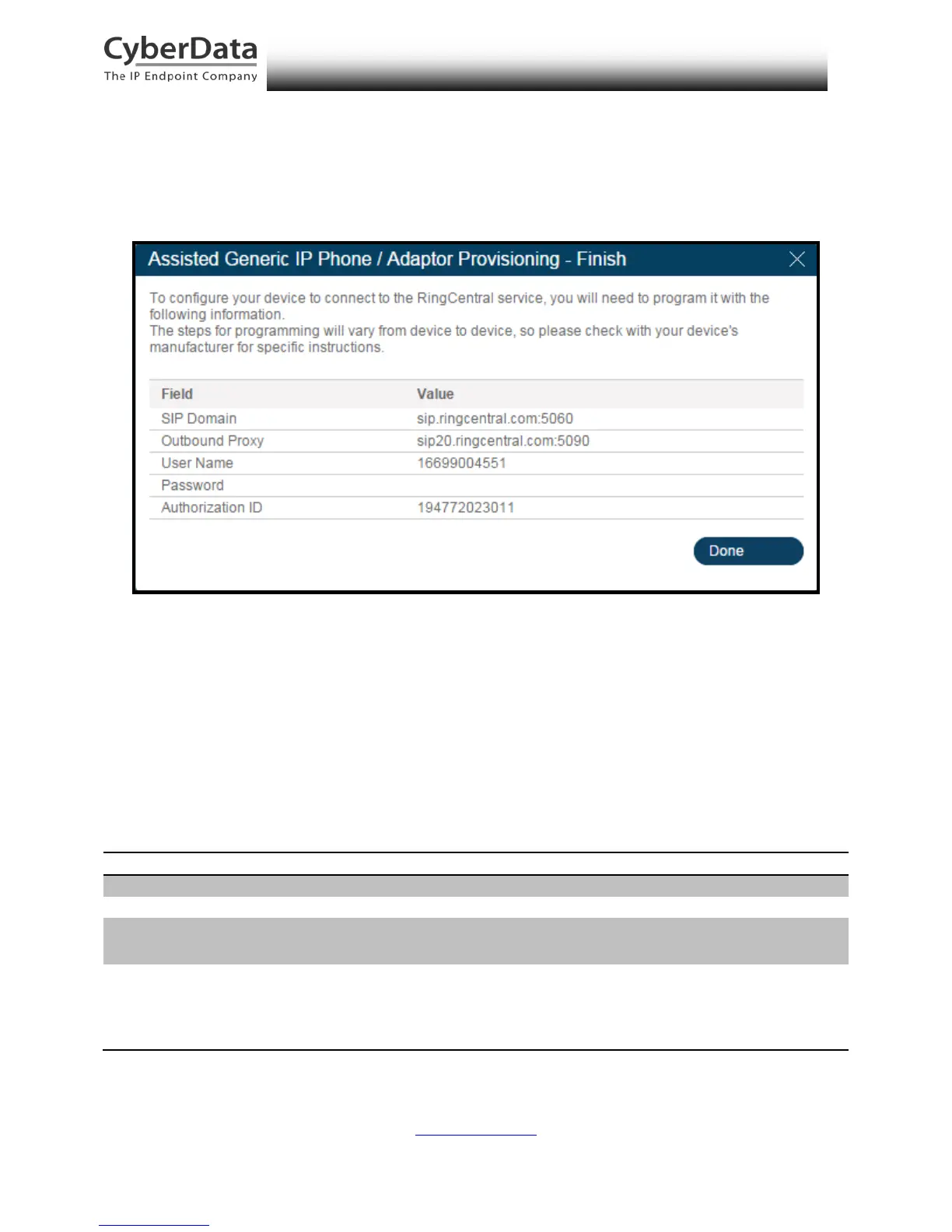
10. A popup window labeled Assisted Generic IP Phone/Adaptor Provisioning will
appear. You will use the provisioning information to register the paging extension with
RingCentral.
Figure 6-9. IP Phone Provisioning Information
Note: The Password has been obscured. These values are published only for reference.
SIP Fields Table
Use the following table to determine how the RingCentral SIP field values above correlate to the
CyberData SIP field values.
Table 6-1. SIP Fields Table
SIP Domain (without colon and port number)
Outbound Proxy Port
Outbound Proxy address before colon
Port number following colon in Outbound Proxy
address



 To Next Page