
 Need help?
Do you have a question about the CyberPower CST135UC2 and is the answer not in the manual?
Describes the various icons and indicators on the UPS LCD screen for status monitoring.
Covers the procedures for powering the UPS unit on and off using the power button.
Explains how to enter and navigate the UPS setup mode to access its various functions.
Details the steps for selecting, viewing, and confirming options within the UPS setup menu.
Allows selection of input voltage quality ranges to optimize UPS operation and battery usage.
Configures the maximum output voltage threshold for switching to battery power, with fine-tuning.
Configures the minimum output voltage threshold for switching to battery power, with fine-tuning.
Sets the UPS's sensitivity to power events, affecting how often it switches to battery mode.
Sets the time threshold for the audible alarm and "ON BATT." icon when runtime is low.
Determines if the UPS will perform a self-test when configured, ensuring operational readiness.
Manages outlets for non-critical equipment to be powered off during low battery conditions.
Enables or disables audible alarms, with options to mute most notifications except critical faults.
Controls whether the LCD screen turns off automatically after inactivity in Line Mode.
Clears the recorded number of power outages and system events from the UPS memory.
Resets all UPS settings to their original factory default values.
Exits the configuration menu and returns the UPS display to its normal status monitoring view.
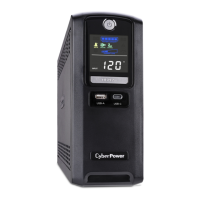
The CyberPower Smart App UPS Series CST135UC2 is a sophisticated uninterruptible power supply designed to provide reliable power protection and management for connected equipment. This device ensures continuous operation during power outages, fluctuations, and other electrical disturbances, making it an essential component for safeguarding sensitive electronics.
The primary function of the CST135UC2 is to supply clean and stable power to connected devices, even when the utility power is unstable or unavailable. It achieves this through several key mechanisms:
The CST135UC2 is designed with a user-friendly interface and a range of customizable settings to optimize its performance for various environments.
The CST135UC2 includes features designed to facilitate maintenance and ensure the longevity of the unit and its battery.
By combining robust power protection with an intuitive interface and comprehensive diagnostic tools, the CyberPower Smart App UPS Series CST135UC2 offers a complete solution for managing and protecting critical electronic devices.
 General
| Input Voltage | 120V |
|---|---|
| Output Voltage | 120V |
| Waveform Type | Simulated Sine Wave |
| USB Charging Ports | 2 |
| Communication Port | USB |
| Typical Transfer Time | 4 ms |
| Transfer Time | 4 ms |
| Input Plug Type | NEMA 5-15P |
| Cord Length | 6 ft |
| Battery Type | Sealed Lead Acid |
| Typical Recharge Time | 8 hours |
| Battery Recharge Time | 8 hours |
| EMI/RFI Filtration | Yes |
| Dimensions | 11.5 x 5.8 x 10.5 in |
| Weight | 14.3 lbs |
| Output Frequency | 60 Hz |
| Output Frequency (Battery Mode) | 60 Hz +/- 1 Hz |
| Outlets | NEMA 5-15R |
| Input Voltage Range | 90-140 V |
| Input Frequency | 60 Hz |
| Battery Runtime | Varies by load |
| Typical Backup Time | 15 minutes at half load |
| Output Power Capacity | 1350VA / 810W |
| Output Voltage Regulation (Battery Mode) | +/- 5% |







 To Next Page