GX1500U
User’s Manual
K01-0000844-00
Thank you for purchasing a CyberPower product. Please take a few minutes to register your product at
www.cyberpowersystems.com/registration/. Registration certifies your product's warranty, confirms your
ownership in the event of a product loss or theft and entitles you to free technical support. Register your
product now to receive the benefits of CyberPower ownership.
(SAVE THESE INSTRUCTIONS)
This manual contains important safety instructions. Please read and follow all instructions carefully during
installation and operation of the unit. Read this manual thoroughly before attempting to unpack, install, or
operate your UPS.
CAUTION! To prevent the risk of fire or electric shock, install in a temperature and humidity controlled
indoor area free of conductive contaminants. (Please see specifications for acceptable temperature and
humidity range).
CAUTION! To reduce the risk of electric shock, do not remove the cover except to service the battery. Turn
off and unplug the unit before servicing the batteries. There are no user serviceable parts inside except for
the battery.
CAUTION! Hazardous live parts inside can be energized by the battery even when the AC input power is
disconnected.
CAUTION! The UPS must be connected to an AC power outlet with fuse or circuit breaker protection. Do
not plug into an outlet that is not grounded. If you need to de-energize this equipment, turn off and unplug
the unit.
CAUTION! To avoid electric shock, turn off the unit and unplug it from the AC power source before
servicing the battery or installing a computer component.
CAUTION! Not for use in a computer room as defined in the Standard for the Protection of Electronic
Computer/Data Processing Equipment, ANSI/NFPA 75.
CAUTION! To reduce the risk of fire, connect only to a circuit provided with 20 amperes maximum branch
circuit over current protection in accordance with the National Electric Code, ANSI/NFPA 70.
CAUTION! DO NOT USE FOR MEDICAL OR LIFE SUPPORT EQUIPMENT! DO NOT use in any
circumstance that would affect the operation and safety of life support equipment, medical applications, or
patient care.
CAUTION! DO NOT USE WITH OR NEAR AQUARIUMS! To reduce the risk of fire or electric shock, do not
use with or near an aquarium. Condensation from the aquarium can cause the unit to short out.
CAUTION! DO NOT USE THE UPS ON ANY TRANSPORTATION! To reduce the risk of fire or electric shock,
do not use the unit on any transportation such as airplanes or ships. The effect of shock or vibration caused
during transit and the damp environment can cause the unit to short out.
UNPACKING
Inspect the UPS upon receipt. The box should contain the following: (a) UPS unit (b) User’s manual (c) USB
A+B type cable (d) Function Setup Guide
*PowerPanel® Personal software is available on our website. Please visit www.cyberpower.com and go to the
Software Section for free download.
SUPPORTS ACTIVE PFC POWER SUPPLIES
This CyberPower UPS system delivers sine wave output, which is ideal for seamless operation of computers
using high efficiency switching power supplies with Active Power Factor Correction (Active PFC), home
entertainment systems, and other sensitive electronics.
OVERVIEW
The GX1500U provides complete power protection from utility power that is not always consistent. The
GX1500U features 1445 Joules of surge protection. The unit provides long lasting battery backup during
power outages with maintenance free batteries. The GX1500U ensures consistent power to your computer
system and includes software that will automatically save your open files and shutdown your computer
system during a utility power loss.
SYSTEM BLOCK DIAGRAM
AUTOMATIC VOLTAGE REGULATOR
The GX1500U uses Automatic Voltage Regulation (AVR) to stabilize inconsistent utility power voltage to
levels that are safe for connected equipment. AVR safeguards hardware and important data files by
automatically increasing low utility power to a consistent and safe output voltage while preserving battery
power for outages.
DETERMINE THE POWER REQUIREMENTS OF YOUR EQUIPMENT
1. Ensure that the equipment plugged into the outlet does not exceed the UPS unit’s rated capacity
(1500VA/900W for GX1500U). If the rated capacities of the unit are exceeded, an overload condition
may occur and cause the UPS unit to shut down or the circuit breaker to trip.
2. There are many factors that can affect the amount of power that your computer system will require.
It is suggested that the load placed on the battery outlets not exceed 80% of the unit’s capacity.
HARDWARE INSTALLATION GUIDE
1. Your new UPS may be used immediately upon receipt. However, after receiving a new UPS, to ensure
the battery’s maximum charge capacity, it is recommended that you charge the battery for at least 8
hours. Your UPS is equipped with an auto-charge feature. When the UPS is plugged into an AC outlet,
the battery will automatically charge whether the UPS is turned on or off. Note: This UPS is designed
with a safety feature to keep the system from being turned on during shipment. The first time you turn
the UPS on, you will need to have it connected to AC power or it will not power up.
2. With the UPS unit turned off and unplugged, connect your computer, monitor, and any other
peripherals requiring battery backup into the battery power supplied outlets. DO NOT plug a laser
printer, paper shredder, copier, space heater, vacuum, sump pump or other large electrical devices
into the “Battery and Surge Protected Outlets”. The power demands of these devices may overload
and damage the unit.
3. Plug the UPS into a 2 pole, 3 wire grounded receptacle (wall outlet). Make sure the
wall branch outlet is protected by a fuse or circuit breaker and does not service
equipment with large electrical demands (e.g. air conditioner, copier, etc…). The
warranty prohibits the use of extension cords, outlet strips, and surge strips.
4. Press the power switch to turn the unit on. The Power On indicator light will
illuminate and the unit will “beep”. If an overload is detected, an audible alarm will sound and the unit
will emit one long beep. To correct this, turn the UPS off and unplug at least one piece of equipment
from the battery power supplied outlets. Make sure the circuit breaker is depressed and then turn the
UPS on.
5. To maintain optimal battery charge, leave the UPS plugged into an AC outlet at all times.
6. To store the UPS for an extended period, cover it and store with the battery fully charged. While in
storage, recharge the battery every three months to ensure battery life.
7. Ensure the wall outlet and UPS are located near the equipment being attached for proper
accessibility.
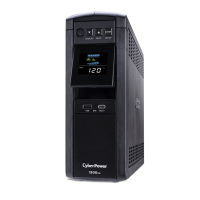
1 Power Switch: Used as the master on/off
switch for equipment connected to the
battery power supplied outlets.
2 Power On Indicator: This LED is illuminated
when the utility power is normal and the
UPS outlets are providing power, free of
surges and spikes.
3 LCD module display: High resolution and
intelligent LCD display shows all the UPS
information using icons and messages.
For more information please review the
“Definitions for Illuminated LCD Indicators”
section below.
4 Down/Display button: The button can be
used to select the LCD display contents
including Input Voltage, Output Voltage,
and Estimated Run Time. Short press the
button to scroll down the function menu.
Pressing the button for 2 seconds will keep
the LCD display always on or turn the LCD
display off while in AC/Utility power mode.
For more information about the
Down/Display Button, please refer to the
Function Setup Guide
.
5 Up/Mute button: Short press the button to scroll up the function menu. Holding the button for more
than 2 seconds will silence the alarm. For more information about the Up/Mute Button, please refer to
the
Function Setup Guide
.
6 Enter/Setup Button: Press the button for 2 seconds to enter the setup menu and then select the
functions for configuration. For more information about the Enter/Setup Button, please refer to the
Function Setup Guide
.
7 USB Charging Ports: The USB charging ports (Type A and Type C) provide DC 5V 3.1A power output
with battery backup.
8 Battery and Surge Protected Outlets: The unit has 6 battery powered/surge suppression outlets for
connected equipment to ensure temporary uninterrupted operation of your equipment during a
power failure. (DO NOT plug a laser printer, paper shredder, copier, space heater, vacuum, sump pump
or other large electrical devices into the “Battery and Surge Protected Outlets”. The power demands
of these devices may overload and damage the unit.)
9 Full-Time Surge Protected Outlets: The unit has 6 surge suppression outlets.
10 Circuit Breaker: Located on the back of the UPS, the circuit breaker serves to provide overload and
fault protection.
11 Serial/USB Ports to PC: The USB port allows connection and communication between the USB port
on the computer and the UPS unit.
12 Wiring Fault Indicator (red): This LED indicator will illuminate to warn the user that a wiring problem
exists, such as bad ground, missing ground or reversed wiring. If this is illuminated, disconnect all
electrical equipment from the outlet and have an electrician verify the outlet is properly wired. The
unit will not provide surge protection without being plugged into a grounded and properly wired wall
outlet.
13 Communication Protection Ports (RJ45): Bi-directional communication ports provide surge
protection to a 10/100/1000 Ethernet connection.
14 Outlets Designed for AC Adapters: The unit has 2 outlets spaced to allow AC power adapter blocks to
be plugged into the UPS without blocking adjacent outlets.
Replacement of batteries located in an OPERATOR ACCESS AREA. When replacing batteries, replace with
the same number of the following battery: CyberPower / RB1290X2 for the GX1500U.
CAUTION! RISK OF EXPLOSION IF BATTERY IS REPLACED BY AN INCORRECT TYPE. DISPOSE OF USED
BATTERIES ACCORDING TO LOCAL REGULATIONS.
CAUTION! Risk of Energy Hazard, 24 V, maximum 9 Ampere-hour battery. Before replacing batteries,
remove conductive jewelry such as chains, wrist watches, and rings. High energy conducted through these
materials could cause severe burns.
CAUTION! Do not dispose of batteries in a fire. The batteries may explode.
CAUTION! Do not open or mutilate batteries. Released material is harmful to the skin and eyes. It may be
toxic.
CAUTION: A battery can present a risk of electrical shock and high short circuit current. The following
precautions should be observed when working on batteries:
(1) Remove watches rings, or other metal objects.
(2) Use tools with insulated handles.
BATTERY REPLACEMENT PROCEDURE
1. Turn off and unplug all connected equipment.
2. Turn the UPS off and unplug it from the AC power source.
3. Turn the UPS on its side.
4. Remove the front panel retaining screws located on the bottom of the UPS.
5. Slide the front panel completely off of the unit.
6. Remove the fixed stand from the upper battery.
7. Remove the batteries from the compartment.
8. Disconnect the battery wires from the batteries.
9. Install the replacement batteries by connecting the red wire (+) and black wire (-) to the same color
connectors from both the upper and lower battery pack. Note: Only use new batteries for
replacement and both batteries should be replaced at the same time to ensure maximum life span.
10. Put the batteries back into the compartment and reattached the fixed stand.
11. Slide back the battery compartment cover and tighten the retaining screws.
12. Recharge the UPS for 8-16 hours to fully charge the battery.
REMINDER: Batteries are considered HAZARDOUS WASTE and must be disposed of properly. Most
retailers that sell lead-acid batteries collect used batteries for recycling, as required by local regulations.
Advanced Energy-Saving Design
The GreenPower UPS™ has a high-efficiency charger, which makes it the most
energy-efficient UPS in its class. The advanced high-frequency charging system
significantly improves charging efficiency and conserves energy. As a result of this
advanced design, the GreenPower UPS™ uses less energy compared to competitive
models. The GreenPower UPS™ is manufactured in accordance with the Restriction on
Hazardous Substances (RoHS) directive making it one of the most
environmentally-friendly UPS on the market today.
FCC Compliance Statement This device complies with part 15 of the FCC rules. Operation is subject to the
following two conditions: (1) this device may not cause harmful interference, and (2) this device must accept
any interference received, including interference that may cause undesired operation.
Note:
This equipment has been tested and found to comply with the limits for a Class B digital device,
pursuant to part 15 of the FCC Rules. These limits are designed to provide reasonable protection against
harmful interference in a residential installation. This equipment generates, uses, and can radiate radio
frequency energy and, if not installed and used in accordance with the instructions, may cause harmful
interference to radio communications. However, there is no guarantee that interference will not occur in a
particular installation. If this equipment does cause harmful interference to radio or television reception,
which can be determined by turning the equipment off and on, the user is encouraged to try to correct the
interference by one or more of the following measures:
- Reorient or relocate the receiving antenna.
- Increase the separation between the equipment and receiver.
- Connect the equipment to an outlet on a circuit different from that to which the receiver is connected.
- Consult the dealer or an experienced radio/TV technician for help.
Important
: Changes or modifications not expressly approved by the party responsible for
compliance could void the user's authority to operate the equipment.
Canadian Compliance Statement CAN ICES-3 (B)/NMB-3(B)
IMPORTANT SAFETY INSTRUCTIONS
INSTALLING YOUR UPS SYSTEM
CYBERPOWER GREENPOWER UPS™ TECHNOLOGY

 Need help?
 General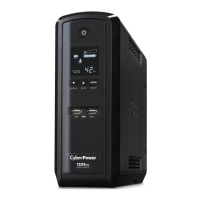








 To Next Page