©2021 Cyber Power Systems (USA), Inc. All rights reserved. All other trademarks are the property of their respective owners.
5
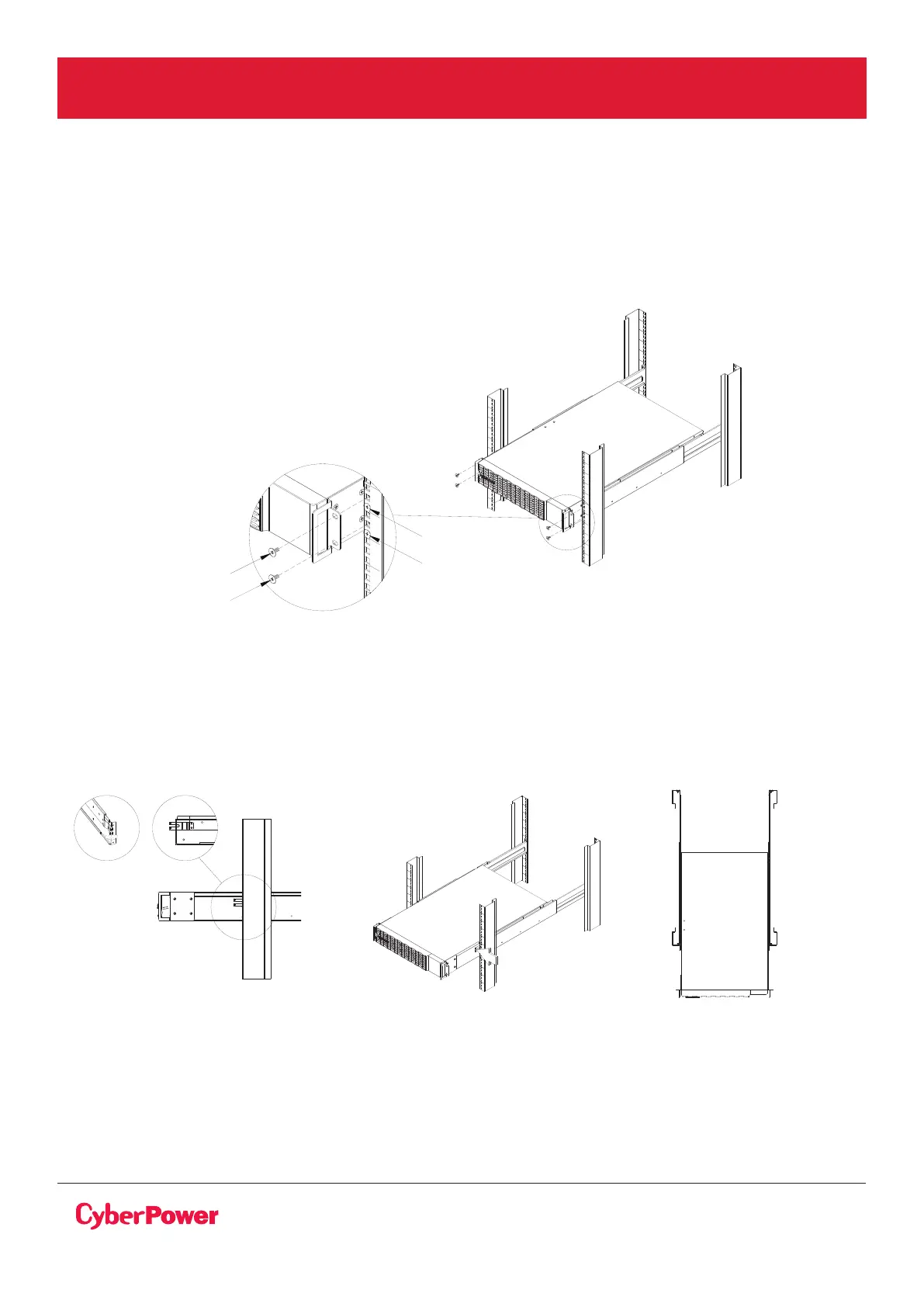
Step 4: Place and secure the step-down transformer on the rails
Slide the hanging brackets on the step-down transformer on to the rails mounted in the rack with the
front of the unit facing toward you. Secure the step-down transformer to your rack with four black
M5X12L pan head screws at the front of the rack (square holes 1 and 4 as shown above).
HARDWARE INSTALLATION CONT.
RACKMOUNT INSTALLATION FOR 4-POST RACK CONT.
RACKMOUNT EARS INSTALLATION CONT.
RACKMOUNT INSTALLATION FOR 2-POST RACK
This unit can be installed in a 2-post rack with an optional CyberPower 2-post mounting kit
(model: 2POSTKIT, sold separately).
See the instructions included with the rail kit for installation procedures.
NOTE: To slide the step-down transformer out from the rack
The step-down transformer will be secured by a safety locking mechanism midway of pulling it out of
the rack. Use both hands to hold the step-down transformer and press the safety locking tab to pull the
step- down transformer out.
position 1
position 4
position 2
position 5



 To Next Page