EasyManua.ls Logo

CYC Motor APT 500c Display - User Manual

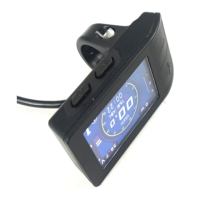
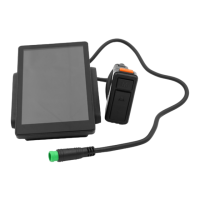
CYC Motor APT 500c Display
10 pages
Print Icon
To Next Page IconTo Next Page
Loading...
APT 500c Display
User’s Guide
Question and Answer IconNeed help?

Do you have a question about the CYC Motor APT 500c Display and is the answer not in the manual?

Summary

Product Specifications

Electrical Specifications

Details screen size, voltage, current, operating and storage temperature ratings.

Physical Dimensions and Materials

Outlines physical dimensions and materials used for the product shell and display window.

Key Product Features

Lists features like low-temperature use, high-contrast screen, ergonomic design, and display information.

Main Functionalities

Display Power On;Off

Explains turning the display on/off via the power button and automatic shutdown.

Race and Street Mode Switching

Describes switching between Race and Street modes for startup configuration.

Adjusting Assist Levels

How to change assist levels from 0 (neutral) up to 9 using UP/DOWN buttons.

Switching Speed and Mileage Displays

Cycle through different readings like TRIP/KM, TIME/MIN, ODO/KM, AVG SPD, MAX SPD.

Parameter Settings

Settings Menu Navigation

Guides on using MENU, UP, DOWN buttons for parameter selection and changes.

System Unit Settings (Metric;Imperial)

How to switch between Metric and Imperial units for system display settings.

Display Brightness Adjustment

Adjusts the display's backlight brightness using UP/DOWN buttons.

Automatic Power Off Timer

Configuration of the auto power-off timer, settable from 1 to 9 minutes or off.

Battery Voltage Configuration

How to set the battery voltage, supporting 24V to 52V options.

Battery Level Indicator Options

Options for battery indication display: Voltage, Percentage, or Off.

Accessing Advanced Settings

Steps to access advanced settings via the 'More' option, requiring a password.

Wheel Diameter Setup

How to set the wheel diameter, supporting 16 to 29 inch options.

Assist Level Options Configuration

Selecting the number of assist levels (3, 5, or 9) and power distribution.

Password and Mode Setup

Managing startup password (PIN ON/OFF) and mode switching (Race/Street).

Troubleshooting Error Codes

Common Error Code Explanations

Lists common error codes (21H, 22H, 24H, 30H) and their descriptions for troubleshooting.

Installation and Assembly Details

Assembly Torque Specifications

Specifies torque requirements for assembly (STD 0.1 N.m, MAX 0.2 N.m) to prevent damage.

Connector Pinout Configuration

Details the pinout of the male connector, including wire colors and their functions.

Product Certifications

Compliance Certifications (CE, IP65, ROHS)

Lists relevant certifications such as CE, IP65 (waterproof), and ROHS compliance.

Getting Started Guide

Step 1: Connection and Power Check

Verifies wire connections and display power-on, noting potential temporary Error 30H.

Step 2: Assist and Throttle Testing

Guides on testing pedal assist and throttle functionality via the mobile app in Assist Level 0.

Step 3: Initial Display Setup

Instructs on setting up wheel diameter, battery voltage, and preferred assist levels on the display.

Overview

The APT 500c Display is a user-friendly interface designed for electric bicycle systems, providing essential information and control functionalities. This display is derived from the TFT LCD Display Guide by Tianjin APT Science and Technology Co., Ltd.

Function Description

The APT 500c Display serves as the primary interface for an electric bicycle system, allowing users to monitor various parameters, control assist levels, and configure settings. It provides real-time data on speed, mileage, battery status, and power output, enhancing the riding experience by keeping the rider informed and in control. The display supports different riding modes and offers customizable settings to suit individual preferences.

Important Technical Specifications

Electrical Parameters:

  • Screen: 2.2-inch IPS screen, offering high contrast and a colorful matrix display.
  • Battery Supply: Compatible with 24V, 36V, 48V, and 52V battery systems.
  • Rated Operating Current: 40mA.
  • Off Leakage Current: Less than 1uA.
  • Max Output Current to Controller: 100mA.
  • Operating Temperature: -20°C to 70°C.
  • Storage Temperature: -30°C to 80°C.
  • Certification: CE / IP65 (waterproof) / ROHS.

Dimensions & Materials:

  • Product Shell: Made of ABS plastic.
  • Transparent Window: High-strength Acrylic.
  • Dimensions: Length 179mm x Width 40mm x Height 18mm.

Assembly Information:

  • Mounting Screw: M4*10.
  • Torque Requirements: Standard (STD) = 0.1 N.m., Maximum (MAX) = 0.2 N.m. (Note: Excessive torque can cause damage).

Pin Layout (Male KT/Lishui Variant):

  • Pin 1 (Red wire): Anode (24V to 52V).
  • Pin 2 (Black wire): GND.
  • Pin 3 (Yellow wire): TxD (display -> controller).
  • Pin 4 (Green wire): RxD (controller -> display).
  • Pin 5 (Blue wire): Power cord to the controller.

Usage Features

Main Functionalities:

  • Power On/Off: Press and hold the POWER button for 1 second to turn the display on/off. The display automatically shuts down after a period of inactivity.
  • Mode Switch: Double-press the POWER button to toggle between Race Mode and Street Mode. This sets the start-up mode; real-time mode changes can be made via a mobile app.
  • Assist Level Operating: Short press the UP/DOWN buttons to change the assist level. The top assist level is 9, with 0 being neutral. The number of assist levels can be customized.
  • Speed & Mileage Display Switch: Short press the MENU button to cycle through different speed and mileage readings:
    • TRIP / KM: Trip distance.
    • TIME / MIN: Trip time in minutes.
    • ODO / KM: Odometer.
    • AVG SPD: Trip average speed.
    • MAX SPD: Trip maximum speed.

Parameter Settings (Button Navigation):

  • Entering/Exiting Settings: Long press the MENU button (for at least 2 seconds) to enter or exit the settings menu.
  • Navigation: Use UP/DOWN buttons to navigate between parameters. Press MENU to select a parameter, then use UP/DOWN to change its value. Press MENU again to deselect and save changes.
  • Automatic Exit: The display automatically exits the settings menu after 30 seconds of inactivity.
  • Safety Feature: For safety, the display cannot enter the settings menu while riding and will exit if the user starts riding.

MENU Options:

  • System (Metric/Imperial): Press UP/DOWN to switch between Metric and Imperial units.
  • Brightness: Press UP/DOWN to adjust the backlight brightness from I (darkest) to IIIII (brightest).
  • Auto Off: Press UP/DOWN to set the auto power-off time from 1 to 9 minutes, or disable it (Off).
  • Battery: Press UP/DOWN to set the battery voltage (24V to 52V).
  • Battery Indication: Press UP/DOWN to choose how battery status is displayed: Voltage, Percentage, or Off.

Advanced Settings:

  • Access: Select "More" from the MENU options. A password is required to enter advanced settings (default password: 1919).
  • Key Parameters: Only "Wheel" and "Assist" parameters need to be set; other parameters should be neglected as they do not affect the system.
    • Wheel: Press UP/DOWN to set the wheel diameter (16 to 29 inches).
    • Assist: Press UP/DOWN to choose the number of assist levels (3, 5, or 9 gears). The power output is evenly distributed across the chosen levels, configurable via the CYC Motor (BAC) mobile app (Assist Level Configuration, Speed Limit Assist, and Axle Torque Sensor Assist settings).
  • Password Setup Page: Selecting "NEXT" in advanced settings leads to the password setup page.
    • PIN ON: Enables/disables the start-up password.
    • PIN Num: Sets a new password (default is 1919).
    • MODE: Toggles between Race mode and Street mode, similar to the main screen.

Quick Start Guide:

  • Step 1 (Initial Connection): Ensure all wires are properly connected. Power on the display and verify battery voltage and level. A brief "Error 30H" upon startup is normal as the system connects. If battery information is not displayed, refer to Step 3.
  • Step 2 (Functionality Test): Connect to the CYC Motor (BAC) mobile app. Set the display to Assist Level 0. Test Pedal Assist System (PAS) by turning the crankset and checking if Average Pedal RPM changes in the app. Test the throttle by opening it and checking if Throttle In voltage changes in the app. Perform these tests in Assist Level 0 to prevent unintended bike thrust.
  • Step 3 (Display Configuration): Set up the correct information on the display, including wheel diameter, battery voltage (if incorrect), and preferred number of assist levels.

Maintenance Features

Error Codes: The display may show error codes in certain situations. Refer to the CYC Motor (BAC) mobile application user guide for instructions on how to clear these errors.

  • Error 21H: Instantaneous phase overcurrent.
  • Error 22H: Throttle voltage out of range.
  • Error 24H: Hall sensor error.
  • Error 30H: Communication error.

Support: For further assistance, users are advised to contact technical support at technical_support@cycmotor.com.

CYC Motor APT 500c Display Specifications

General IconGeneral
BrandCYC Motor
ModelAPT 500c Display
CategoryBicycle Accessories
LanguageEnglish

Related product manuals