DESCRIPCIÓN GENERAL DE LA NAVEGACIÓN
Hay tres botones en los laterales del Joule GPS y un botón grande debajo de la pantalla.
CAPÍTULO 2: NAVEGACIÓN
Medida
resaltada
Medidas
extras
Puerto micro USB
Tiempo de la sesión
o reloj
Temperatura
Flecha del Norte
Nivel de
la batería
Botón [INTRO]
Botón [MÁS]
Botón [MENOS]
Botón [INTERVALO]
BOTONES
WATIOS
451 160
21 96
1:06:45
FC
MPH CAD
170 894
W MED WATIOS MX
TIEMPO SESIÓN
KJ
9:34A
71º
380
INT
PRÉSENTATION DE LA NAVIGATION
La navigation s'effectue à l'aide de trois boutons situés sur le côté du GPS Joule et d'un grand bouton,
situé sous l'écran.
CHAPITRE 2: NAVIGATION
Système
métrique
sélectionné,
Systèmes
métriques
additionnels
Port micro-USB
Durée du tour ou Heure
Température
Flèche
d’orientation
(Nord)
Niveau
de batterie
Bouton [ENTER]
Bouton [PLUS]
Bouton [MOINS]
Bouton [INTERVAL]
BOUTONS
WATTS
451 160
21 96
1:06:45
HR
MPH CAD
170 894
WATTS MOY WATTS MAX
TEMPS
D'UTILISATION
KJ
9:34A
71º
380
INT
NAVIGATIONSÜBERSICHT
Es befinden sich drei Tasten an der Seite des Joule GPS und eine große Taste unter dem
Bildschirm.
KAPITEL 2: NAVIGATION (Navigation)
Markierte
Metrik,
Ergänzende
Metriken
Micro-USB-Anschluss
Fahrtzeit oder Uhr
Temperatur
Nordpfeil
Batteriestand
[ENTER]-Taste
[PLUS]-Taste
[MINUS]-Taste
[INTERVAL]-Taste
TASTEN
WATT
451 160
21 96
1:06:45
HR
MPH CAD
170 894
AV WATT MX WATT
FAHRTZEIT KJ
9:34A
71º
380
INT
PANORAMICA DELLA NAVIGAZIONE
Ci sono 3 tasti sui lati di Joule GPS e un unico grande tasto sotto il display.
CAPITOLO 2: NAVIGAZIONE
Misura
evidenziata
Misure
complementari
Porta Micro-USB
Temperatura
Freccia nord
Livello batteria
Pulsante [INVIO]
Pulsante [PIÙ]
Pulsante [MENO]
Pulsante
[INTERVALLO]
PULSANTI
WATT
451 160
21 96
1:06:45
FC
MPH CAD
170 894
WATT MEDI MX WATT
TEMPO CORSA
KJ
9:34A
71º
380
INT
Tempo corsa o Orologio
Overzicht van de navigatie
Er zijn drie knoppen aan de zijkanten van Joule GPS en één grote knop onder het scherm.
HOOFDSTUK 2: DASHBOARDS
Geselecteerde
meetgegevens
Complementaire
meetgegevens
Micro-usb-poort
Rittijd of tijd
Temperatuur
Pijl noordelijke richting
Batterijniveau
[ENTER]-knop
[PLUS]-knop
[MINUS]-knop
[INTERVAL]-knop
KNOPPEN
WATTS
451 160
21 96
1:06:45
HR
MPH CAD
170 894
AV WATTS MX WATTS
RIDE TIME KJ
9:34A
71º
380
INT
Joule GPS User Guide page 10
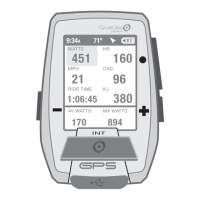
BUTTONS and SCREEN
There are three buttons on the sides of the Joule GPS and one large button below the screen. The
screen is divided into 3 display areas. The top area, Title Bar, displays time, temperature, compass, and
battery level. The large middle section, displays user-selected metrics and can be configured to show 3
to 6 windows. The lower section shows complimentary metrics associated with the highlighted metric.
CHAPTER 2: JOULE GPS OVERVIEW & SETUP
Highlighted
Metric,
Complimentary
Metrics
Micro-USB port
Ride Time or Clock
Temperature
North Arrow and GPS Signal Lock Indicator
Battery Level
[ENTER] button
* Press once to move through each Dashboard
* Hold for 3 seconds - Go to Menu
* In Menus, press to selects menu item
* In Menus, hold for 3 seconds to go to Dashboard
Shifts selected metric or “highlight box”
to the right and down
Shifts selected metric or “highlight box”
to the left and up
* Press to mark intervals
* Hold for 3 seconds - Go to Interval view
* Hold for 3 seconds - Go to Ride view
* In Menus, press to go back to previous screen
Press together to put the Joule to sleep
Press together to “find” sensors that may have
been lost or were not awake when the Joule
powered up.
[PLUS] button
[MINUS] button
[PLUS] button
[MINUS] button
[INTERVAL] button
[INTERVAL] button
BUTTONS FUNCTION
WATTS
451 160
21 96
1:06:45
HR
MPH CAD
170 894
AV WATTS MX WATTS
RIDE TIME KJ
9:34
A
71º
380
INT


 To Next Page
 Loading...