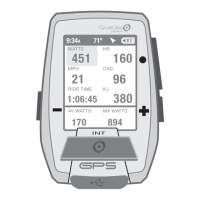
CAPÍTULO 3: DESCRIPCIÓN GENERAL DEL MENÚ Y EMPAREJAMIENTO
Guía del usuario de Joule GPS, página 13
CAPÍTULO 4: SELECCIONES DEL MENÚ: HISTORIAL: INFORMES
El Joule GPS muestra los informes de los historiales de la última sesión o de cualquier sesión elegida y los
compara con los valores promedio de todas las sesiones o de las 2 semanas, 4 semanas, 8 semanas o los
6 meses o 12 meses anteriores a la sesión elegida. Nota: La sesión seleccionada no se utiliza para obtener
el valor promedio.
INFORMES
Resumen
9/20/10 2 Sem.
178
86
17,3
135
156
78
16,5
126
W
MED
MED
CAD
MED
MPH
FC
MED
9:34A
Editar o Usar
BRÚJULA
CUENTA REGRESIVA
Informe - totales
Detener y eliminar
FECHA Y HORA
PANTALLA
MEMORIA
ALTÍMETRO
ACERCA DE JOULE
EMPAREJAMIENTO Se
pueden emparejar varias bicicletas con
nombres únicos. (p. ej.: Bicicleta de
carreras de Juan, Bicicleta de montaña
de Juan, etc.).
Nombre
Peso, lb
Sensor Potencia (seleccionar)
Sensor de Cadencia (seleccionar)
Sensor Velocidad (seleccionar)
Sensor Frecuencia Cardíaca
(seleccionar)
Sensor UR (seleccionar)
ELIM. BICI
Menú principal
Sesión
Historial
Sensores
Formación
Navegación
Usuario
Disp.
Regr. al Tablero
9:34A 71º
HISTORIAL
Editar o Usar
otros sensores
Primero empareja los dispositivos más
cercanos al sensor.
Mantenga el Joule a 30 centímetros
como mínimo del buje PowerTap
cuando haya otros sensores.
30 cm o 12”
!
IMPORTANTE
EMPAREJAMIENTO POR PROXIMIDAD
Historial
Últ. Sesión
Selec. Sesión
Informe - Máx
Informe - totales
Regresar al menú principal
9:34A 71º
Prom.
Datos por
Fecha Sesiones
Trabajo
WATIOS
1802
874
176
0,92
KJ
KJ/H
TSS
FI
9:34A
INFORME - MÁX
Nombre
Peso, lb
Altura, pul.
Fecha de Nac.
Género
FTP
Zonas de Potencia
Zonas de Frecuencia Cardíaca
USUARIO Se pueden almacenar
distintos usuarios en cada Joule
(p. ej.: Juan, Roberto y Raquel pueden
compartir el mismo dispositivo con
información específica para cada uno).
CHAPITRE 3: PRÉSENTATION DES MENUS & ASSOCIATION
Guide de l'utilisateur du GPS Joule page13
CHAPITRE 4: COMMANDES DU MENU: HISTORIQUE: RAPPORTS
Le GPS Joule affiche les rapports Historique du dernier tour ou du tour sélectionné et les compare avec les
moyennes par tours ou par date sur 2 semaines, 4 semaines, 8 semaines, 6 mois ou 12 mois précédant le
tour sélectionné. Remarque : les moyennes n'incluent pas le tour sélectionné.
RAPPORTS
Résumé
9/20/10 2 semaines
178
86
17,3
135
156
78
16,5
126
MOY
WATTS
MOY
CAD
MOY
MPH
MOY
HR
9:34A
Modifier
ou Utiliser
Sélectionner un vélo
BOUSSOLE
COMPTE À REBOURS
Rapport - Totaux
Arrêter et supprimer
SÉLECTIONNER UN UTILISATEUR
DATE ET HEURE
AFFICHAGE
MÉMOIRE
ALTIMÈTRE
À PROPOS DE JOULE
ASSOCIATION Vous pouvez
associer plusieurs vélos en leur attribuant
chacun un nom. (exemple: «vélo de
course de Jim, VTT de Jim», etc.)
Nom
Poids, lb
Capteur de Puissance (sélectionner)
Capteur de Cadence (sélectionner)
Capteur de Vitesse (sélectionner)
Capteur de Fréquence Cardiaque
(sélectionner)
Capteur de RU (sélectionner)
SUPPRIMER UN VÉLO
Menu principal
Tour
Historique
Capteurs
Entraînement
Navigation
Utilisateur
Appareil
Retour Tableau Bord
9:34A 71º
HISTORIQUE
Modifier ou Utiliser
autres capteurs
Associez d'abord les appareils les plus
proches du capteur.
Conservez le Joule à une distance
de 12” maximum du moyeu PowerTap
en présence d'autres capteurs.
12” ou 30cm
!
IMPORTANT
ASSOCIATION À PROXIMITÉ
Historique
Dernier Tour
Sélectionner un tour
Rapport - Max
Rapport - Totaux
Retour menu principal
9:34A 71º
Moyenne
Données par
Données Tours
Travail
MAX
1802
874
176
0,92
KJ
KJ/H
TSS
FI
9:34A
RAPPORT - MAX
Nom
Poids, lb
Taille, in
Date de naissance
Sexe
FTP
Zones de puissance
Zones de fréquence cardiaque
UTILISATEUR Vous pouvez
enregistrer plusieurs utilisateurs dans
chaque Joule. (exemple: Jim, Bob et Rachel
peuvent partager le même appareil, avec
des informations qui leur sont propres)
KAPITEL 3: MENÜÜBERSICHT & KOPPLUNG
Joule GPS Benutzerhandbuch Seite 13
KAPITEL 4: MENÜAUSWAHL VERLAUF: BERICHTE
Der Joule GPS zeit einen Verlaufsbericht nach letzter Fahrt oder ausgewählten Fahrten und vergleicht sie mit
den Fahrten oder Daten über 2 Wochen, 4 Wochen, 8 Wochen, 6 Monate oder 12 Monate vor der ausgewählten
Fahrt. Hinweis: Die Durchschnittswerte enthalten die ausgewählte Fahrt nicht.
BERICHTE
Zusammenfassung
9/20/10 2 Wo
178
86
17,3
135
156
78
16,5
126
AV
WATT
AV
CAD
AV
MPH
AV
HR
9:34A
Bearbeiten oder
Verwenden
KOMPASS
COUNTDOWN
Berichtsummen
Stoppen
und löschen
EINEN BENUTZER AUSWÄHLEN
DATUM UND UHRZEIT
ANZEIGE
SPEICHER
HÖHENMESSER
ÜBER JOULE
KOPPELN Mehrere Räder können
mit individuellen Namen gekoppelt
werden. (z. B.: „Thorstens Rennrad,
Thorstens Mountainbike usw.)
Name
Gewicht in lb
Leistungssensor (auswählen)
Trittfrequenzsensor (auswählen)
Geschwindigkeitssensor (auswählen)
Herzfrequenzsensor (auswählen)
RU-Sensor (auswählen)
RAD LÖSCHEN
Hauptmenü
Fahrt
Verlauf
Sensoren
Training
Navigation
Benutzer
Gerät
Zurück zur Anzeige
9:34A 71º
VERLAUF
Bearbeiten oder
Verwenden
andere Sensoren
Koppelt zuerst Geräte, die am nähesten
am Sensor sind.
Joule 30 cm von der PowerTab-Nabe
entfernt halten, wenn andere Sensoren
vorhanden sind.
30 cm
!
WICHTIG
NÄHE-KOPPLUNG
Verlauf
Letzte Fahrt
Fahrt auswählen
Bericht - Max.
Bericht - Summen
Zurück zum Hauptmenü
9:34A 71º
Durchschnitt
Daten nach
Datum Fahrten
Arbeit
MAX.
1802
874
176
0,92
KJ
KJ/HR
TSS
IF
9:34A
BERICHT - MAX
Name
Gewicht in lb
Höhe in Zoll
Geburtsdatum
Geschlecht
FTP
Leistungszonen
Herzfrequenzzonen
BENUTZER Auf jedem Joule
können mehrere Benutzer gespeichert
werden. (z. B.: Jim, Bob, Rachel können
alle dasselbe Gerät mit ihren eigenen
Informationen nutzen)
CAPITOLO 3: PANORAMICA DEI MENU & COLLEGAMENTO
Manuale dell’utente Joule GPS pag. 13
CAPITOLO 4: SELEZIONI MENU: DATI STORICI: REPORT
Joule GPS mostra report di dati storici in base all’ultima corsa o a qualsiasi corsa selezionata e li confronta
rispetto alle medie per corse o data nelle ultime 2, 4, 8 settimane, 6 o 12 mesi prima della corsa
selezionata. Nota: le medie non comprendono la corsa selezionata.
REPORT
Riepilogo
9/20/10 2 sett
178
86
17.3
135
156
78
16.5
126
WATT
MEDI
CAD
MEDIA
MPH
MEDI
FC
MEDIA
9:34A
Modifica o
utilizza
ALLENAMENTI
INTERVALLO AUTOM.
PUNTI DI RIFERIMENTO
PERCORSI
STATO GPS
BUSSOLA
CONTO ALLA ROVESCIA
Report - totali
Interrompi e cancella
SELEZIONA UN UTENTE
DATA E ORA
DISPLAY
MEMORIA
ALTIMETRO
INFORMAZIONI SU JOULE
COLLEGAMENTO Più biciclette
possono essere collegate con nomi
univoci. (ad es.: "Bici da corsa di Jim,
Mountain Bike di Jim, ecc.)
Nome
Peso, libbre
Sensore di potenza (seleziona)
Sensore di cadenza (seleziona)
Sensore di velocità (seleziona)
Sensore di frequenza cardiaca (seleziona)
Sensore unità di resistenza (seleziona)
CANCELLA BICI
Menu principale
Corsa
Dati storici
Sensori
Allenamento
Navigazione
Utente
Dispositivo
Torna a Cruscotto
9:34A 71º
DATI STORICI
Modifica o
utilizza
altri sensori
Rivolgere prima i dispositivi verso
il sensore. Mantenere Joule entro
12” dal mozzo PowerTap
in presenza di altri sensori.
12' o 30 cm
!
IMPORTANTE
COLLEGAMENTO DI PROSSIMITÀ
Dati storici
Ultima corsa
Seleziona una corsa
Report-Max
Report - Totali
Torna al Menu principale
9:34A 71º
Dati
medi per
Data Corse
Lavoro
MAX
1802
874
176
0.92
KJ
KJ/FC
TSS
IF
9:34A
REPORT - MAX
Nome
Peso, libbre
Altezza, in
Data di nascita
Sesso
FTP
Gamme di potenza
Zone di frequenza cardiaca
UTENTE Su ciascun Joule è possible
memorizzare più utenti (ad es.: Jim, Bob,
Rachel possono condividere lo stesso
dispositivo con informazioni univoche)
HOOFDSTUK 3: MENU-OVERZICHT & KOPPELEN
Gebruikershandleiding Joule GPS pagina 13
HOOFDSTUK 4: MENU SELECTIONS: HISTORIE: RAPPORTEN
De Joule GPS geeft de historierapporten weer met allereerst de meest recente rit (of een geselecteerde rit)
en vergelijkt met de gemiddelden per rit of datum sinds de laatste 2, 4 of 8 weken, of 6 of 12 maanden voor
de geselecteerde rit. Opmerking: In de gemiddelden wordt de geselecteerde rit niet meegeteld.
RAPPORTEN
Summary
9/20/10 2wk
178
86
17.3
135
156
78
16.5
126
AV
WATTS
AV
CAD
AV
MPH
AV
HR
9:34A
Bewerken
of gebruiken
COMPASS
COUNTDOWN
Rapport-totalen
Stoppen en verwijderen
KIES EEN GEBRUIKER
KOPPELEN Er kunnen meerdere
fietsen gekoppeld worden met unieke
namen. (bijvoorbeeld "Wedstrijdfiets
Jan" of "Mountainbike Jan")
Naam
Gewicht, lbs:
Krachtsensor (selecteer)
Cadanssensor (selecteer)
Snelheidssensor (selecteer)
Hartslagsensor (selecteer)
RU-sensor (selecteer)
DELETE BIKE
Main Menu
Ride
History
Sensors
Training
Navigation
User
Device
Back to Dashboard
9:34A 71º
HISTORIE
Bewerken
of gebruiken
andere sensors
Koppelt eerst apparaten die zich het
dichtst bij de sensor bevinden.
Breng de Joule tot op 30cm van de
PowerTap-naaf indien er zich ook nog
andere sensoren in de buurt bevinden.
12” of 30cm
!
BELANGRIJK
KOPPELEN OP AFSTAND
History
Last Ride
Select a Ride
Report - Max
Report -en
Back to Main Menu
9:34A 71º
Gemiddelden
per:
Datum Ritten
Work
MAX
1802
874
176
0.92
KJ
KJ/U
TSS
IF
9:34A
RAPPORTEN - MAX
Naam
Gewicht, lbs:
Lengte, in
Geboortedatum
Geslacht
FTP
Krachtzones
Hartslagzones
GEBRUIKER Op elke Joule
kunnen meerdere gebruikers worden
opgeslagen. (bijvoorbeeld Jan, Peter en
Ilse kunnen allemaal hetzelfde apparaat
gebruiken met elke eigen gegevens)
Joule GPS User Guide page 21
CHAPTER 4: NAVIGATION
GPS STATUS
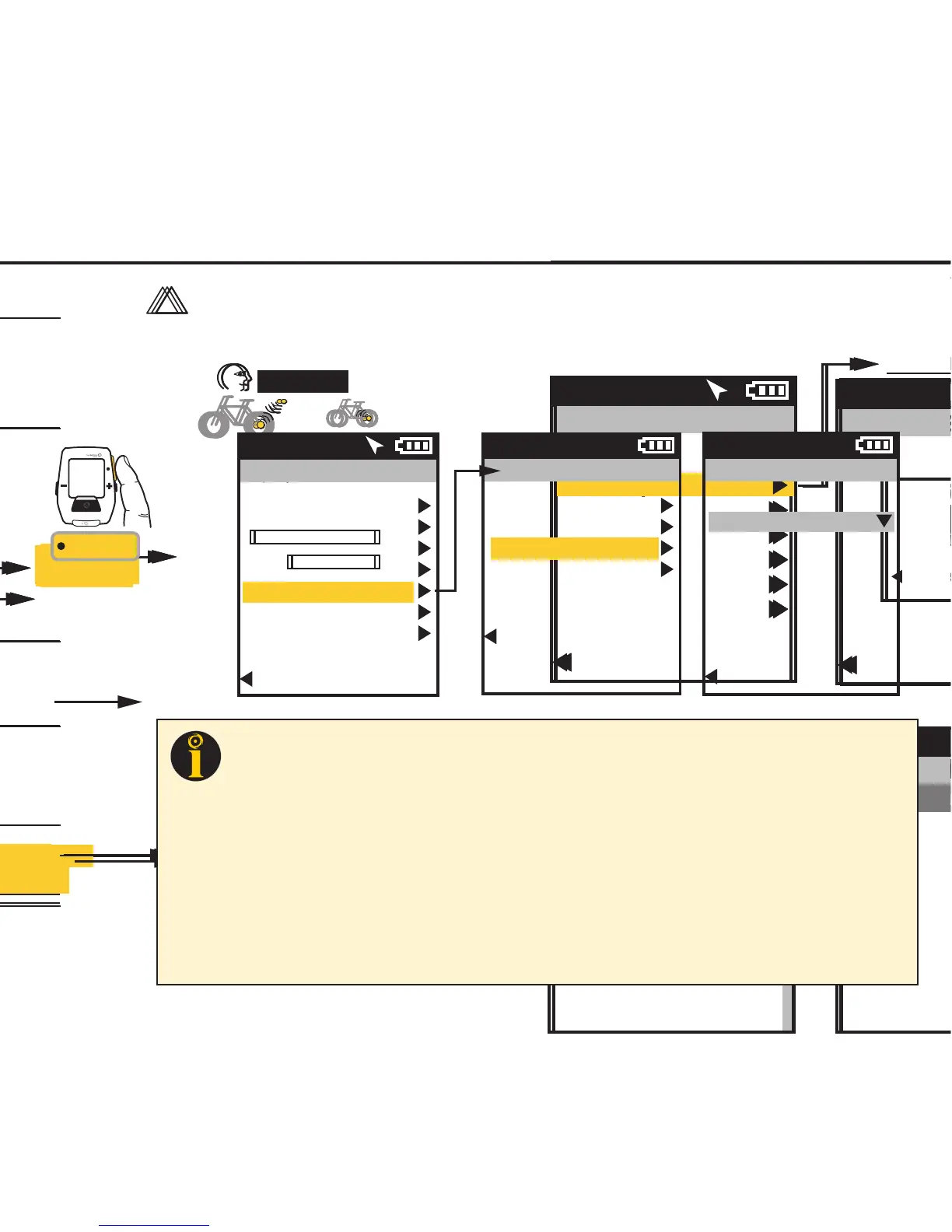
Information related to your GPS signal can be checked in the GPS Status area. Your GPS signal can be set
to Active or Off. The current accuracy of your position is estimated in meters. The exact location of your
position in Latitude and Longitude notation (i.e. degrees, minutes, seconds) is displayed. Also, the current
elevation as calculated by the Joule GPS barometer.
INT
[ENTER]
Press & Hold
3 sec. to enter
Menus. Scroll
to Navigation;
Press •[ENTER] ;
Select GPS Status
FROM DASHBOARD
Main Menu
Ride
History
Sensors
Training
Navigation
User
Device
Back to Dashboard
9:34A 71º
GPS Status
Status
Active/Off
Accuracy
5m
Location
N43°01’14.307”
W89°28’11.189”
Altitude
737
Back to Navigation
9:34A
Navigation
Waypoints
Routes
GPS Status
Compass
Back to Main Menu
9:34A
TIP: Your current location is listed as a latitude and longitude pair. The numbers making up the pair are in degrees,
minutes, and seconds. The letter associated with the number is a compass point, North, South, East, West. When viewing
a map, latitude lines run horizontally, longitude lines run vertically, converging at each pole, widest at the equator.
Lines of Latitude are numbered from zero degrees to 90°, north and south. These numbers can be subdivided into
minutes and seconds for greater granularity. 0° Latitude is the equator, the imaginary line that divides the earth into north
and south hemispheres.
Lines of Longitude, also numbered in degrees, subdivided in minutes and seconds. 0° Longitude is the Prime Meridian,
established 1884, an imaginary line that runs through Greenwich, England. From the Prime Meridian, the lines of
Longitude run 180° east and 180° west until they meet in the Pacific Ocean, making up the imaginary line known as the
International Date Line.
Using the Latitude/Longitude numbered pair you can describe any location on Earth. In fact, the example in the menu
above is the location of Saris Cycling Group, near Madison, Wisconsin.


 To Next Page
 Loading...