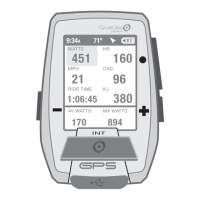
Guía del usuario de Joule GPS, página 17
CAPÍTULO 5: MENÚ DEL DISPOSITIVO
FECHA Y HORA
PANTALLA
MEMORIA
ALTÍMETRO
ACERCA DE JOULE
DISP.
FECHA Y HORA
PANTALLA
MEMORIA
ALTÍMETRO
ACERCA DE JOULE
DISP.
FECHA Y HORA
PANTALLA
MEMORIA
ALTÍMETRO
ACERCA DE JOULE
Fecha y Hora
Fijar desde GPS
Sí/No
Zona Horaria
Auto
Forma de Reloj
12/24 H
Reg. a Dispos.
9:34A 71º
Configura la hora
automáticamente
a partir del GPS
OPCIÓN EN LA ENTRADA
CAPÍTULO 5: MENÚ DEL DISPOSITIVO
Velocidad/FC
15, 30, 60, 90 min, Nunca
Establecer en cualquier número
Restablece el odómetro, el tiempo de funcionamiento y los kilojulios a cero.
Muestra la cantidad de memoria libre en el dispositivo.
Borra las sesiones guardadas en el dispositivo desde la última descarga. No afecta a
los informes del historial.
Borra todos los datos de las sesiones registradas del dispositivo.
Control Reg.
Fin Tiempo Sesión
Odómetro
Rest Odómetro
Memoria Restante
Eliminar Mem. Sesión
Borrar historial
ENTRADA
DE LA PANTALLA
OPCIÓN EN LA ENTRADA
Altitud
Altitud Actual
1030
Altitud en Origen
830
Use Altitud Local
Reg. a Dispos.
9:34A 71º
Configure y seleccione Use
Altitud Local para calcular y
utilizar la compensación por
altitud a fin de obtener unas
lecturas del sensor
barométrico más precisas.
Cambio del número de ventanas de medidas y de medidas individuales dentro de cada tablero
Sí/No
Cambio de las medidas que se muestran en el tablero del GPS
0-5
Sí/No. Si Luz de Fondo Intelig. está activado, la luz de fondo estará encendida continuamente
al nivel indicado entre el atardecer y el amanecer, siempre que el dispositivo esté encendido.
La localización por GPS se utiliza para determinar a qué hora tendrán lugar el amanecer y el
atardecer. La luz de fondo funciona normalmente pulsando el botón correspondiente entre el
amanecer y el atardecer.
0-5
Nunca, 10 s - 1 min. y Siempre
3, 5, 10 min: la pantalla entra en el modo de suspensión después del periodo de inactividad
establecido
English, Deutsch, Français, Italiano, Español, Nederlands
Imperial o métrico
Guide de l'utilisateur du GPS Joule page17
CHAPITRE 5: MENU APPAREIL
DATE ET HEURE
AFFICHAGE
MÉMOIRE
ALTIMÈTRE
À PROPOS DE JOULE
APPAREIL
DATE ET HEURE
AFFICHAGE
MÉMOIRE
ALTIMÈTRE
À PROPOS DE JOULE
APPAREIL
DATE ET HEURE
AFFICHAGE
MÉMOIRE
ALTIMÈTRE
À PROPOS DE JOULE
Date et heure
Régl. sur GPS
Oui/Non
Zone Horaire
Auto
Format Horaire
12/24 H
Retour Appareil
9:34A 71º
Auto règle
l'heure
sur le GPS
FONCTION
CHAPITRE 5: MENU APPAREIL
Vitesse/H
15, 30, 60, 90 min, Jamais
Défini sur n'importe quel chiffre
Réinitialise l'odomètre, la durée de la course et les kilojoules
Affiche la mémoire restante sur l'appareil
Efface les tours enregistrés sur l'appareil depuis le dernier téléchargement. Ne modifie pas
les rapports Historique
Efface toutes les données de tour de l'historique de l'appareil
Commande d'enregistrement
Temps d'utilisation final
Odomètre
Réinitialiser l'odomètre
Mémoire restante
Effacer Mémoire Tour
Effacer Historique
OPTION AFFICHÉE
FONCTION
Altitude
Altitude Courant
1030
Altitude d'origine
830
Utiliser Altitude Locale
Retour Appareil
9:34A 71º
Définissez et sélectionnez
l'option «Utiliser Altitude
Locale» pour calculer et
utiliser la valeur de l'altitude
pour un affichage plus
précis du capteur
barométrique.
Change le nombre de fenêtres de métriques et le nombre de métriques individuelles
dans chaque tableau de bord
Oui/Non
Change les métriques affichées dans le tableau de bord GPS
0-5
Oui/Non Si l'option «Rétroéclair. Intellig.» est définie sur Oui, le rétroéclairage est
toujours activé aux périodes spécifiques paramétrées entre le lever et le coucher du
soleil, lorsque l'appareil est allumé. La localisation GPS est utilisée pour déterminer à
quelle heure le lever et le coucher du soleil ont lieu. Le rétroéclairage fonctionne
normalement, en appuyant sur les boutons, entre le lever et le coucher du soleil.
0-5
Jamais activé, 10 sec - 1 min et Toujours activé
3, 5, 10 min - L'affichage passe en mode veille après le délai d'inactivité défini.
Anglais, allemand, français, italien, espagnol, néerlandais
Système anglo-saxon ou système métrique
Joule GPS Benutzerhandbuch Seite 17
KAPITEL 5: GERÄTEMENÜ
DATUM UND UHRZEIT
ANZEIGE
SPEICHER
HÖHENMESSER
ÜBER JOULE
DEVICE
DATUM UND UHRZEIT
ANZEIGE
SPEICHER
HÖHENMESSER
ÜBER JOULE
DEVICE
DATUM UND UHRZEIT
ANZEIGE
SPEICHER
HÖHENMESSER
ÜBER JOULE
Datum und Uhrzeit
vom GPS einstellen
Ja/Nein
Zeitzone
Auto
Uhrzeitformat
12/24 Stunden
Zurück zum Gerät
9:34A 71º
Autom. Einstellung
der Zeit vom GPS
Änderung der Anzahl der Metrikfenster und individuellen Metriken in jeder Anzeige.
Ja/Nein
Änderung der auf der GPS-Anzeige angezeigten Metriken.
0-5
Ja/Nein Falls die intelligente Hintergrundbeleuchtung aktiviert ist, leuchtet die
Hintergrundbeleuchtung immer mit dem angegebenen Pegel zwischen Sonnen- aufgang und
Sonnenuntergang, während das Gerät eingeschaltet ist. Der GPS-Ort wird verwendet, um
festzustellen, wann der Sonnenaufgang und Sonnenuntergang erfolgt. Die Hintergrundbeleuch
-
tung funktioniert normal bei Tastendruck zwischen Sonnenaufgang und Sonnenuntergang.
0-5
Nie ein, 10 Sek. - 1
Min. und Immer ein 3, 5, 10 Min. - Display geht nach der angegebenen Zeit der Inaktivität in den
Ruhezustand.
English, Deutsch, Francais, Italiano, Espanol, Nederlands
Englisch oder Metrisch
EINGABEOPTION
KAPITEL 5: GERÄTEMENÜ
Geschwindigkeit/HR
15, 30, 60, 90 Min., Nie
Beliebige Zahl einstellen
Setzt den Kilometerzähler, die Betriebszeit und die Kilojoule auf Null zurück
Zeit den restlichen Speicherplatz auf dem Gerät an
Löscht die seit dem letzten Download auf dem Gerät gespeicherten Fahrten. Beeinflusst die
Verlaufsberichte nicht
Löscht alle Verlaufsdaten vom Gerät
Aufzeichnungssteuerung
Fahrzeit beenden
Kilometerzähler
Kilometerzähler zurücksetzen
Restlicher Speicher
Fahrtspeicher löschen
Verlauf löschen
DISPLAYEINGABE
EINGABEOPTION
Höhe
Aktuelle Höhe
1030
Starthöhe
830
Starthöhe verwenden
Zurück zum Gerät
9:34A 71º
Stellen Sie „Starthöhe
verwenden“ ein und
verwenden Sie es, um den
Höhenversatz für genauere
barometrische
Sensoranzeigen zu
berechnen und zu
verwenden.
Manuale dell’utente Joule GPS pag. 17
CAPITOLO 5: MENU DEL DISPOSITIVO
DISPOSITIVO
DATA E ORA
DISPLAY
MEMORIA
ALTIMETRO
INFORMAZIONI SU JOULE
DISPOSITIVO
DATA E ORA
DISPLAY
MEMORIA
ALTIMETRO
INFORMAZIONI SU JOULE
Data e ora
Impostare da GPS
Sì/No
Fuso orario
Auto
Formato orologio
12/24 H
Torna a Dispositivo
9:34A 71º
Auto imposta
l’ora da GPS
OPZIONE INPUT
CAPITOLO 5: MENU DEL DISPOSITIVO
Velocità/FC
15, 30, 60, 90 min, Mai
Impostare su qualsiasi numero
Riporta il contachilometri, il tempo di corsa e kj a 0
Mostra la quantità di memoria residua del dispositivo
Cancella le corse salvate sul dispositivo dall’ultimo download. Non influenza i report sui
dati storici
Cancella tutti i dati storici delle corse dal dispositivo
Controllo report
Tempo fine corsa
Contachilometri
Ripristina contachilometri
Memoria residua
Cancella Memoria corsa
Cancella Dati storici
INPUT DISPLAY OPZIONE INPUT
Altitudine
Altitudine attuale
1030
Altitudine Home
830
Usa Altitudine Home
Torna a Dispositivo
9:34A 71º
Impostare e selezionare
“Usa Altitudine Home” per
calcolare ed utilizzare lo
scostamento di altitudine
per ottenere letture più
accurate del sensore
barometrico.
Cambiare il numero di finestre Misura e le misure singole all’interno di ciascun cruscotto
Sì/No
Cambiare le misure visualizzate sul cruscotto GPS
0-5
Sì/No Se Retroilluminazione è impostato su Sì, la retroilluminazione è attiva in modalità
continua sul livello specificato tra alba e tramonto, quando il dispositivo è acceso. La
posizione GPS è utilizzata per determinare l’alba e il tramonto. La retroilluminazione
funziona generalmente con azionamento del pulsante tra alba e tramonto.
0-5
Mai On, 10 sec– 1 min e Sempre On
3, 5, 10 min – Il display va in modalità di riposo dopo un periodo designato di inattività.
Inglese, tedesco, francese, italiano, spagnolo, olandese
Inglese o Metrico
Gebruikershandleiding Joule GPS pagina 17
HOOFDSTUK 5: DEVICE MENU
9:34A 71º
Stelt automatisch
de tijd in van
de GPS
OPTIES
HOOFDSTUK 5: DEVICE MENU
Snelheid/HR
15, 30, 60, 90min, Nooit
Stel gelijk welk getal in
Odometer resetten, looptijd en kJ terug naar nul
Geeft het beschikbare geheugen op het apparaat weer
Verwijdert de ritten die werden opgeslagen sinds de laatste download Heeft geen invloed
op de Historierapporten
Verwijdert alle historische ritgegevens van het apparaat
Recordbeheer
Einde rittijd
Odometer
Odometer resetten
Nog beschikbaar geheugen
Ritgeheugen wissen
Historie wissen
DISPLAY INPUT INPUT OPTION
9:34A 71º
Kies ‘Use Home Altitude’ om
het altitudeverloop te
berekenen en te gebruiken
met het oog op meer
nauwkeurige gegevens van
de barometrische sensor.
Verander het aantal meetgegevens per venster en de individuele meetgegevens in elk dashboard
Ja/Neen
Kies andere meetgegevens die moeten worden weergegeven op het GPS-dashboard
0-5
Ja/Neen Indien de achterverlichting geactiveerd is, dan zal de achterverlichting op het gekozen
niveau blijven zolang het apparaat actief is, tussen zonsopgang en zonsondergang. De
zonsopgang en -ondergang wordt bepaald door de GPS-locatie. De achterverlichting functioneert
normaal met drukken op de knoppen tussen zonsopgang en -ondergang
.
0-5
Nooit aan, 10sec.– 1 min. en Altijd aan
3, 5, 10min - Scherm gaat in slaapstand na een ingestelde periode van inactiviteit.
English, Deutsch, Français, Italiano, Español, Nederlands
Imperiaal of Metrisch
Date and Time
Set from GPS
Yes/No
Time Zone
Auto
Clock Format
12/24 HR
Back to Device
DEVICE
DATE AND TIME
DISPLAY
MEMORY
ALTIMETER
ABOUT JOULE
DEVICE
DATE AND TIME
DISPLAY
MEMORY
ALTIMETER
ABOUT JOULE
Altitude
Current Altitude
1030
Home Altitude
830
Use Home Altitude
Back to Device
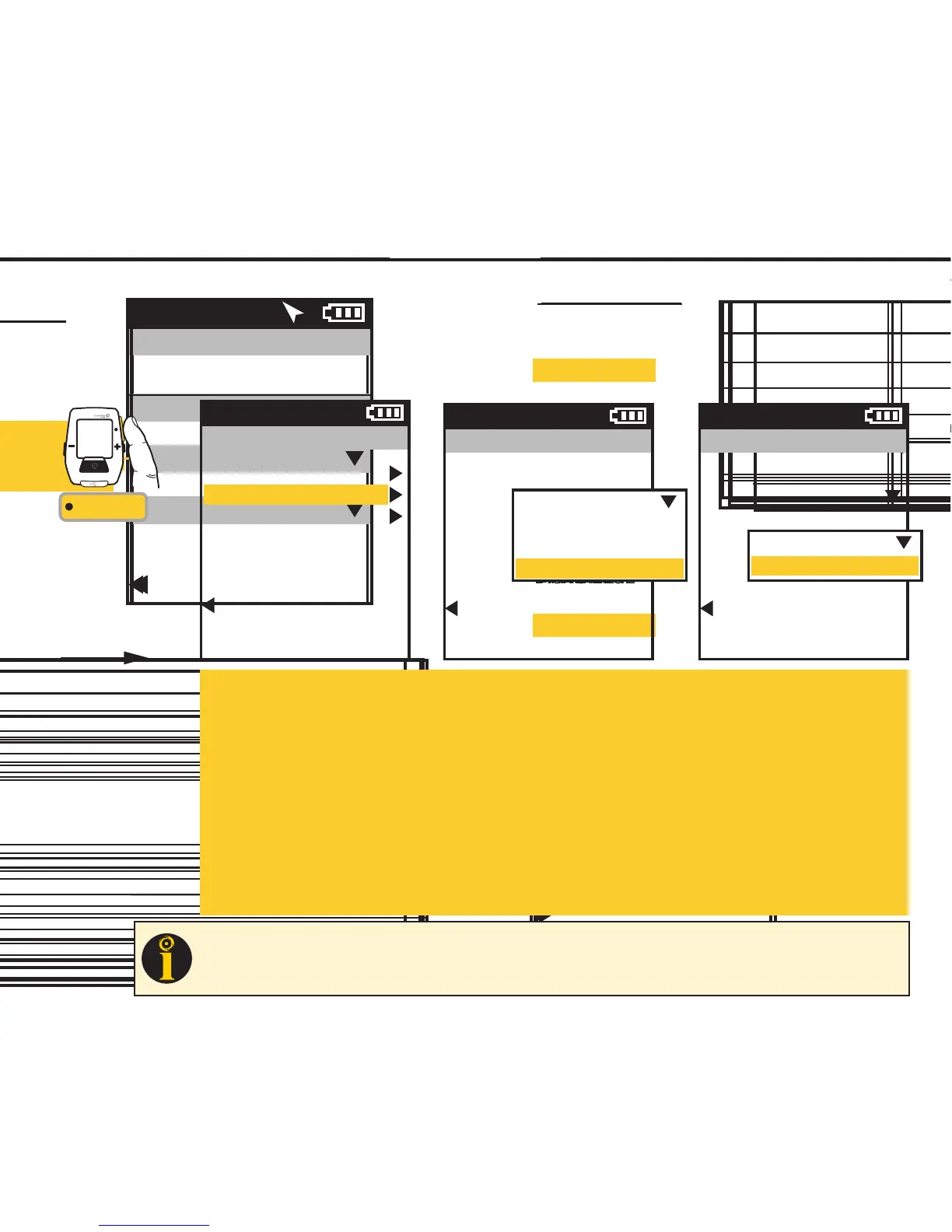
Auto Interval Mode:
Distance:
Select Distance, scroll to and enter the amount of distance you want to travel before the interval is marked.
Time:
Select Time, scroll to and enter the amount of time that you want to pass before the interval is marked.
Position:
Select Position, scroll to Position Option, press •[ENTER]. Choose either Current Position or First
Interval to set the GPS position of where the interval will be marked. Current Position indicates that
each time you pass your current position on earth an interval will be marked. Choosing First Interval
indicates that the position marker will be set when you press the interval button the first time. Each
time you pass that point on earth an interval will be marked.
CHAPTER 6: TRAINING
TRAINING using AUTO INTERVAL
Auto Interval allows you to set the Joule GPS to record intervals automatically during your ride based on an amount of time
which has passed, or a distance traveled, or passing a specific GPS position point. The interval is automatically marked and
will appear on the Interval dashboard. Select Off to turn Auto Interval off.
Training
Workouts
Auto Interval
Countdown
Back to Main Menu
9:34A
Auto Interval
Mode
Time
0:10:00
Back to Training
9:34A
Off
Distance
Time
Position
Auto Interval
Mode
Position
Position Option
Current Position
Back to Training
9:34A
Current Position
First Interval
INT
[ENTER]
Press & Hold
3 sec. to enter
Menus. Scroll
to Training;
Press •[ENTER] ;
Select Auto Interval
FROM DASHBOARD
Joule GPS User Guide page 28
TIP
: Use Auto Interval in Position Mode when participating in a criterium or cyclocross event to count each lap. Set the
Position Option to First Interval prior to warmup. When you get to the start line press the interval button, indicating an
interval will be marked each time you pass this point (within 30 meters of point).


 To Next Page
 Loading...