EN-2 EN-3
It’s that simple It’s that simple
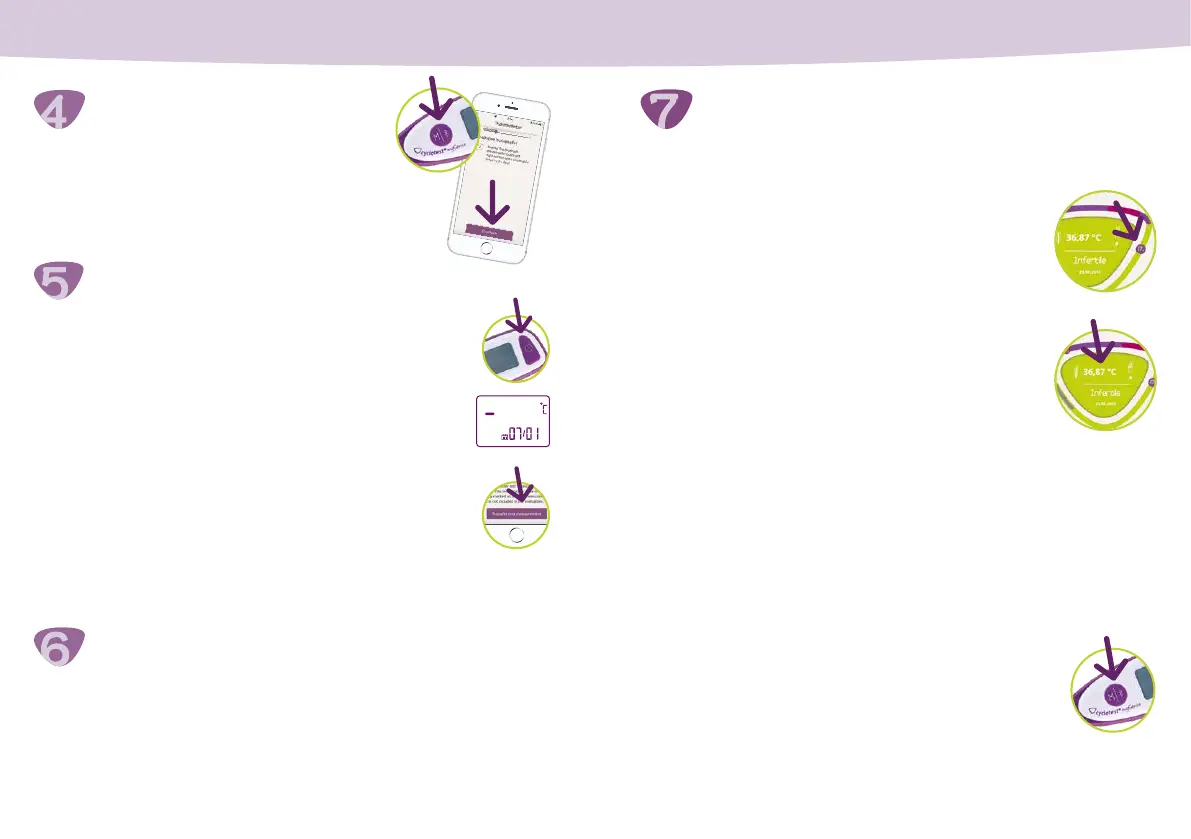
Connect the thermometer
Perform a test measurement
Enter cycle data
First steps
Press and hold the M/Bluetooth button
on the thermometer for 1–5 seconds,
then tap “Continue“.
You can view the most important information
about your cycle in your Daily chart. To view
past or future days, move the highlighted day
around the edge of the cycle triangle.
To enter cycle data, tap in the centre of the
large cycle triangle. You can only enter data
for the current day or past days.
Note: You cannot enter your basal temperature
manually. This is transmitted by the thermometer via Bluetooth.
There are two ways to transfer your basal body temperature
to the app:
• Immediately after a measurement, when the app is open and
Bluetooth is enabled.
• Manually at any time. To do so, open the app
and press the M/Bluetooth button on the
thermometer for 1–5 seconds.
Finding out your fertility status
Entering data
Transferring temperature data
Note: You can repeat the test at any time by selecting Menu >
Settings > Test measurement
Now enter your cycle data, such as the rst day of your men-
strual cycle.
Caution: This day is also your rst cycle start date. You can also
enter extra information if you wish.
• Press the On/Off button on the thermometer.
• Wait until after the second beep, then a line and
“°C“ will ash on the display.
• Place the thermometer under your tongue in
the pocket on the left or the pocket on the right.
• If the temperature measurement was successful,
a beep will sound.
• In the app, tap “Transfer test measurement“.


 To Next Page