EN-16 EN-17
Operating the device Operating the device
Change the battery if:
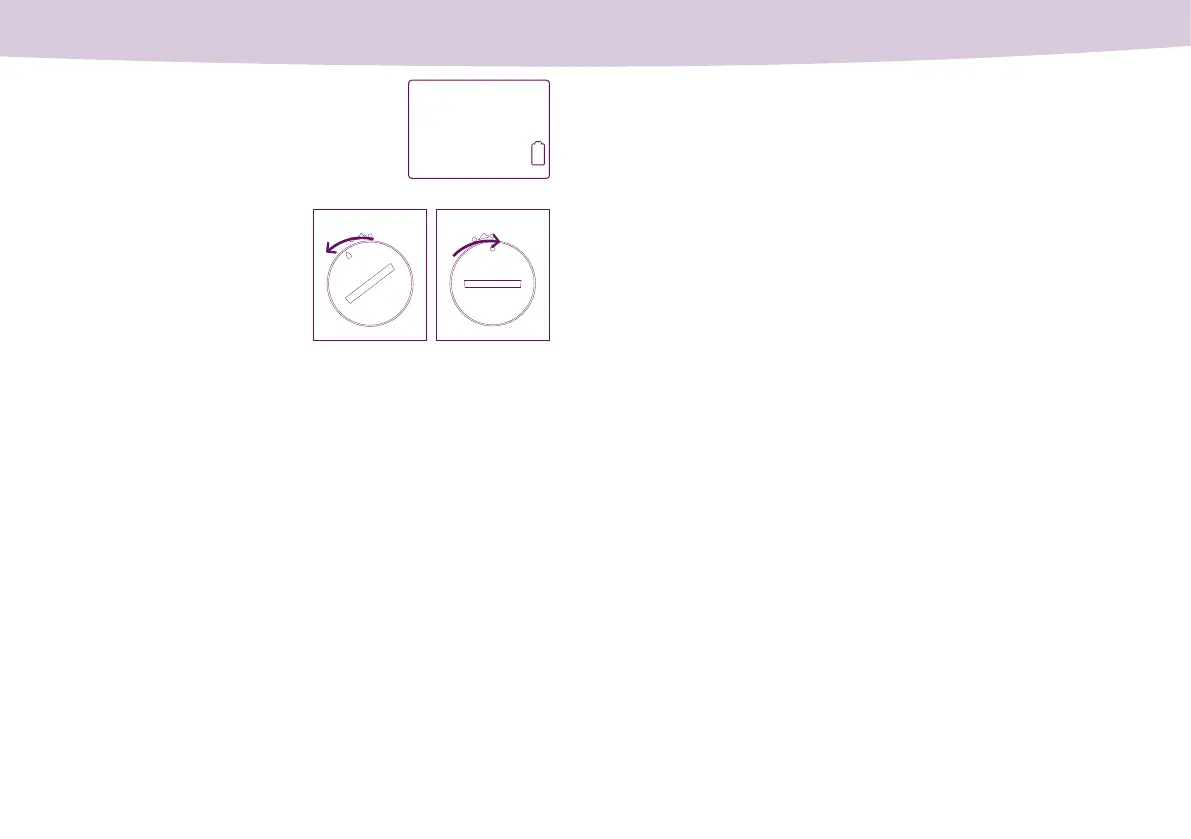
– After switching on the device, the “battery
at“ indicator (Figure 2) appears on the dis-
play. You must insert a new battery before you
can take any temperature measurements.
Figure 2
• Unlock the battery cover by turning
it past the marker to the left. Then
lift the cover off.
• Remove the old battery and insert a
new battery (CR2032) with the “+”
symbol facing up.
– Nothing is shown on the display despite
pressing the on/off button.
Battery com-
partment cover
unlocked
Battery com-
partment cover
locked
• Place the cover back on the battery
compartment and lock it in place.
After changing the battery, the thermometer must be connected to the
mySense app so that the date and time can be resynchronised. To do this,
open the mySense app and turn on the thermometer. Until you have done
this, you cannot take any new temperature measurements.
Measurement values stored on the device are retained when the battery
is changed.
Changing devices
Each mySense basal body temperature thermometer has a unique sig-
nature assigned to a specic user. Signatures are assigned during initial
setup when the device is synchronised with the mySense app for the rst
time.
If your device is lost or faulty, you can assign a new mySense basal body
temperature thermometer to your user account.
To do this, go to “Menu → Settings → Replace thermometer” in the mySense
app and follow the instructions.
Please note: If you change device during a cycle, the current cycle be-
comes inactive in the mySense app. For your safety, the mySense app
only accepts measurement data from a single device during a cycle.


 To Next Page