EN-12 EN-13
Operating the device Operating the device
• If you perform more than 30 measurements without transferring the
values to the mySense app, the oldest value is deleted to make room for
a new measurement.
display to remind you to transfer the measurement values to the app
as soon as possible.
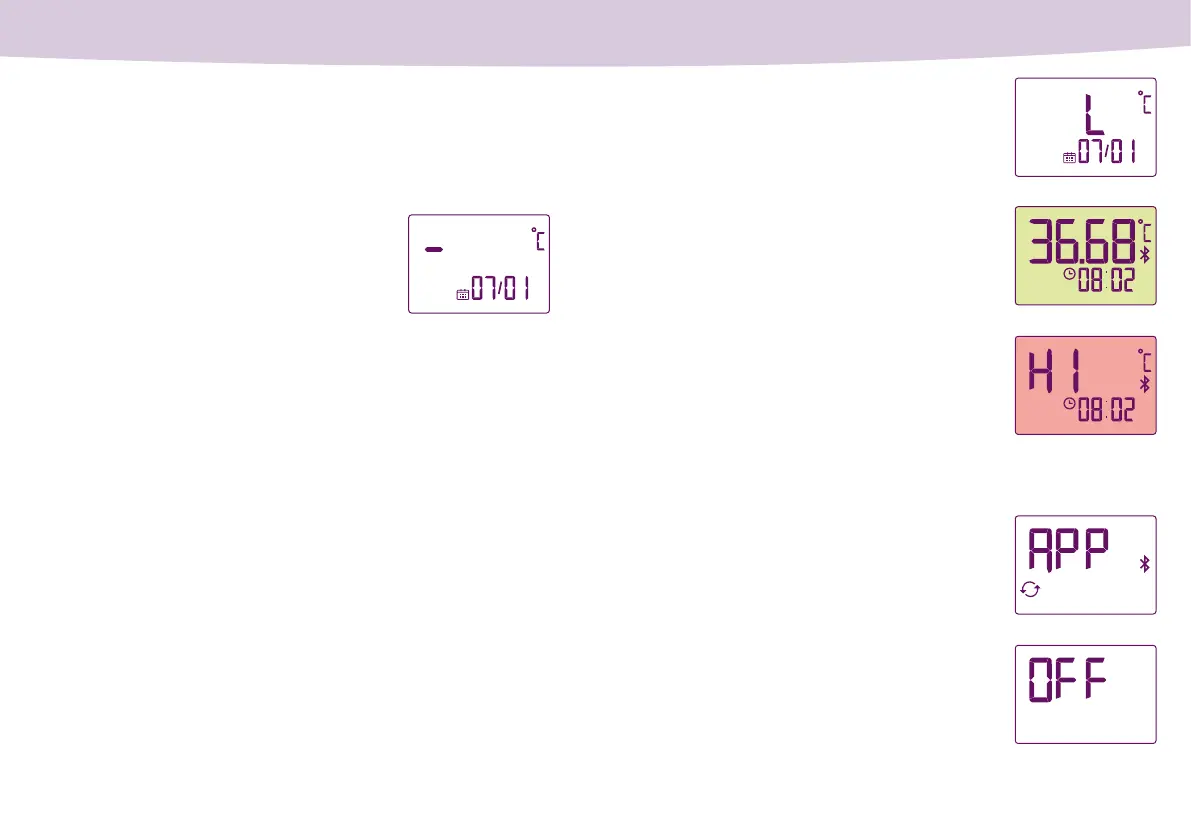
The device is now ready to perform a new meas-
urement (Figure 7). You will then hear another beep.
Never begin a measurement before this message
appears on the display or before you hear the sec-
ond beep and the dash and °C icon ash on the
display. The thermometer must already be in meas-
urement mode when you start measuring to be able to correctly record
the progress of the measurement.
Take the measurement within the selected measurement timeframe im-
mediately after waking up. Take the measurement even before you get up.
Measured values determined outside the measurement timeframe will not
be transferred to the mySense app.
You must have slept for at least ve hours before taking a measurement
and must not have stood up in the last hour before the measurement. If
you have not had enough sleep, skip the measurement.
Measuring wake-up temperature
Figure 7
• Place the probe tip underneath your tongue on either the left-hand or
right-hand side. The temperature sensor must make good contact with
the tissue.
• Close your mouth and breathe calmly through your nose so that the
measurement result is not affected by the air that you breathe.
• As long as the measured temperature remains below the measuring
range (32.00°C to 43.99°C), the display shows L (low) (Figure 8). Have a
• During the measurement, the current tempera-
ture is shown on the display. You must wait until
the measurement is complete to ensure the ac-
curacy of the temperature value.
little patience during the measurement. The sen-
sor must rst warm up from room temperature to
body temperature.
• A long beep indicates that the measurement is
complete. The measurement value is shown on
the display (Figure 9).
• If the thermometer measures an elevated tem-
perature of 37.50°C or above, you will hear 10
beeps in rapid succession. The display switches
between showing the temperature and “HI” (fe-
ver alert, Figure 10).
• The device now tries to establish a Bluetooth con-
nection to transfer the measured value to the mySense app. Make sure
that the smartphone is within range, Bluetooth is enabled and the my-
Sense app is running.
Figure 9
Figure 10
• If the device cannot establish a connection, the
measurement value is stored on the device to
be transferred later. The device can temporarily
store up to 30 measurement values. The ther-
mometer then switches itself off (Figure 12).
• If the connection is successful, the “APP“ indica-
tor appears (Figure 11). Once the data has been
transferred, the thermometer switches off auto-
matically (Figure 12).
Figure 8
Figure 12
Figure 11


 To Next Page