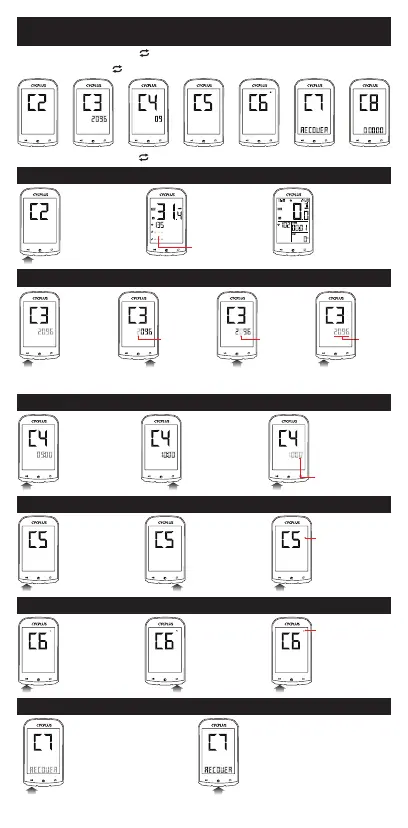
About Settings
Long press [right button ] to enter setting.
Press [right button ] to switch 8 setting pages.
KMH
ODO
KM
Long press [right button ] to return to home page after finish setting.
Press left button
to start searching
the ANT sensor.
Data will appear
when the sensor
has been
connected.
It will return to
home page after
10 seconds.
Ant+ Sensors Connection
unlinked sensor
digits flashing
Press left button
to start setting.
Press right button
to modify the digit.
Press mid button to
switch the setable digit.
Press left button
to finish setting.
the setable
digit flashing
the setable
digit flashing
all digits
flashing
Wheel Circumference Setting
Speed Unit Setting
KMH KMH KMH
Press left button
to start setting.
Press right button
to switch between
KMH and MPH.
Press left button
to finish setting.
the unit flashing
Temperature Unit Setting
the icon flashing
Press left button
to start setting.
Press right button
to switch between
℃ and ℉.
Press left button
to finish setting.
Factory Reset
Press left button
to start setting.
Long press mid button to
restore factory settings, and
the computer will turn off.
Time Zone Setting
Press left button
to start setting.
Press right
button to modify
the time zone.
Press left button
to finish setting.
time zone
digits flashing
02
Refer to Chart (P29)


 To Next Page