EasyManua.ls Logo

Cylon CBT-STAT - Page 8

Cylon CBT-STAT
20 pages
Print Icon
To Next Page IconTo Next Page
To Previous Page IconTo Previous Page
Loading...
8 © Cylon Controls Ltd. MAN0120US rev 16
CBT-STAT and CBT-STAT-H
USER MODE
User mode is the default behavior for the CBT-STAT and CBT-STAT-H keypads.
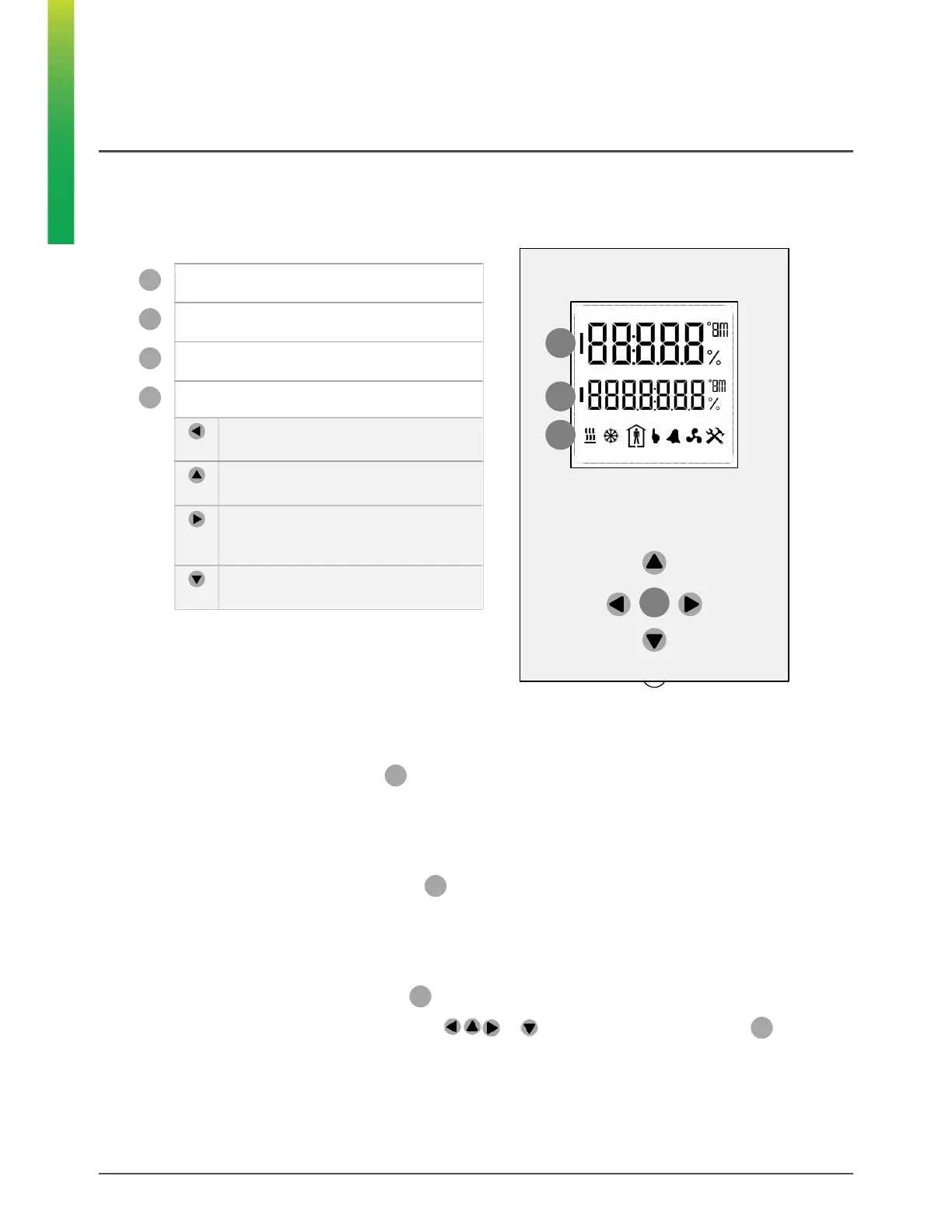
Keypad and Display
1
st
line (large digits)
2
nd
line (small digits)
Operation Mode indicators
Keypad
Left button
No function
.
Up button
Increase setpoint
.
Right button
Toggle occupancy override (if Permit
Occupancy Override is enabled)
.
Down button
Decrease setpoint
.
c
a
b
d
Temperature
In User mode, the 1
st
line (large digits)
on the display shows the current Temperature Sensor reading.
Humidity
On the CBT-STAT-H, the 2
nd
line (small digits)
shows the current Humidity Sensor reading.
Temperature Setpoint
On the CBT-STAT, the 2
nd
line (small digits)
shows the current value of the Temperature Setpoint.
On the CBT-STAT-H, pressing any of the buttons or changes the 2nd line (small digits)
to show the
Temperature setpoint.
a
b
c
d
a
b
b
b

Related product manuals