28
27
29
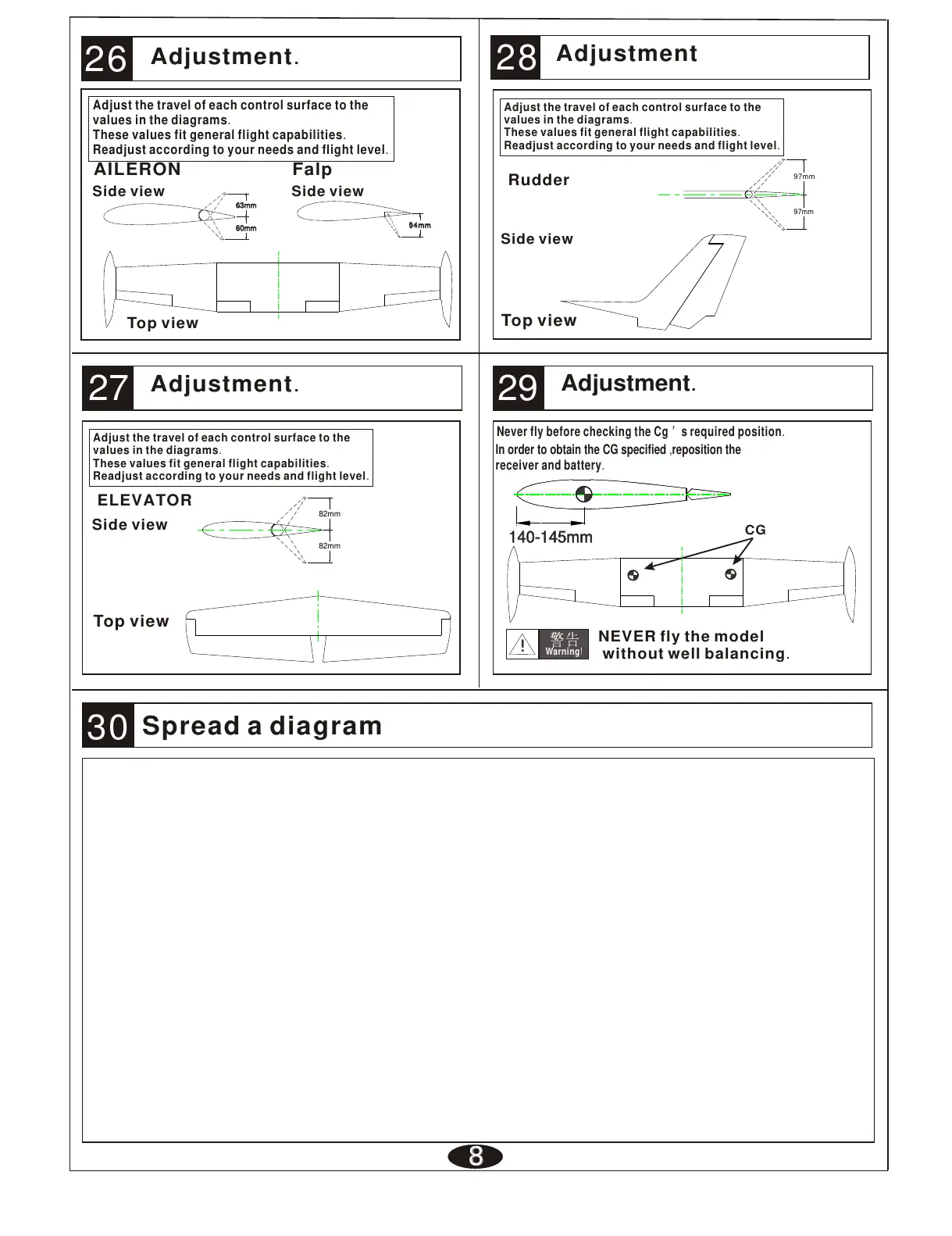
Side view
ELEVATOR
Adjust the travel of each control surface to the
values in the diagrams.
These values fit general flight capabilities.
Readjust according to your needs and flight level.
Top view
26
AILERON
Adjustment.
Adjust the travel of each control surface to the
values in the diagrams.
These values fit general flight capabilities.
Readjust according to your needs and flight level.
888
Adjustment.
Never fly before checking the Cg s required position.
In order to obtain the CG specified ,reposition the
receiver and battery.
NEVER fly the model
without well balancing.
Warning!
!
CG
Side view
Rudder
Adjust the travel of each control surface to the
values in the diagrams.
These values fit general flight capabilities.
Readjust according to your needs and flight level.
Top view
140-145mm140-145mm140-145mm
Adjustment
Adjustment.
Side view
30
Top view
94mm94mm94mm
Falp
Side view
Spread a diagram
97mm
97mm
60mm60mm60mm
63mm63mm63mm
82mm
82mm



 To Previous Page