EasyManua.ls Logo

Cyrus AV Master 8.0 - User Manual

Cyrus AV Master 8.0
36 pages
Print Icon
To Next Page IconTo Next Page
Loading...
AV Master 8.0
User Instructions
SELECT
MODE SETUPINPUT
AV Master 8.0
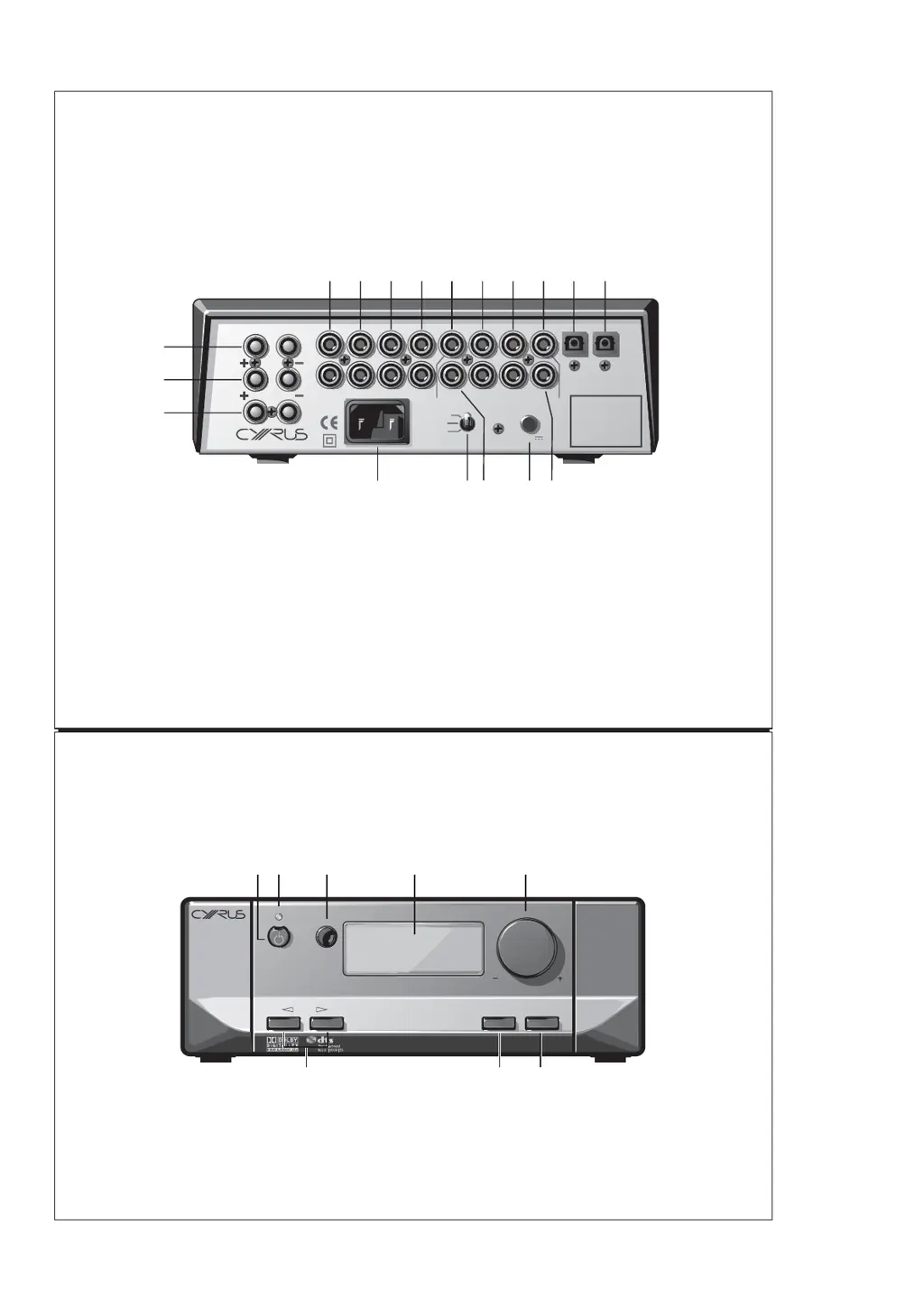
Fig 1
Cyrus AV Master 8.0 Surround Decoder
Fig 2
afedc
bc d
fgh
ea
bghi1)
1!1@1#1$1%
1^
1&
1*
FRONT SURR BACK SUB
IN-6 IN-5 IN-3
CTRE IN-4
MC-
BUS
LEFT
SPEAKER
RIGHT
SPEAKER
CTRE
SPEAKER
IN-1
IN-2
MADE IN ENGLAND
L&R POWER AMP
FRONT
BACK
SURR
IN
OUT
LL
RR
+12V

Questions and Answers

  • J
    Jessica MartinAug 11, 2025
    How to troubleshoot no sound from speakers on Cyrus AV Master 8.0 Media Converter?
    • C
      Carrie TurnerAug 11, 2025
      If you're not getting any sound from the speakers connected to your Cyrus Media Converter, first ensure that the internal power amplifiers are enabled within the setup menu. Then, verify that any external power amplifiers are switched on. Finally, confirm that the correct source is selected and the input is set up properly.
  • M
    Marc RogersAug 16, 2025
    Why does my Cyrus Media Converter make loud noises from speakers with certain sources?
    • S
      Steven WatsonAug 16, 2025
      If you are experiencing loud noises from the speakers when using specific sources or discs with your Cyrus Media Converter, it might be due to an incompatible audio format for multi-channel sound. Verify that the audio format of the program is compatible with the AV Master 8.0.
  • S
    Samuel KennedyAug 22, 2025
    What to do if there is no sound from the sub-woofer of Cyrus AV Master 8.0?
    • F
      fgarciaAug 22, 2025
      If you're not hearing sound from the subwoofer connected to your Cyrus Media Converter, first check the speaker configuration section in the setup menu to ensure the subwoofer is selected. Also, verify the subwoofer level settings on both the AV Master 8.0 and the subwoofer itself. If all speakers are set to ‘large’, and there's no LFE channel information, try another program that includes LFE channel information. The LFE channel may not be recorded, so trying another program with LFE channel information can help diagnose the issue.
  • M
    Mrs. Vanessa JensenAug 28, 2025
    How to fix no sound from some speakers on Cyrus AV Master 8.0?
    • N
      Nicholas MorganAug 29, 2025
      If some speakers aren't producing sound with your Cyrus Media Converter, it's possible that they haven't been selected. Access the speaker configuration section within the setup menu to check the speaker selection settings.
  • A
    Amber ContrerasSep 3, 2025
    Why is there no sound from any speaker with one of the sources on Cyrus Media Converter?
    • E
      Eric ChristensenSep 3, 2025
      If you're experiencing a lack of sound from any speaker when using a specific source on your Cyrus Media Converter, the audio format may be incompatible. Check the audio format of the disc or tape to ensure it is compatible with the AV Master 8.0. Also, the input for this source may not be correctly set up, so check the source selection and input setup procedure.

Cyrus AV Master 8.0 Specifications

General IconGeneral
BrandCyrus
ModelAV Master 8.0
CategoryMedia Converter
LanguageEnglish

Related product manuals