39
Networking Basics
Connecting to a Wireless Network in Windows XP
To be able to connect to a wireless network, make sure the proper network
settings are configured for DWL-650+.
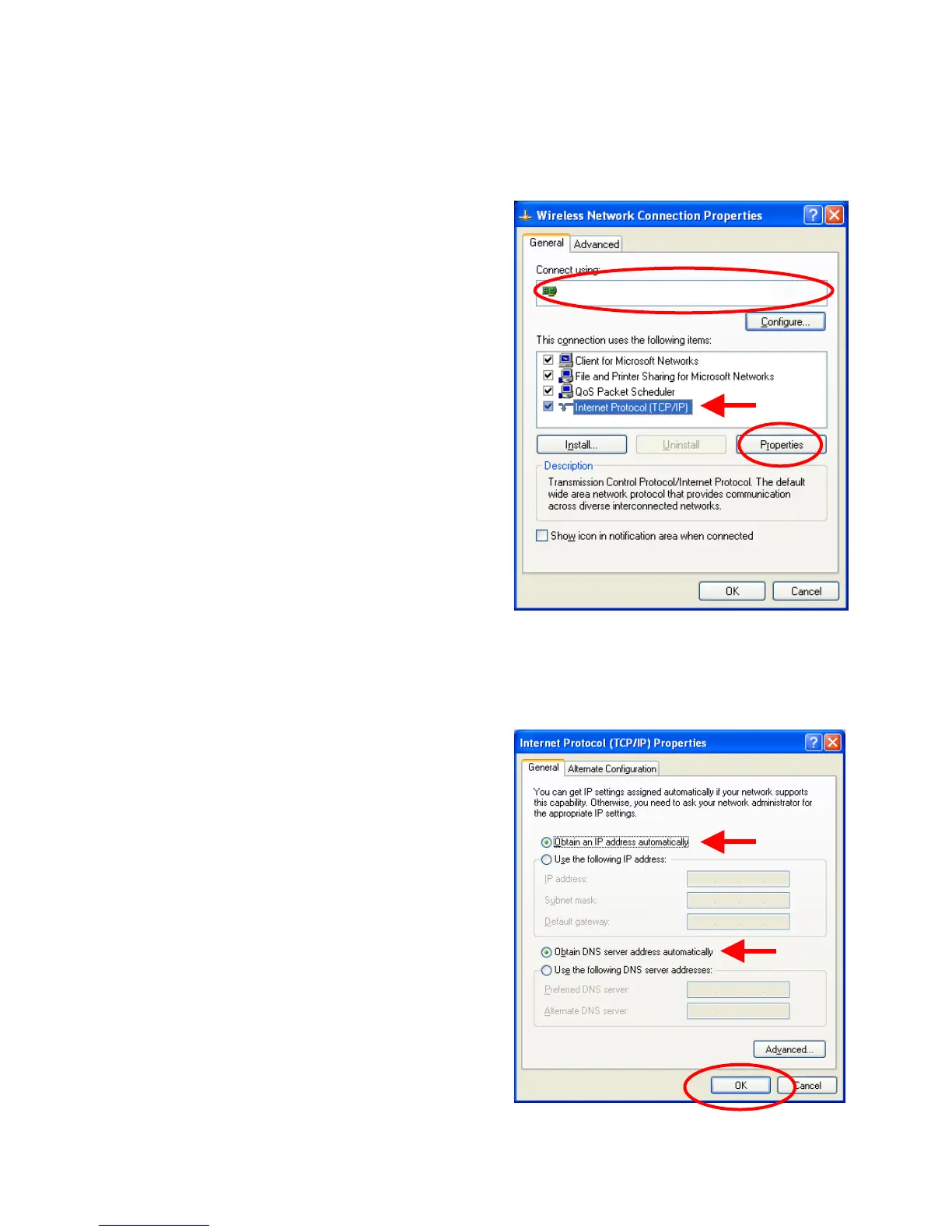
Go to Start > right-click on My Network
Places >
select Properties > double-click on the
Wireless Network Connection
associated with the DWL-650+ > select
Properties > select Internet Protocol
(TCP/IP) > click Properties
Connecting to a Wireless Network with a Wireless Router or an
Access Point using a DHCP server in Windows XP.
Select Obtain an IP address
automatically - if the Wireless Router
or Access Point has DHCP server
enabled
Select Obtain DNS server address
automatically.
Click OK
Fig. 8.26
Fig. 8.27
D-Link AirPlus DWL-650+ Wireless Cardbus Adapter







 To Next Page