
 Need help?
Do you have a question about the D-Link AirPlus G DWL-G122 and is the answer not in the manual?
Instructions for inserting the D-Link CD-ROM and initiating the driver installation process.
Steps for physically connecting the DWL-G122 USB adapter to your computer after installation.
Guide on restarting the computer after driver installation and hardware setup.
Confirms successful installation and checks for the configuration utility icon.
Details on displayed information like Status, SSID, Frequency, Wireless Mode, and Encryption.
Explains settings for SSID, Wireless Mode, Data Encryption, Authentication, and Key Length.
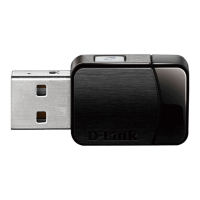
The D-Link DWL-G122 AirPlus G™ High Speed 802.11g USB Wireless Adapter is a device designed to provide wireless connectivity for desktop or laptop computers. It operates on the 802.11g standard, offering high-speed wireless communication, and is also backward compatible with 802.11b networks.
The primary function of the DWL-G122 is to enable a computer to connect to a wireless network. It acts as a wireless client, allowing the computer to communicate with an 802.11b or 802.11g Access Point in Infrastructure Mode, or directly with another 802.11b or 802.11g wireless adapter in Ad-Hoc (Peer-to-Peer) networking mode. The device plugs into an available USB port on the computer, providing a convenient way to add wireless capabilities.





 To Next Page
 General