EasyManua.ls Logo

D-Link AirPlus DWL-650+ - Page 57

D-Link AirPlus DWL-650+
62 pages
Print Icon
To Next Page IconTo Next Page
To Previous Page IconTo Previous Page
Loading...
57
Networking Basics
Sharing an LPR printer
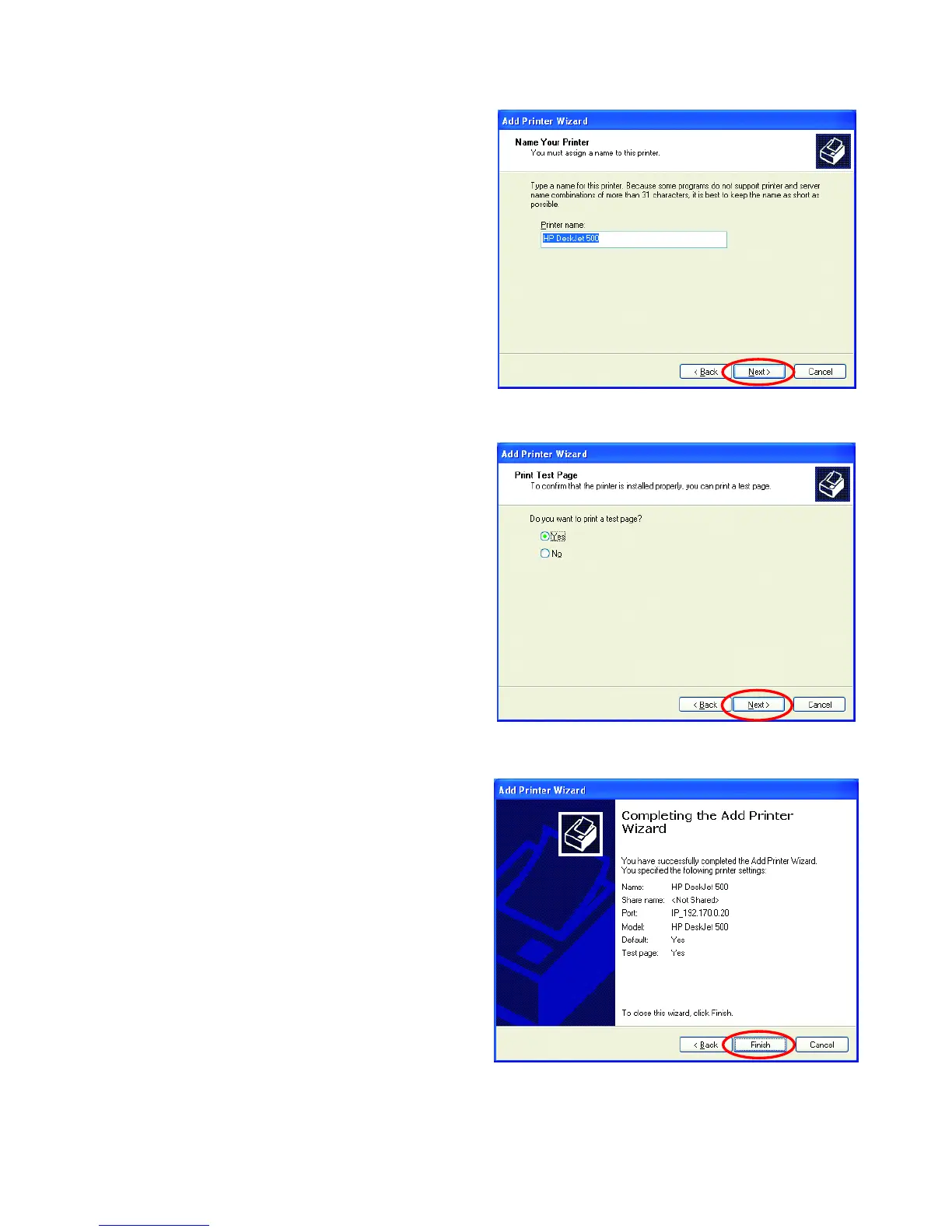
You can rename your
printer if you choose. It
is optional.
Please remember the name o
f
your printer. You will need this
information when you use the
Add Printer Wizard on the
other computers on you
r
network.
Click Next
Select Yes, to print a
test page.
Click Next
This screen will display
information about your
printer.
Click Finish to
complete the
addition of the
printer.
Please run the Add
Printer Wizard on
all the computers
on your network in
order to share the
printer.
Note: You must run the Network Setup Wizard
on all the computers on your network before you
run the Add Printer Wizard.
Fig. 8.67
Fig. 8.68
Fig. 8.69

Other manuals for D-Link AirPlus DWL-650+

Related product manuals