12
Configuration
Configuring the VoIP Gateway
8 data bits (sometimes called a “word length” of 8 bits)
1 stop bit (sometimes referred to as a 1-bit stop interval)
No Flow control
Arrow keys enabled
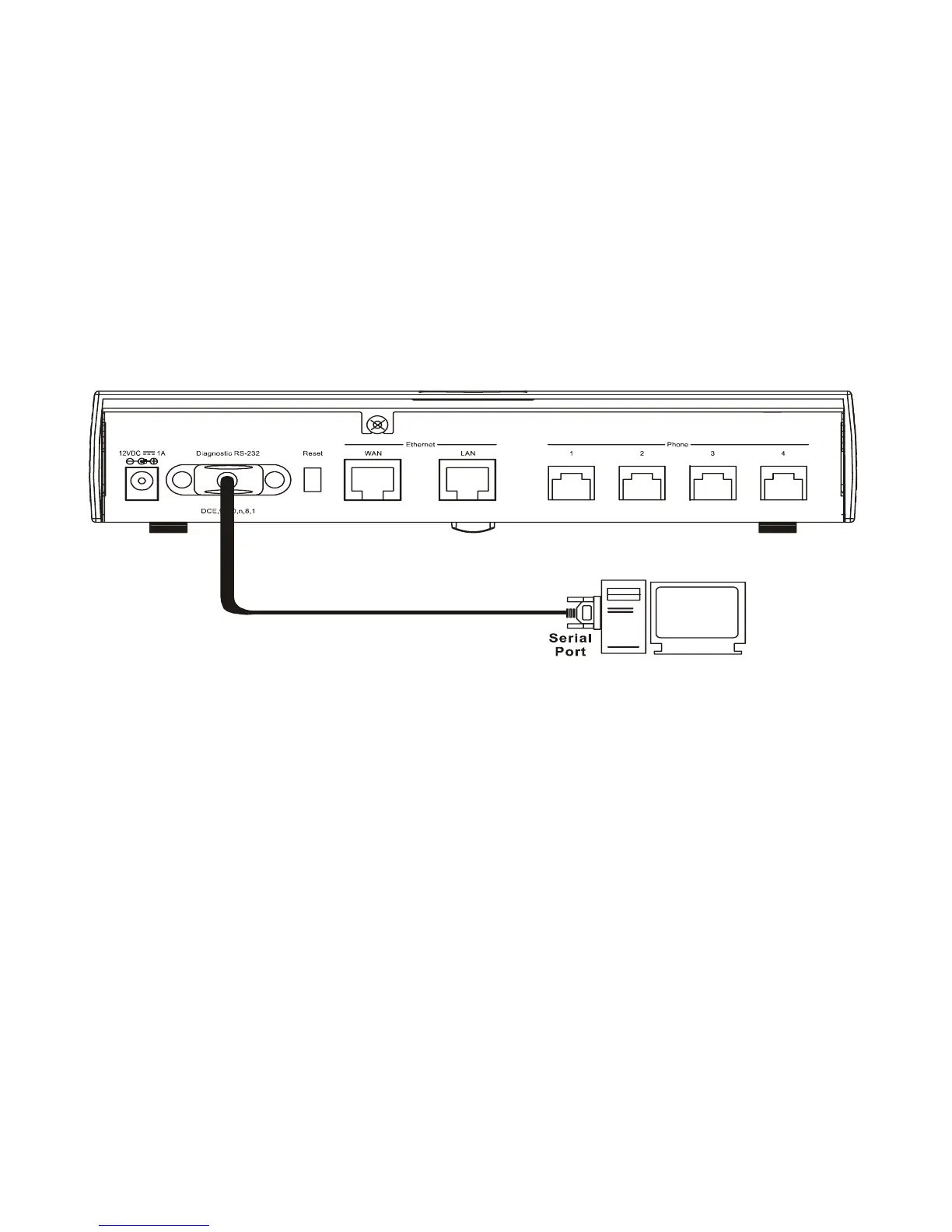
A typical console connection is illustrated below:
Example of a Console Connection
Configuring the VoIP Gateway Using Telnet
Once you have set an IP address for your device, you can use a Telnet pro-
gram (in a VT-100 compatible terminal mode) to access and configure it. Most
of the screens are identical, whether accessed from the console port or from a
Telnet interface.
Console Usage Conventions
The console interface uses the following conventions:
Items in <angle brackets> can be toggled on or off using the space bar.
Items in [square brackets] can be changed by typing in a new value. You
can use the Backspace and Delete keys to erase characters behind and
in front of the cursor.


 To Next Page