14
Configuration
Configuring the VoIP Gateway
Configuration Settings
In order for the VoIP to function, you must provide the device with the following
information:
Where the device receives its IP settings from.
IP settings – IP Address, Subnet Mask, and Default Gateway
All of these settings are found in the first menu item in the Boot Menu named IP
Configuration.
Configure IP
Use the <Tab> key to highlight the first menu item Configure IP and press <En-
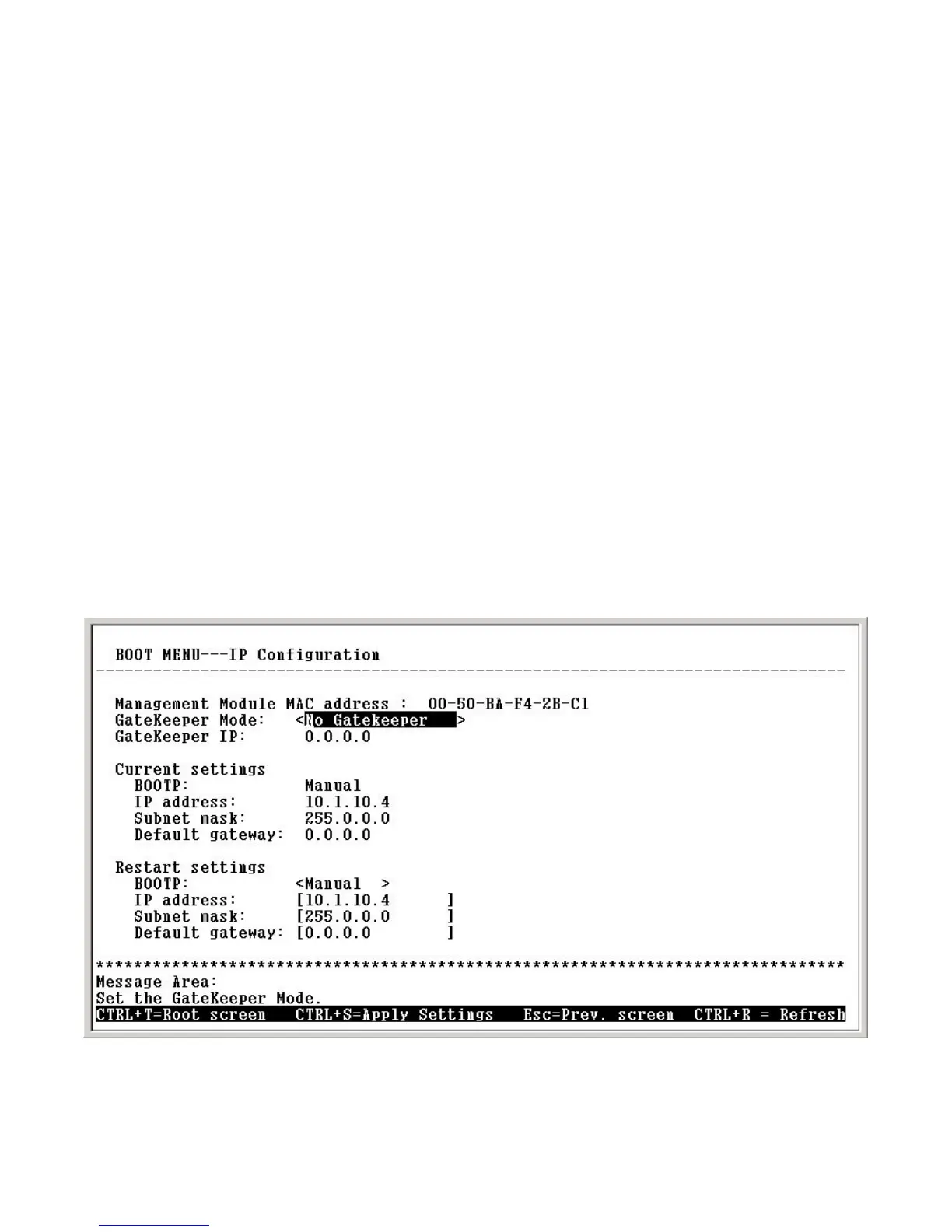
ter>. The IP Configuration screen will now be displayed:
Boot Menu—IP Configuration screen
Gatekeeper Mode– Choose the Gatekeeper mode
Gatekeeper IP –The Gatekeeper IP address is necessary if you chose
the <Manual Discovery> item within the Gatekeeper Mode
Gatekeeper Mode: Use the <Space> key to select the Gatekeeper mode
once the device is rebooted (restarted). Choices include:


 To Next Page