6D-Link DHP-311AV User Manual
Section 1 - Product Overview
Hardware Overview
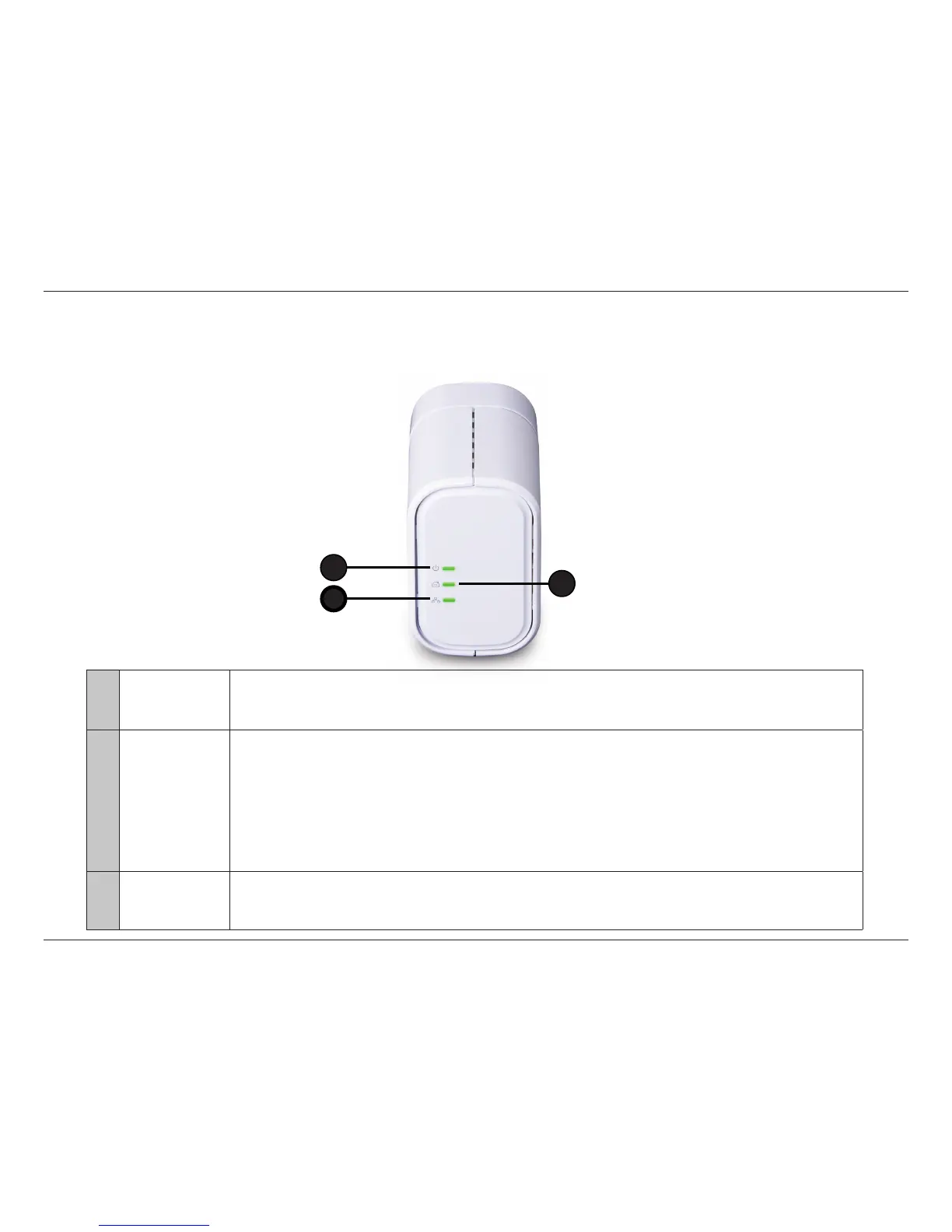
LEDs
1 Power LED
A solid light indicates that the device is receiving electrical power.
A blinking light indicates that the device is setting itself up after reset or security button was pressed or
power saving mode enabled. When the light is O, The device is not receiving electrical power.
2 PowerLine LED
• Solid - The device is connected to a PowerLine network.
• Blinking - The device is transmitting data.
• O - The device has not found any other compatible PowerLine devices using the same encryption key.
The color indicates the PowerLine link rate:
• Green - The PowerLine link rate is faster than 80 Mbps.
• Amber - The PowerLine link rate is between 50 Mbps and 80 Mbps.
• Red - The PowerLine link rate is less than 50 Mbps.
3 Ethernet LED
• Solid - The Ethernet port is linked but there is no data trac.
• Blinking - The device is transmitting data.
• O - There is no Ethernet connection.
2
1
3



 To Next Page