DIR-822 Quick Installation Guide
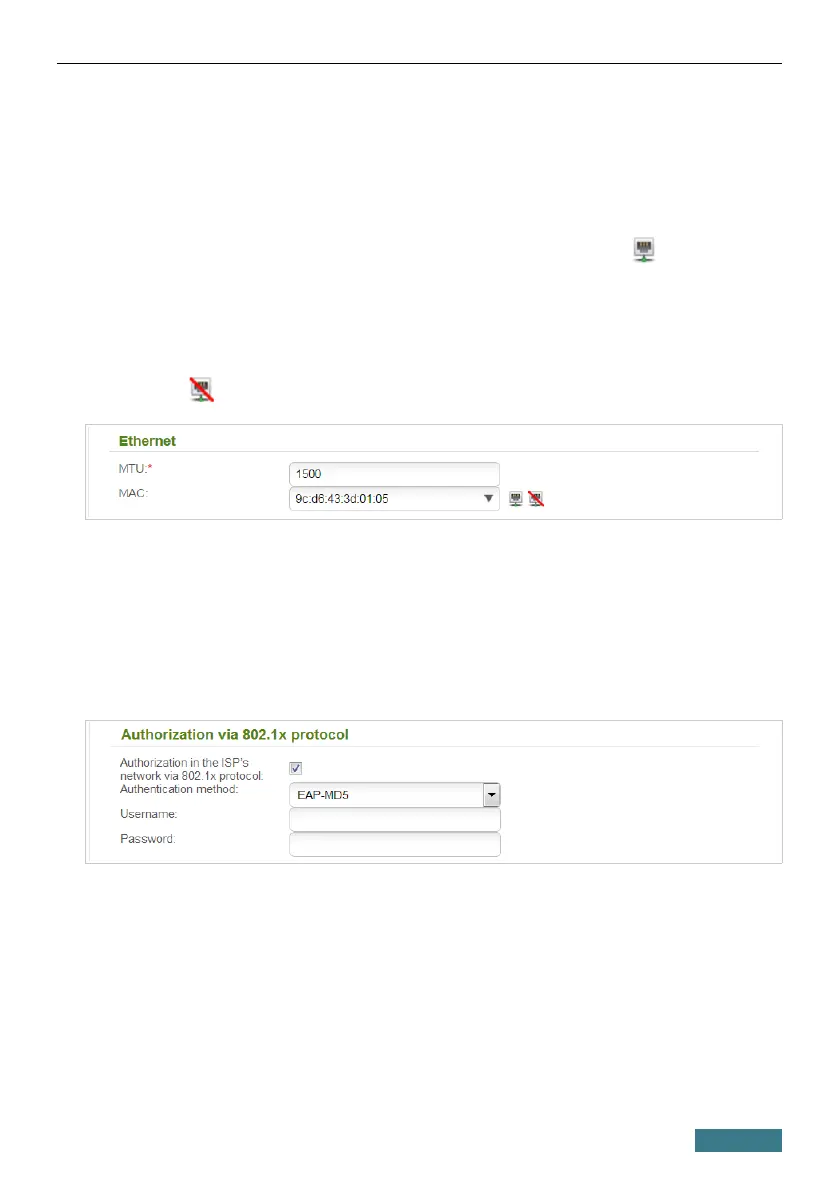
6. If your ISP uses MAC address binding, in the Ethernet section, in the
MAC field, enter the MAC address registered by your ISP upon
concluding the agreement. To set the MAC address of the network
interface card (of the computer that is being used to configure the router
at the moment) as the MAC address of the WAN interface, click the
Clone MAC address of your computer icon ( ). To set the
address of a device connected to the router's LAN at the moment, select
the relevant value from the drop-down list (the field will be filled in
automatically). To set the router's MAC address as the MAC address of
the WAN interface, click the Restore default MAC address
icon ( ).
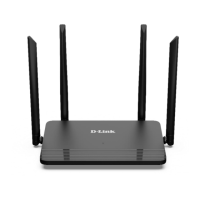
7. If your ISP uses authorization via the 802.1x protocol, in the
Authorization via 802.1x protocol section, select the
Authorization in the ISP's network via 802.1x protocol
checkbox. Fill in the fields of the section in accordance with data
provided by your ISP. The section is not displayed for the connection of
PPPoE, IPv6 PPPoE, PPPoE Dual Stack, Static IPv6, and Dynamic IPv6
types.
19



 To Next Page