DIR-822 Quick Installation Guide
14. Click the Add button.
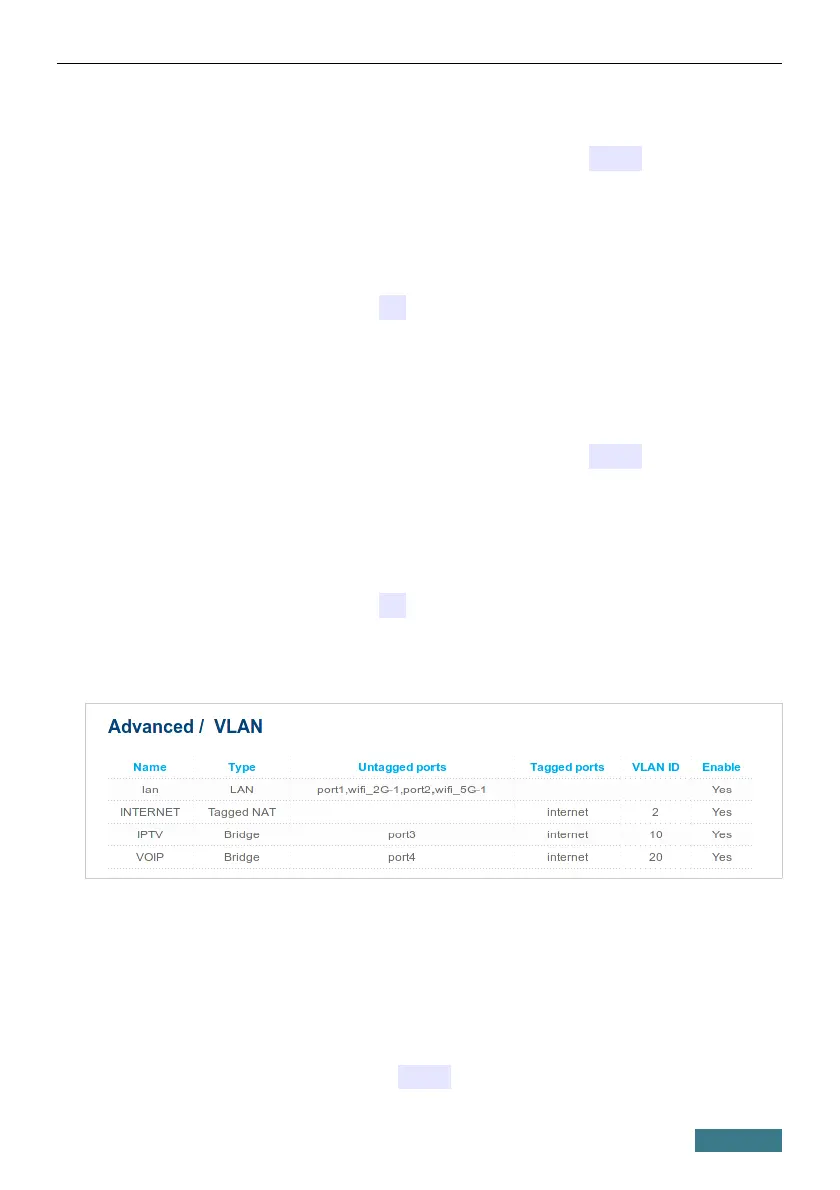
15. In the Name field, enter a name for the new group (IPTV).
16. From the Type drop-down list, select the Bridge value.
17. From the Tagged port drop-down list, select the internet value.
18. In the Untagged ports section, select the port3 checkbox.
19. In the VLAN ID field, enter 10.
20. Click the Apply button.
You have created the group of ports for IPTV service.
21. Click the Add button.
22. In the Name field, enter a name for the new group (VOIP).
23. From the Type drop-down list, select the Bridge value.
24. From the Tagged port drop-down list, select the internet value.
25. In the Untagged ports section, select the port4 checkbox.
26. In the VLAN ID field, enter 20.
27. Click the Apply button.
You have created the group of ports for access to IP telephony.
28. Log into the web-based interface and go to the Net / WAN page.
29. Click the Add button.
30. On the opened page, select the PPPoE value from the Connection
Type drop-down list.
31. From the Interface drop-down list, select the Internet.2 value.
32. In the Username field, enter user.
28



 To Next Page