31D-Link DIR-867 User Manual
Section 4 - Conguration
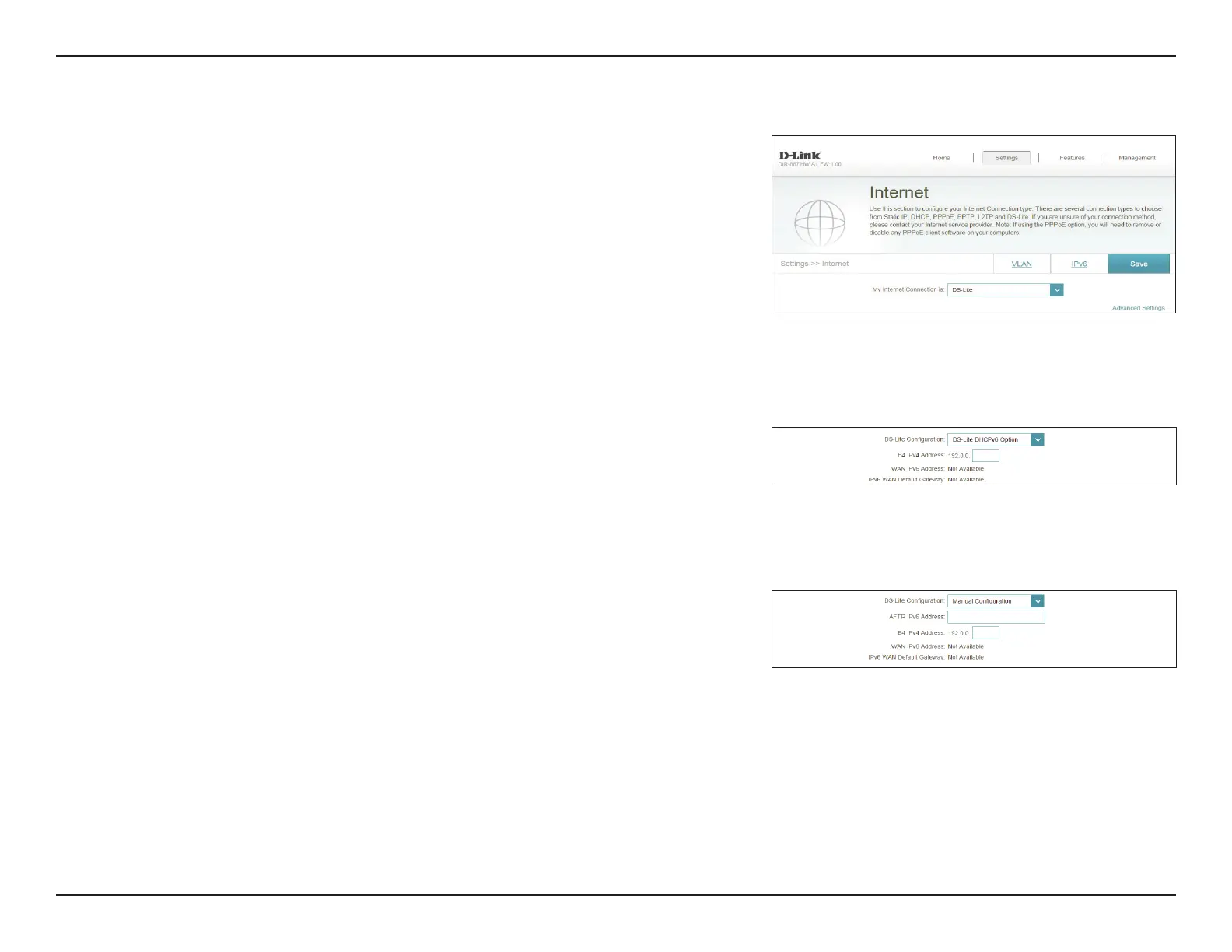
DS-Lite
DS-Lite is an IPv6 connection type. After selecting DS-Lite, the following
parameters will be available for conguration:
Advanced Settings
DS-Lite
Conguration:
Select DS-Lite DHCPv6 Option to let the router allocate the AFTR
IPv6 address automatically. Select Manual Conguration to enter
the AFTR IPv6 address manually.
DS-Lite DHCPv6
B4 IPv6 Address: Enter the B4 IPv4 address value used here.
WAN IPv6
Address:
Once connected, the WAN IPv6 address will be displayed here.
IPv6 WAN Default
Gateway:
Once connected, the IPv6 WAN default gateway address will be
displayed here.
Manual
AFTR IPv6
Address:
Enter the AFTR IPv6 address used here.
B4 IPv6 Address: Enter the B4 IPv4 address value used here.
WAN IPv6
Address:
Once connected, the WAN IPv6 address will be displayed here.
IPv6 WAN Default
Gateway:
Once connected, the IPv6 WAN default gateway address will be
displayed here.
Click Save when you are done.


 To Next Page