60
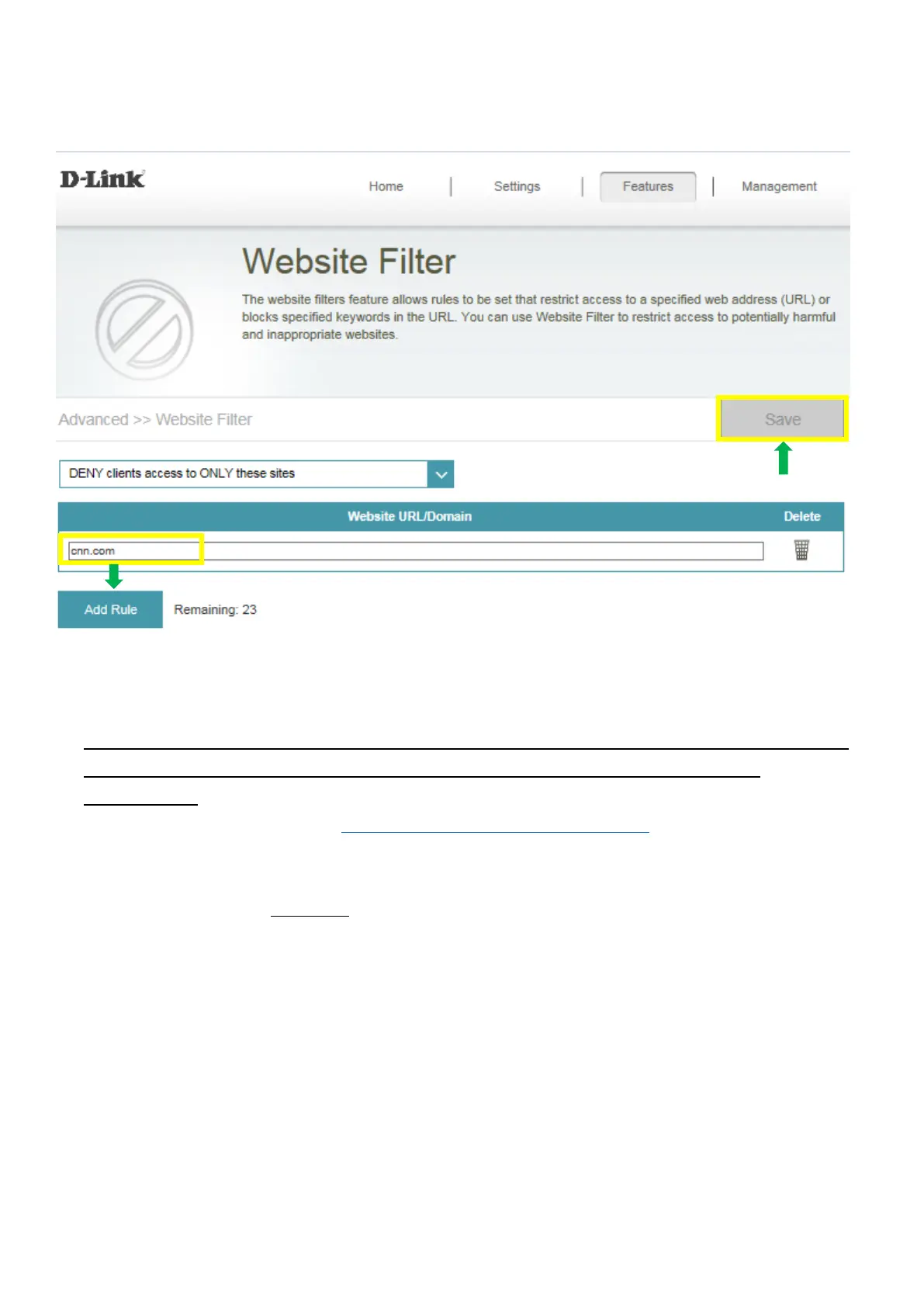
Step 3: You may specify a maximum of fifteen web sites. To add a new site to the list, click Add Rule,
and enter the URL or domain you wish to deny or allow access to in the Website URL/Domain column,
and click save.
Note:
1. If you wish to delete a rule, click on its trash can icon in the Delete column. If you wish to edit a
rule, simply replace the URL or domain.
2. The https website can’t be blocked by website filter. For example: Facebook, YouTube,
Amazon…etc. If necessary, please apply OpenDNS paid service to fulfill your
requirement.
The service website is as below: https://www.opendns.com/setupguide/. There are 15 days for free
trial. Sign up for new account, follow the setup guide to establish the service, and start enjoy the
stunning service provided by Cisco.
Note: Please confirm if DNS relay is enabled. (It’s enabled by default)



 To Next Page