31D-Link DIR-905L User Manual
Section 3 - Conguration
Firewall & DMZ
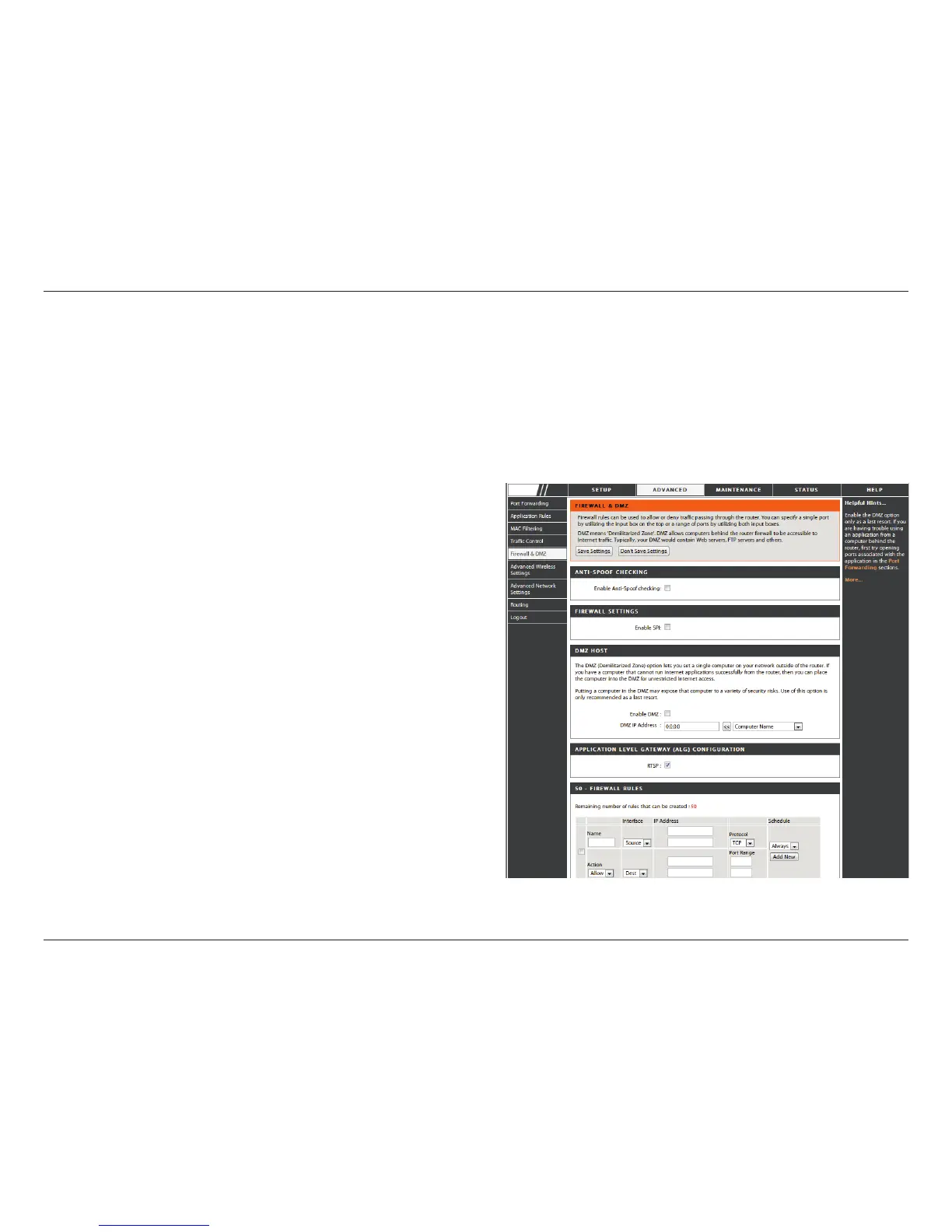
This section will allow you to set up a DMZ host and to set up rewall rules.
If you have a client PC that cannot run Internet applications properly from behind the DIR-905L, then you can set the client up
for unrestricted Internet access. It allows a computer to be exposed to the Internet. This feature is useful for gaming purposes.
Enter the IP address of the internal computer that will be the DMZ host. Adding a client to the DMZ (Demilitarized Zone) may
expose your local network to a variety of security risks, so only use this option as a last resort.
Check this to enable SPI.
Check this box to enable DMZ.
Enter the IP address of the computer you would like
to open all ports to.
Choose a name for the rewall rule.
Select to Allow or Deny transport of the data packets
according to the criteria dened in the rule.
The Source/Destination is the TCP/UDP port on either
the LAN or WAN side.
Click Add New to access the Schedules window. See
Maintenance>Schedules for more information.
Enter a beginning and ending IP address.
Select the transport protocol that will be used for the
lter rule.
Enter the desired port range for the lter rule.
Enable DMZ Host:
DMZ IP Address:
Name:
Action:
Source/Dest:
Schedule:
IP Address:
Protocol:
Port Range:
Enable SPI:
DIR-905L


 To Next Page