18
Conexión
Conexión mediante Wi-Fi
1. Deslice el dedo en el indicador para
desbloquear el DWR-2101.
2. Conecte su dispositivo a una de las
redes inalámbricas del DWR-2101. Para
encontrar las redes y sus contraseñas,
pulse el icono SSID en la página principal.
Pulse el conmutador Contraseña SSID
visible para ver la contraseña.
Conexión mediante Ethernet
1. Use un cable Ethernet para conectar el
DWR-2101 al dispositivo compatible con
Ethernet.
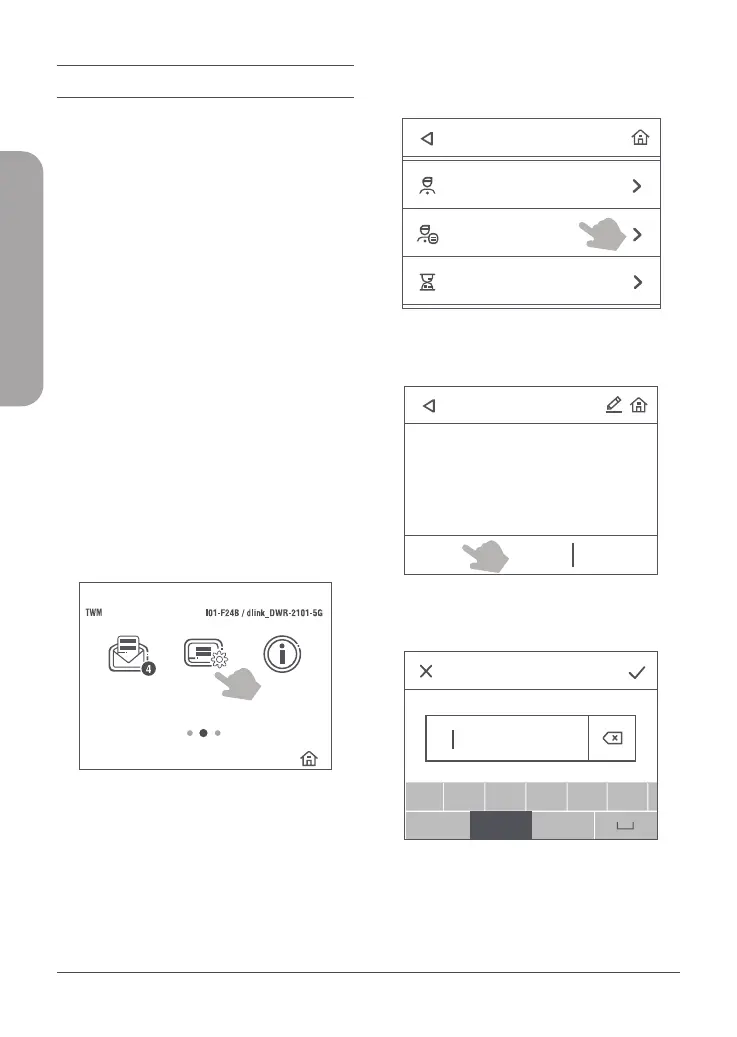
Conguración de un perl de APN
de Internet
1. Deslice el dedo en el indicador para
desbloquear el DWR-2101.
Profile management
Profile name
abc
a
!#$
123
b c d e f
a /A
PdpType
SMS Settings
Settings
Connected Users
Profile management
Profile name:Taiwan Mobile
APN:internet
User name:
IPv4
IPv6
IPv4v6
Password:
PdpType:IPv4v6
Profile name:abc
APN:def
User name:def
Password:abc
PdpType:IPv4v6
Create Select Delete
Data Usage
About
abc
Enter APN
a
!#$
123
b c d e f
a /A
Confirm profile Info
Figura 5: Conguración en la página principal
2. Pulse el icono Parámetros.
Profile management
Profile name
abc
a
!#$
123
b c d e f
a /A
PdpType
SMS Settings
Settings
Connected Users
Profile management
Profile name:Taiwan Mobile
APN:internet
User name:
IPv4
IPv6
IPv4v6
Password:
PdpType:IPv4v6
Profile name:abc
APN:def
User name:def
Password:abc
PdpType:IPv4v6
Create Select Delete
Data Usage
About
abc
Enter APN
a
!#$
123
b c d e f
a /A
Confirm profile Info
Figura 6: Gestión de perles en Parámetros
3. Pulse Gestión de perles.
Profile management
Profile name
abc
a
!#$
123
b c d e f
a /A
PdpType
SMS Settings
Settings
Connected Users
Profile management
Profile name:Taiwan Mobile
APN:internet
User name:
Password:
PdpType:IPv4v6
Profile name:abc
APN:def
User name:def
Password:abc
PdpType:IPv4v6
Create Select Delete
Data Usage
About
abc
Enter APN
a
!#$
123
b c d e f
a /A
Confirm profile Info
Figura 7: Crear un nuevo perl
4. Pulse Crear.
Profile name
abc
a
!#$
123
b c d e f
a /A
PdpType
SMS Settings
Settings
Connected Users
Profile management
Profile name:Taiwan Mobile
APN:internet
User name:
IPv4
IPv6
IPv4v6
Password:
PdpType:IPv4v6
Profile name:abc
APN:def
User name:def
Password:abc
PdpType:IPv4v6
Create Select Delete
Data Usage
About
abc
Enter APN
a
!#$
123
b c d e f
a /A
Confirm profile Info
Figura 8: Nombre del perl
ESPAÑOL



 To Next Page