19
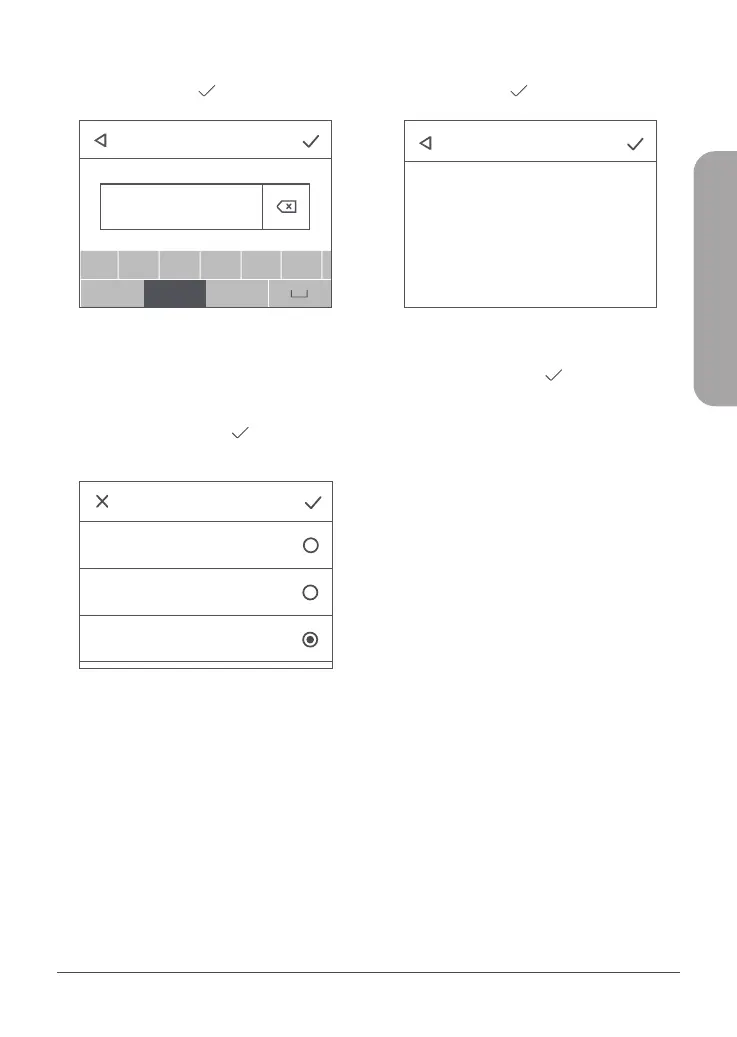
5. Escriba un Nombre del perfil para su
referencia. Pulse para continuar.
Profile management
Profile name
abc
a
!#$
123
b c d e f
a /A
PdpType
SMS Settings
Settings
Connected Users
Profile management
Profile name:Taiwan Mobile
APN:internet
User name:
IPv4
IPv6
IPv4v6
Password:
PdpType:IPv4v6
Profile name:abc
APN:def
User name:def
Password:abc
PdpType:IPv4v6
Create Select Delete
Data Usage
About
abc
Enter APN
a
!#$
123
b c d e f
a /A
Figura 9: Introduzca APN
6. Cada proveedor de servicios de Internet
utiliza una APN diferente. Solicite a su ISP
esta información, incluido el nombre de
usuario y la contraseña que utiliza (si
corresponde). Pulse para continuar
cuando haya introducido la información.
Profile management
Profile name
abc
a
!#$
123
b c d e f
a /A
PdpType
SMS Settings
Settings
Connected Users
Profile management
Profile name:Taiwan Mobile
APN:internet
User name:
IPv4
IPv6
IPv4v6
Password:
PdpType:IPv4v6
Profile name:abc
APN:def
User name:def
Password:abc
PdpType:IPv4v6
Create Select Delete
Data Usage
About
abc
Enter APN
a
!#$
123
b c d e f
a /A
Confirm profile Info
Figura 10: Tipo Pdp
7. Utilice el Tipo Pdp predeterminado
(IPv4v6). Pulse para continuar.
Profile management
Profile name
abc
a
!#$
123
b c d e f
a /A
PdpType
SMS Settings
Settings
Connected Users
Profile management
Profile name:Taiwan Mobile
APN:internet
User name:
IPv4
IPv6
IPv4v6
Password:
PdpType:IPv4v6
Profile name:abc
APN:def
User name:def
Password:abc
PdpType:IPv4v6
Create Select Delete
Data Usage
About
abc
Enter APN
a
!#$
123
b c d e f
a /A
Confirm profile Info
Figura 11: Conrmar información de perl
8. Confirme su información de perfil en
la pantalla. Pulse para finalizar la
configuración.
ESPAÑOL



 To Next Page