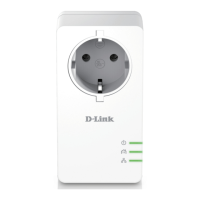
The D-Link DHP-P601AV PowerLine AV2 1000 HD Gigabit Passthrough Kit is a networking solution designed to extend internet connectivity throughout a home or office using existing electrical wiring. This kit includes two D-Link DHP-P600AV PowerLine AV2 1000 HD Gigabit Passthrough Adapters, two Ethernet cables, a Quick Install Guide, and a CD-ROM.
Function Description:
The DHP-P601AV acts as a fast, 1000 Mbps PowerLine AV2 1000 Gigabit Passthrough Adapter, enabling users to connect home computers, networking devices, and gaming devices through the electrical powerlines. It facilitates sharing of Internet connections and printers, file transfers, and online gaming. The passthrough design incorporates a noise filter to minimize interference, thereby maximizing throughput and enhancing overall performance. It provides an Ethernet to PowerLine connection, offering a fast data transfer rate of up to 1000 Mbps. Each adapter features one Gigabit Ethernet Port, ensuring high-speed wired connections. The device is designed for plug-and-play, easy installation, and includes a push-button security feature for network protection.
Important Technical Specifications:
- General:
- PowerLine Interface: Power plug (country-dependent)
- Ethernet Interface: Gigabit Ethernet LAN port, RJ-45 connector
- Functionality:
- Standards: IEEE 802.3, IEEE 802.3u, IEEE 1901, HomePlug AV2
- Security: 128-bit AES data encryption
- LEDs: Power, Ethernet, PowerLine
- PowerLine Modulation Scheme: OFDM symbol modulation
- PowerLine Frequency Band: 2 MHz to 70 MHz
- Data Rate:
- Ethernet: 10/100/1000 Mbps (autonegotiation)
- PowerLine: Up to 1000 Mbps (PHY rate)
- Physical:
- Dimensions: 113.49 x 58.48 x 37.80 mm (4.47 x 2.30 x 1.49 inches)
- Weight: 195 grams
- Power Input: 100 to 240 V AC, 50/60 Hz
- Power Consumption: < 3.7 W
- Operating Temperature: 0 to 40 °C (32 to 104 °F)
- Storage Temperature: -20 to 65 °C (-4 to 149 °F)
- Operating Humidity: 10% to 90% non-condensing
- Storage Humidity: 5% to 95% non-condensing
- Certifications: CE, LVD
System Requirements:
To use the DHP-P601AV, a computer running Windows® 8, 7, Vista®, or XP® (with Service Pack 3) is required. The PC should have an Ethernet network interface (10/100/1000 Mbps), a 1.5 GHz Processor, and 1 GB of memory.
Usage Features:
- LED Indicators:
- Power LED:
- Solid: Device is receiving electrical power.
- Blinking: Device is setting up after reset or simple connect button press.
- Off: Device is not receiving electrical power.
- PowerLine LED:
- Solid: Device is connected to a PowerLine network.
- Off: No compatible PowerLine devices found with the same encryption key.
- Color indicates link rate: Green (excellent), Amber (good), Red (fair).
- Ethernet LED:
- Solid: Ethernet port is linked.
- Off: No Ethernet connection.
- Simple Connect Button: Used to secure the network or reset the device to factory default settings. Pressing for no more than three seconds initiates the security setup.
- Reset Button: Press and hold for 10 seconds to reset the device to factory default settings.
- Push Button Security: Allows users to create a private encryption key for network security. All adapters on the same network must use an identical encryption key. The default key is HomePlugAV. To create a private key, all adapters should first be reset to default, then the Simple Connect Button on the first adapter is pressed for no more than three seconds, followed by pressing the Simple Connect Button on subsequent adapters within two minutes. This process securely configures the PowerLine network.
- Passthrough Design: The integrated electrical outlet allows other devices to be plugged into the adapter, ensuring that the wall outlet remains available. The built-in noise filter helps maintain optimal PowerLine performance even when other devices are plugged into the passthrough outlet.
Maintenance Features:
- Installation Considerations:
- Connect PowerLine devices to electrical outlets not controlled by a wall switch to prevent accidental power loss.
- Avoid connecting PowerLine devices to extension cords, surge protectors, or power strips, as this may hinder correct operation or reduce network performance.
- Avoid outlets near high-power appliances (e.g., washers, dryers, refrigerators) to prevent interference.
- Ensure PowerLine devices are electrically rated for the local power supply.
- Plug power cables into properly grounded electrical outlets to prevent electrical shock.
- The PowerLine device is designed for proper grounding; do not use adapter plugs or remove the grounding prong.
- Troubleshooting:
- If unable to configure parameters, ensure the adapter is not unplugged during configuration.
- If the setup utility doesn't work after changing the connection cable, restart the utility.
- For configuration problems with multiple adapters, reset all network adapters and reconfigure them.
- Important Safety Instructions:
- Do not open or attempt to repair the device.
- Use only the included power adapter.
- Plug the device into the wall in a vertical position with ports facing down.
- Use in a dry location; avoid humid environments.
- Do not submerge in liquid or clean with liquids/solvents. Disconnect from power outlet and use a damp towel for cleaning.
- Keep out of direct sunlight.
- Do not cover or block vents; ensure adequate ventilation.
- Avoid placing near a heater or radiator.
- The device should be located where sufficient ventilation is ensured.
- To power down, simply unplug from the power outlet.

 Need help?
 General









 To Next Page