17
11. Trouble shooting guide.
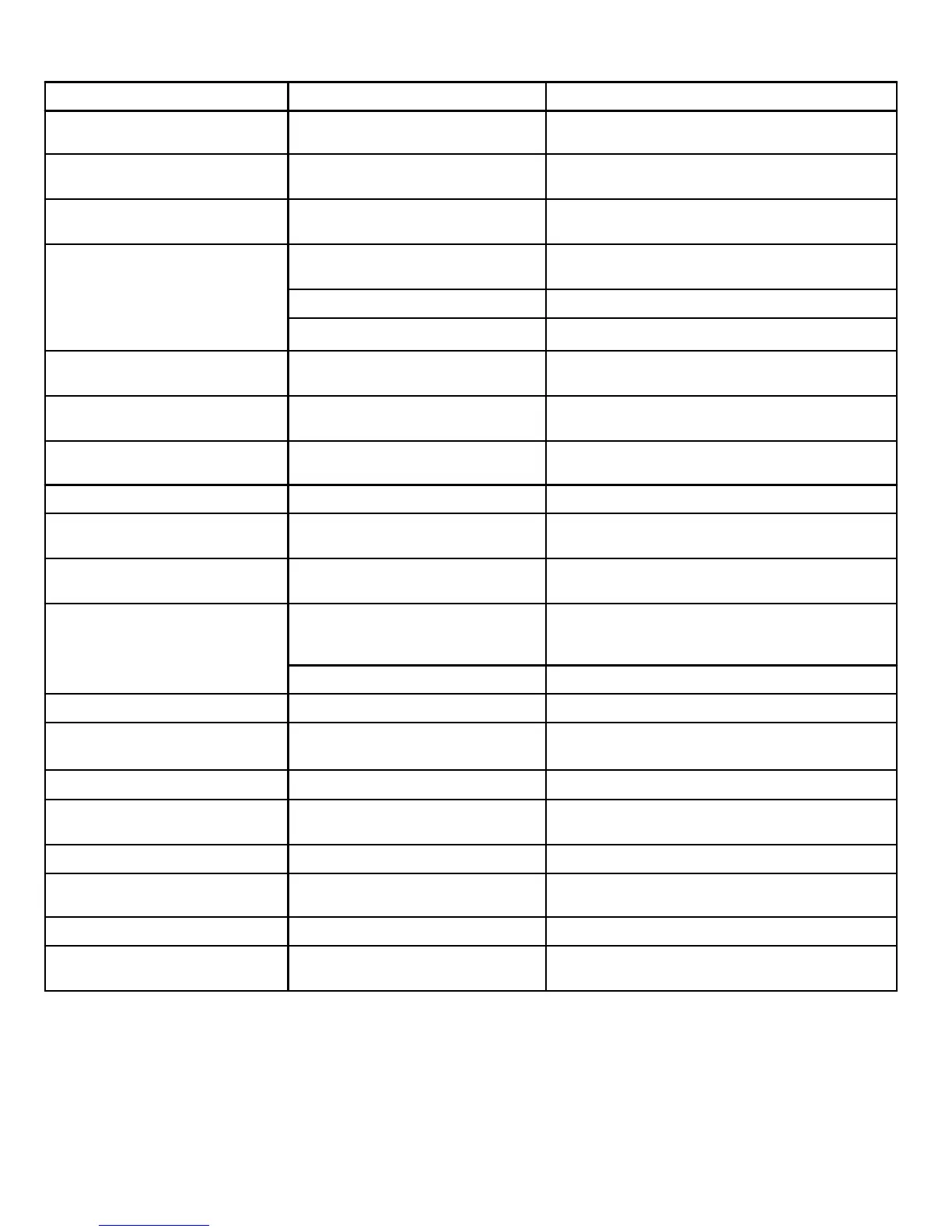
SYMPTOM POSSIBLE CAUSE REMEDY
Dead No led lit Power not connected to TV Check power lead and mains adaptor connections
No Picture. Led lit Red TV in standby. Press Power button on TV or Standby button on
remote control.
No picture. Dark screen Led lit
Green
Backlight faulty Call service agent or Return to store
No picture. Blue screen. No signal
displayed
Incorrect input setting Ensure the input selected has an input connected to
it and is turned on.
Aerial not connected Ensure aerial is connected
TV not tuned in Follow instructions on page 10 -
12
TV Picture noisy and ghosting Poor aerial signal Have aerial signal checked. If indoor aerial it may
need an outdoor aerial.
Teletext freezing or breaking up Poor aerial signal Have aerial signal checked. If indoor aerial it may
need an outdoor aerial.
Bright dots or Dark dots Pixel damage This is not uncommon. It is not covered by warranty
DVD OPERATION
Disc will not insert DVD not selected
Disc already in player
Select DVD in SOURCE Menu
Press Eject to remove disc
Disc will not eject DVD not selected
Disc damaged
Select DVD in SOURCE Menu
Call service agent or Return to store
Disc will not play. Disc dirty or damaged
Incorrect disc region
Clean disc as on page 18 If damaged discard.
This player is only licensed to play Region 2 discs
Lost Password 136900
Disc freezes, jumps or misses
chapters
Disc dirty or damaged Clean disc as on page 18. If damaged discard.
PC OPERATION
No picture. Blue screen. No signal
displayed
No connection from PC to TV.
Check all connections carefully
Poor PC Picture
TV not matched to PC
See page 13 and enter setup menu
Remote Control
No or intermittent operation Exhausted batteries Replace batteries every six months or when required


 To Next Page