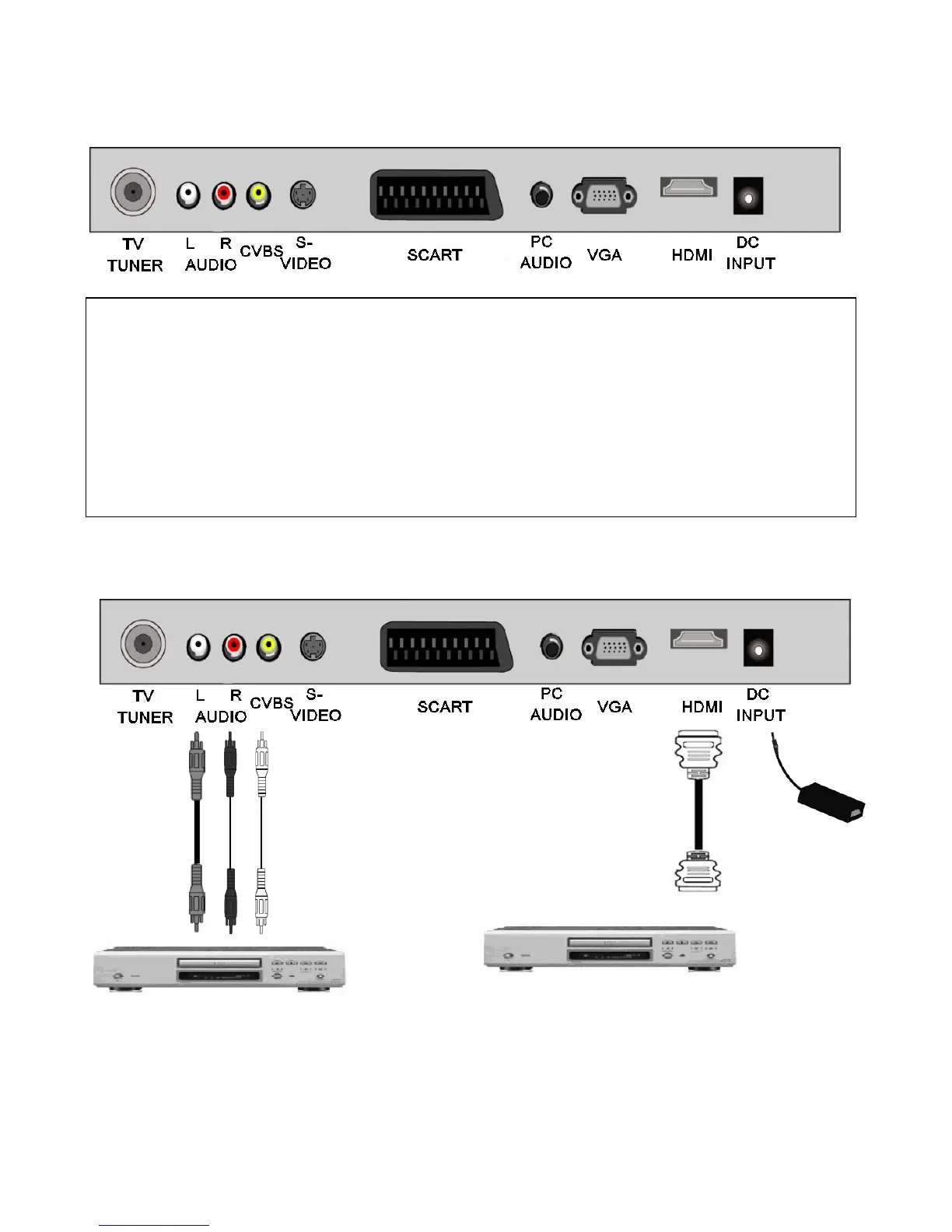
6. Connections. Check drawing and Text locations some have changed
TV TUNER. RF input from TV aerial or cable source.( 1 m/V @ 75 Ω) typical.
AUDIO L/R. Low level audio inputs used in conjunction with CVBS input.
CVBS. Low quality video input (1vPP 75 Ω)
S-VIDEO. Suitable for camcorder input.
SCART. Audio /Video input and output. (General quality).
PC AUDIO. Stereo audio input from PC (Used in conjunction with VGA input).
VGA. PC input (RGB).
HDMI. Input from HDMI source (High Definition).
DC INPUT. +12V DC 3.5A max.
*** NOTE HEADPHONE TEXT REMOVED ******
HDMI InputCVBS
Input
IMPORTANT. When making connections ensure the TV is disconnected from the DC
supply input, and that the appliance being connected is also disconnected from the
mains supply.
Typical connections
Disconnect TV from mains adaptor.
Connect HDMI input.
Apply power to both TV and source.
Use SOURCE button to select HDMI.
Disconnect TV from mains adaptor.
Connect CVBS and Audio L/R (if
required).
Apply power to TV and source.
Use SOURCE button to select AV
8
Mains Adaptor.
Do not connect mains
supply until the adaptor
is connected to the TV.


 To Next Page