ENGLISH
20
8 DESCRIPTION OF COM BOX INTERFACE
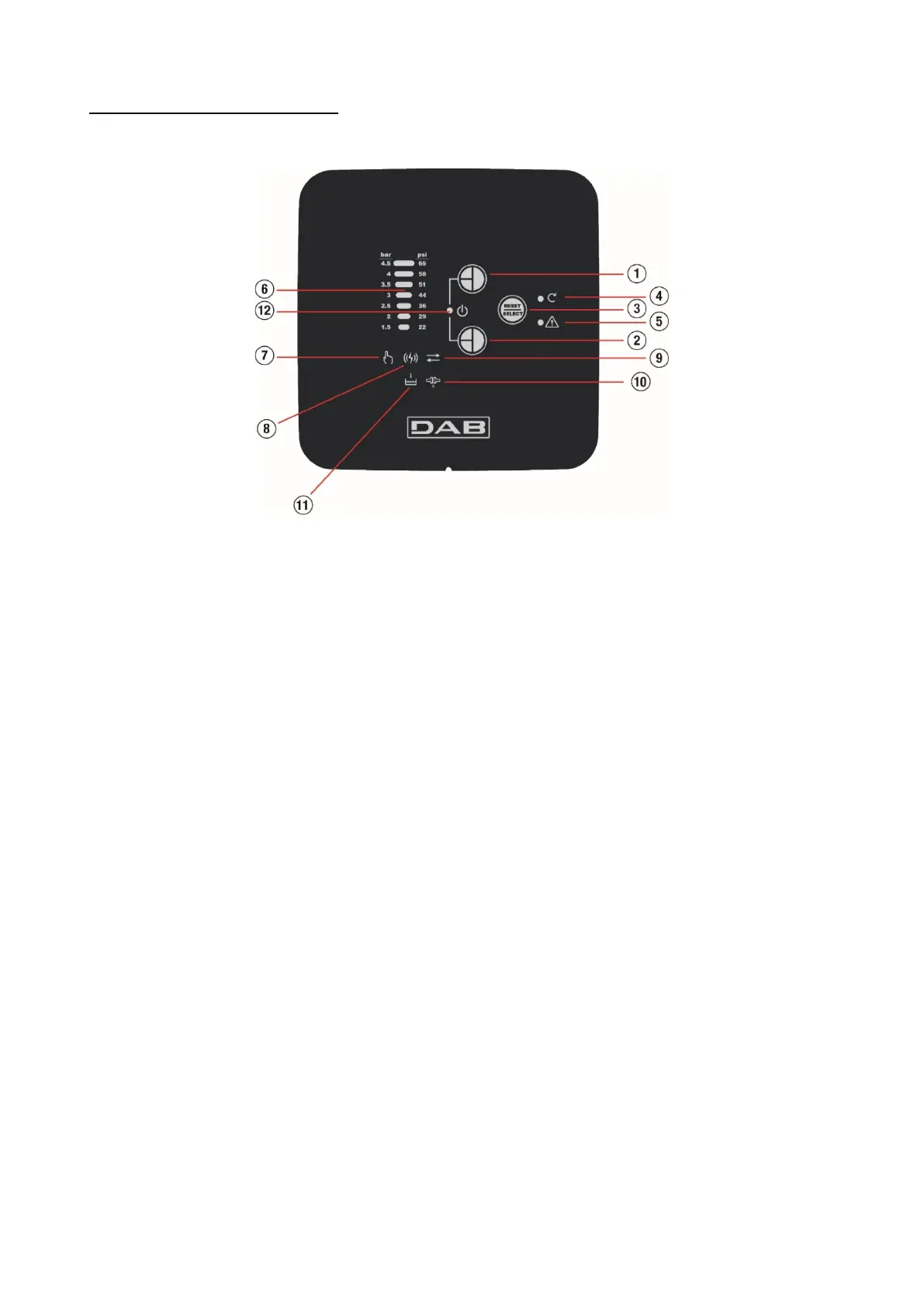
The interface of the DTRON3 pump is presented with the COM BOX unit, the panel of which is shown in the following figure:
Figure 12: panel of the COM BOX device
8.1 Description of operating mode
COM BOX can operate in two modes, Monitor mode and SETUP mode.
MONITOR mode
The following information is available in MONITOR mode:
• pressure on the delivery of the DTRON3 pump (6)
• motor power status (4)
• DISABLE status of the pump (XX)
• current faults/alarms (5, 8, 10, 11)
• connection status of the COM BOX with the DTRON(s) (8)
The following controls are available in MONITOR mode:
• Reset any alarms present
• Disable/enable pump operation
SETUP mode
In SETUP mode the user can:
• Vary the CUT-IN pressure
• Manually activate the pump motor
• Enable/disable the connection between COM BOX and DTRON
• Activate/deactivate recognition of the ANTICYCLING condition
• Disable/enable pump operation






 To Next Page