22
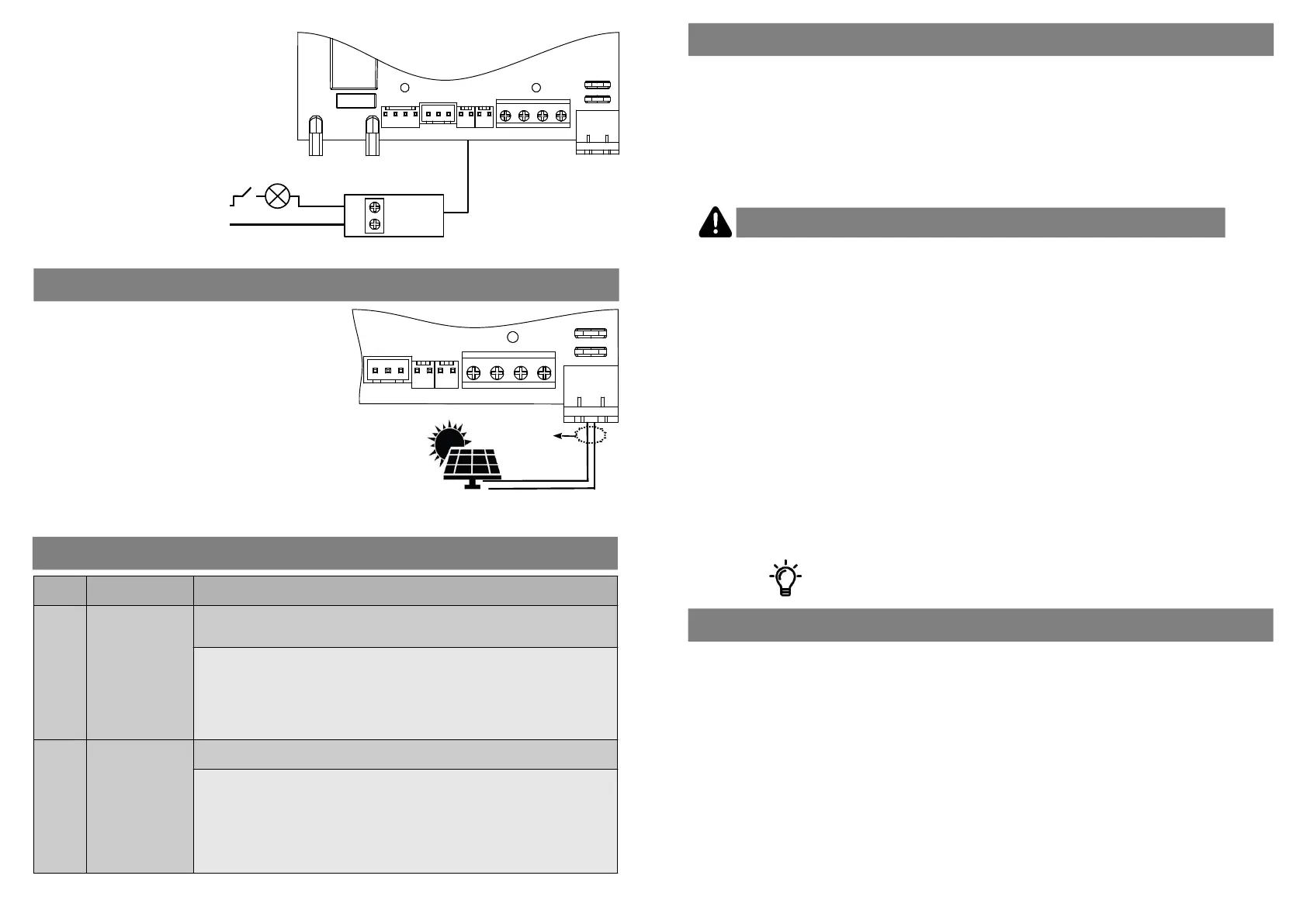
7. Auxiliary Light
The Auxiliary Light output is
used to connect an external light
to the operator. The external
light can be switched on when
the operator is triggered for a
preselected period of me (up
to 9 minutes) or the light can be
acvated via a dedicated remote
buon, without triggering the
operator. If switched on by a
dedicated buon, it will remain
on for a period of 1 hour but can
be switched off before 1 hour is
up by pressing the same buon
again.
Refer to ‘Seng Auxiliary
Output....Menu 5’ for
programming.
LUX DC12
Control Board
NO
COM
DACE
Relay Module
Code: SA001
N
L
External
Light
CONNECTING A SOLAR PANEL
•
Solar panels must be mounted in direct sunlight and the
panel angle alignment should be adjusted for opmal
condions for the locaon. It is very important to ensure
that no shadows will cross the panel during the day.
•
It is recommended that a baery with a capacity of at least
7Ah is used.
•
The operator will automacally detect that it is connected
to a solar supply once the panel voltage exceeds 17V DC. It
will then no longer indicate a power fail message but will
only display a single bar "_" when the panel output voltage
is too low for charging.
•
When connecng a solar panel directly to the controller
the transformer must be removed from the input.
Solar Panel specs:
Power Rang: 20W min
Min Voltage output: 17V DC
Max Voltage Output: 22V DC.
REV AUX LOCK 12V TRIG INF GND
Power
Input
REVLIMITS AUX LOCK 12V TRIG INF GND
Power
Input
LUX DC12 Control Board
Not Polarity
Sensive
Solar Panel
ERROR CODES
ERROR
CODE
MEANING CAUSE & REMEDY
Lb
Low Baery
Cause:
Low baery voltage. The baery may be faulty or an excessive number of
operaons, or devices, may have drained the baery.
Remedy:
Ensure the operator is plugged in and switched on. Fully charging a 5Ah 12V
baery will take 24hrs if the operator is not in use and if no other devices, such as
locks; receivers & lights, are connected.
Check that connected devices are not drawing excessive currents.
Addional devices will reduce the number of daily operaons and standby
operaons.
PF
Power Fail
Cause:
The operator is not detecng an input supply voltage.
Remedy:
If using a transformer, ensure that the transformer is plugged in and switched on.
The output voltage should be between 12VAC – 18VAC, if not the transformer may
need to be replaced.
If using a solar panel, ensure the output voltage is between 17VDC - 22VDC. When
a solar panel is connected to the operator it is necessary for the DC voltage to be
higher than 17V for the operator to switch to DC Solar Operaon aer which the
operator will stop showing the Power Fail message.
Thank you for choosing Dura Access Control Equipment (DACE). We welcome you to the ever growing internaonal
community of DACE product owners. The advanced engineering and high-quality construcon of each DACE
product we build is something of which we are proud.
The LUX DC12 garage operator is packed with features to bring you convenience and enhance your security.
Your owners manual will introduce you to the features and operaon of your new LUX DC12. It is suggested that
you read it carefully since the informaon it contains can contribute greatly to the sasfacon you receive from
your new garage door operator.
●
Only automate garage doors that are within specificaon and are in good working order. The door must be able
to be opened and closed using only one hand and, if released midway, the door should not move. The force
used to open the door by hand should be similar to that used to close the door. If the door is not in perfect
working order, it should be serviced by a qualified garage door technician prior to automaon.
●
Automang a garage door increases the risk of entrapment and crushing. While all reasonable steps have been
taken to ensure that your garage door operator is safe to install and operate, it must be noted that a garage
door is a heavy piece of equipment and can cause serious injury and death. Never allow children to play with or
around the garage door. Only acvate the garage door when it is in full view and when there are no children or
animals in close proximity that could get injured.
●
We highly recommend the installaon of Infrared Safety Beams to increase the safety of the doors operaon.
●
The LUX DC12 is not waterproof and is therefore not suitable for outdoor use.
●
It is important to note that the LUX DC12 garage operator is baery operated and by simply switching off the
mains power supply to the operator it does not mean that the operator does not have power. It is therefore
important that both the mains power supply and the baery be disconnected before working on the operator.
●
Use extreme cauon when operang the manual release as the door may move, resulng in injury or damage.
The door should be inspected every 6 months by disengaging it from the operator and moving it by hand. The
door should move easily but it should not close on its own if released. If the door is found to be defecve, it
must remain disconnected from the operator and a qualified garage door technician be called to carry out
repairs to the door.
Please aach your invoice to this manual for future use (see warranty)
FOREWORD
Important informaon before automang your garage door!
3
DISCLAIMER
Dura Access Control Equipment reserves the right to make changes to the products described in this manual
without noce and without obligaon to nofy any persons or organisaons of such revisions or changes.
Addionally, DACE makes no representaons or warranes with respect to this manual.
This manual may only be copied or distributed as a whole, no alteraons or subsecons may be distributed or
copied without the prior express consent of DACE in wring


 To Next Page
 Loading...