16
EFFECTS ON THE CENTRAL NERVOUS SYSTEM
Oxygen toxicity exposure is monitored by means of
a CNS (Central System Calculation), based on
currently accepted recommendations for exposure
limits. This toxicity is expressed as a percentage
value, % CNS O2, ranging from 0% to 120%. The
percentage value of CNS O2 is shown on the
display, and an alarm is triggered when it exceeds
75%, signaled by blinking of the value.
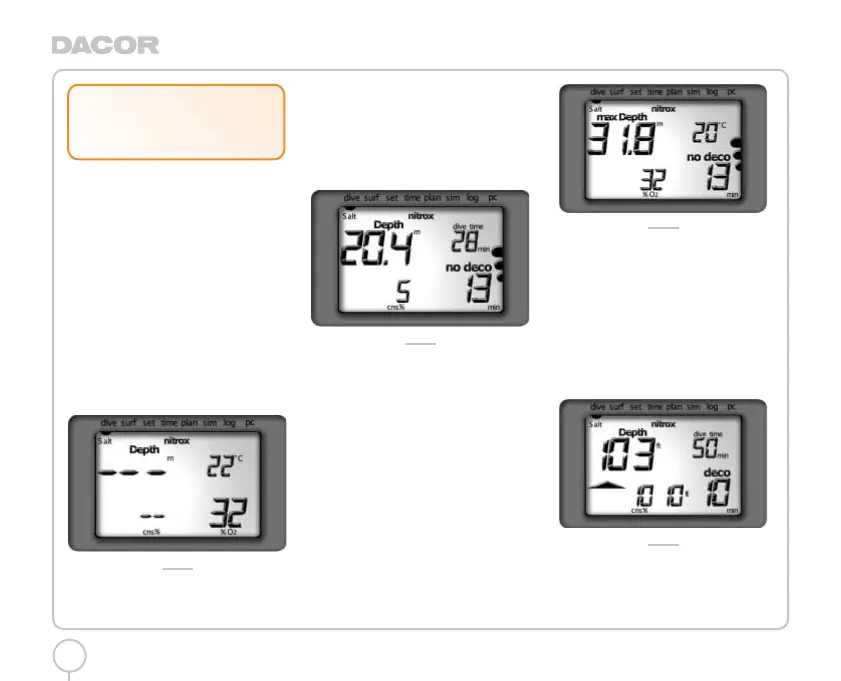
Fig. 23-29 show the data that is displayed during
the various phases of the dive:
Fig. 23- PreDive, on activating DIVE mode, the
display shows the % O2 and the % CNS O2 if it is
greater than zero.
FIG. 23
Fig. 24 - "No decompression" dive, the WIN1
display layout shows:
Nitrox icon.
Sea/fresh.
“No deco” icon.
Current depth (in "m" or "ft").
Dive duration in minutes.
No decompression time remaining in minutes.
% CNS O
2.
FIG. 24
Fig. 25 - Pressing the <Mode> button switches, for
approximately 8 seconds, to the WIN2 display
layout which shows:
Nitrox icon.
Sea/fresh.
No deco icon.
Maximum depth (in "m" or "ft").
Measured temperature (in °C or °F).
No decompression time remaining expressed in
minutes.
Value entered for % O2 in the breathing mix.
After the 8 sec have elapsed, or when the <Mode>
is pressed, the display automatically reverts to the
WIN1 layout.
FIG. 25
Fig. 26 - "Decompression stop" dive, the WIN1
display layout shows:
Nitrox icon.
Sea/fresh.
"Deco" icon.
Current depth (in "m" or "ft").
Dive duration expressed in minutes.
Depth of deepest decompression stop.
Duration of the decompression stop in
question.
% CNS O2.
FIG. 26
Fig. 27 - Pressing the <Mode> button switches, for
approximately 8 seconds, to the WIN2 display
layout which shows:
Nitrox icon.
!
WARNING
When this alarm occurs, ascend
immediately until the alarm condition
ceases.
Darwin.qxd 29/03/2002 16.45 Pagina 16



 To Next Page