4
Service Manual - Dishwasher Models DDW24S, RDW24I and RDW24S
Troubleshooting Flow Chart
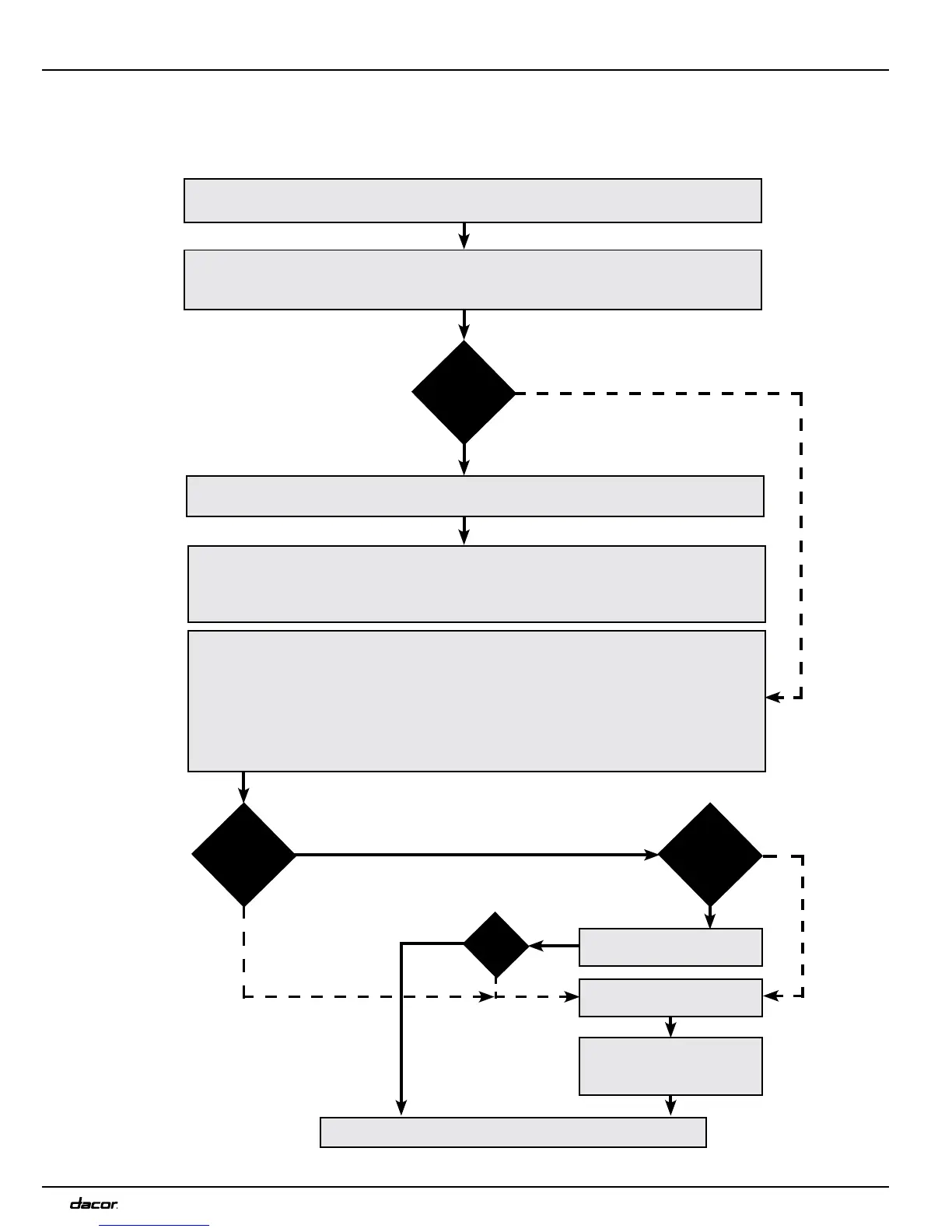
Troubleshooting is an important part of the service callout, and as such we have drawn up a troubleshooting strategy that
describes, in broad terms and step by step, what you need to do to find and diagnose faults arising in our machines.
• Ask the customer to descr ibe the problem.
• Check whether the customer’s description matches the reported fault.
• Check that the machine is correct ly installed:
- Electrical connection - Draina g e
- Water connection - Machine correctly level ed
Fault
found?
Incorrect installation or external factors that affect performance and functionality (for
example, water pressure , electrical supply, drainage).
The machine operates norm ally. No deviations can be found. The customer probably
needs to be informed about proper use of the machine. If necessary, also inform the
customer about the warranty conditions and the fact that the customer will b e ch arged
for the service call.
Yes
Open the service menu:
1. Check the settings
2. Run a test cycle
3. Note any fault codes
If the above actions do not uncover the fault:
• Conduct ge neral troubles hooting. Use the wiring diagram, service bulletins and
other documents on dacorservice.com/partscatalog.
Yes
No
No
Fault
diagnosed?
Repair and check
function/safety.
Car ry out the actions
suggested by Technical
Service.
Service complete
OK?
No
Yes
No
Yes
Fault
found?
Contact Dacor Technical
Service for assis tance.


 To Next Page