24
Before You Call for Service
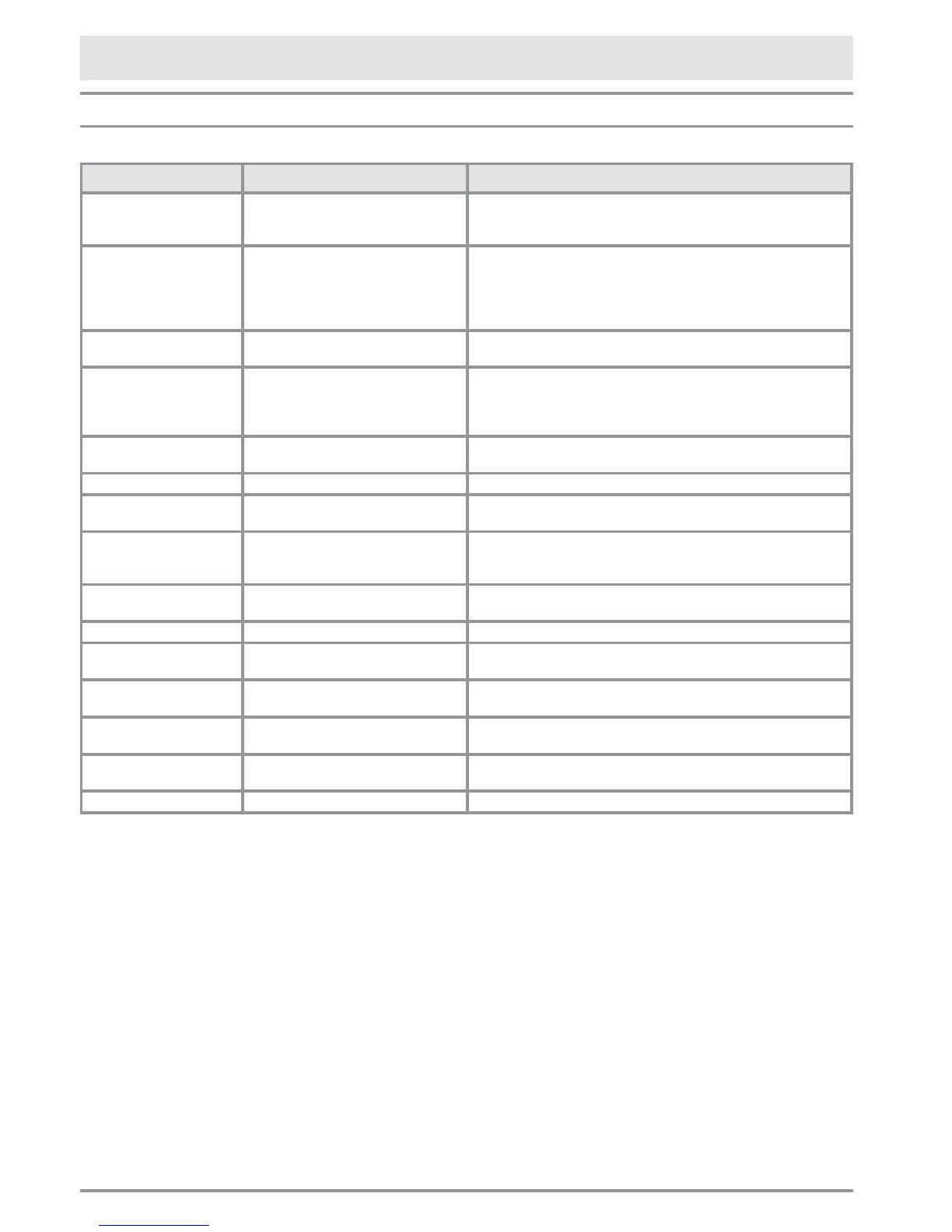
Common Display Messages
Below is a list of the possible messages that may appear on the display in some cases and the suggested action.
Message May Be Caused By What to Do
Check condenser Control panel displays this message
every six months to remind the user
to clean the condenser.
Clean the grill and condenser as instructed on page xx. Clear the
message the SELECT key for ve seconds. Reset condenser
on will appear on display.
Check the Filter Water lter is not installed. Install water lter. See Using the Ice Maker for the First Time
on page 6. If for some reason, you want to operate the ice
maker without the lter installed, for example, you have a whole
house water lter system, set the water lter to bypass. See
page 6.
Door Fridge OPEN Refrigerator door open for a long
period of time.
Close door to prevent refrigerator compartment from becoming
too warm.
Error Code or malfunction
message
Functional problems Call Dacor Customer Service to help you solve the problem or
put you in contact with the nearest service agent. Some error
messages can be cleared by touching the ALARM key for three
seconds.
Fridge too cold Refrigerator compartment too cold. Wait for 12 hours: if malfunction persists call Dacor Customer
Service for advice.
Fridge too warm Refrigerator compartment too warm. See Problem Solution Guide.
Initial Test Appliance has just been turned on. Normal operation. Message should clear by itself after a minute
or two, as appliance starts up.
Power Failure!! Prolonged interruption of electrical
power
Appliance will automatically resume operation. Display will show
warmest temperatures that have occurred inside unit. Minimize
door openings to allow unit to cool down faster.
Replace lter Message appears when only 30% of
lter capacity is left
Replace lter soon. See page 23.
Standby Appliance is turned off. To turn on, see instructions on page 5.
Start Up Phase Appliance has just been turned on. Normal operation. Message comes on after initial test. Message
should clear by itself after a few minutes, as appliance starts up.
FreshZone OPEN FreshZone freezer drawer open for a
long period of time.
Close drawer to prevent compartment from becoming too warm.
FreshZone too cold FreshZone freezer compartment too
cold.
Wait for 12 hours: if malfunction persists call Dacor Customer
Service for advice.
FreshZone too warm FreshZone freezer compartment too
warm.
See Problem Solution Guide.
Unlock Key-pad Control panel locked To access control panel, unlock keypad. See page 5.



 To Next Page