16
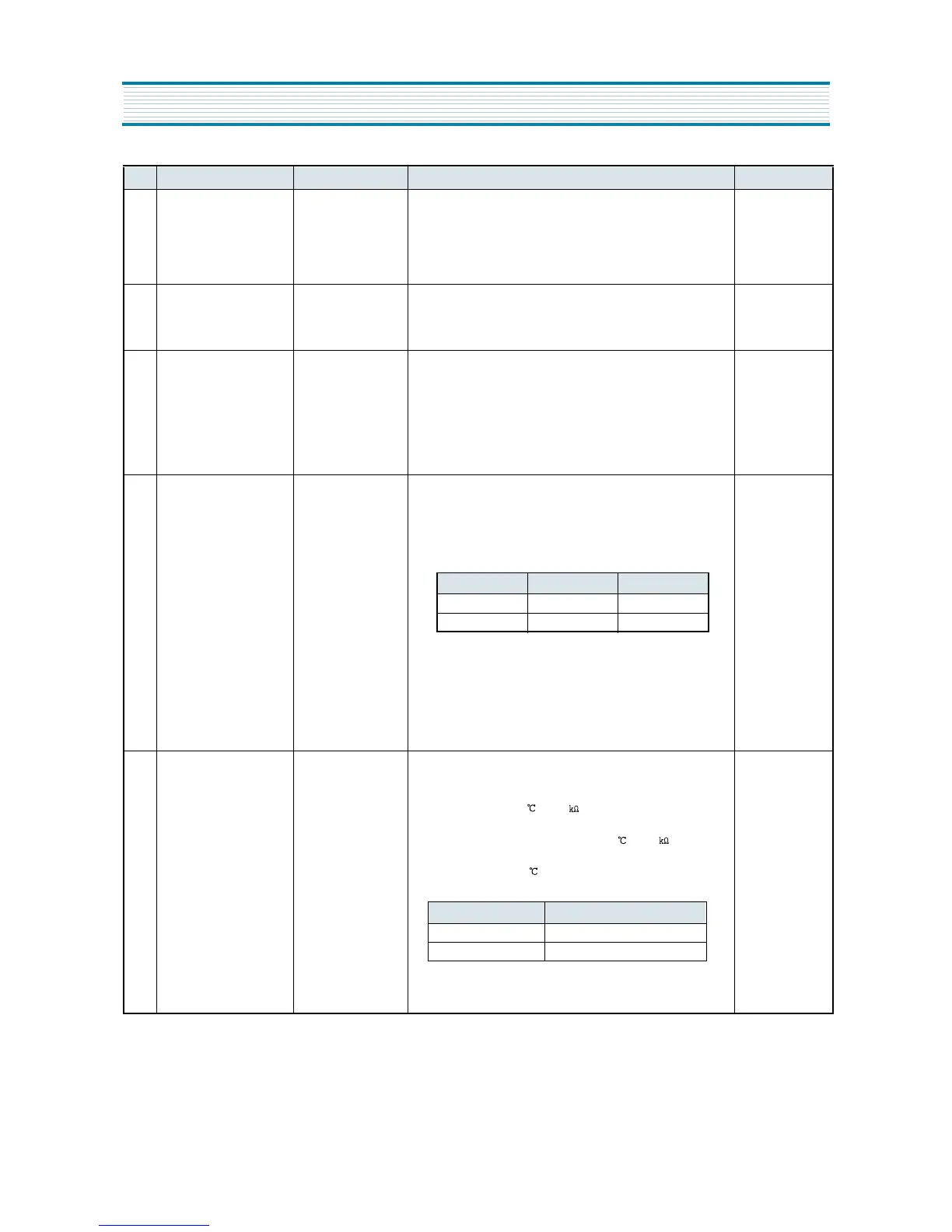
11 Explanation after Delivery Electric Devices 1. Start : press both buttons for 3 seconds after initial power supply
(plug-in).
2. Electric devices turn Off for 3 hours.
3. Display works in normal way.
12 Prevention of COMP Restart COMP 1. COMP does not restart for 6 minutes after COMP Off, though F-Sensor
turns On.
6min. delay
13 Buzzer Alarm Buzzer 1. Buzzer rings by pressing F-PCB Buttons.
2. Buzzer rings for 1 second after initial power supply (plug-in).
3. Buzzer rings for 1 second at the start of A/S Forced Defrosting.
4. Buzzer rings every 1 minute after door opening.
(It rings within 5minutes and ring-time is prolonged as time passes.)
5. Buzzer makes short ring every 5 seconds in Error Display.
14 Demonstration Function Electric Devices 1. Start : open and close Refrigerator[Freshfood Compartment] Door
5 times while pressing FRZ.SET Button.
2. Control
1) Electric devices turn Off except for F-Fan and R-Fan.
2) Fan Control
3. Dissolution :
1) Open and close Refrigerator[Freshfood Compartment] Door 5 times
while pressing REF.SET Button in Demonstration mode.
2) Supply the power again(plug-out and plug-in)
15 Control of R-Sensor Off-
Point
1. Control Resistance
of R-Sensor “ 2”
Off-point
1. In case of Weak-refrigeration (though R-Fan and COMP work on and
on), the following actions are to be done.
2. Resistance R13 : Control Resistance of R-Sensor Middle(“ 2” ) Off-point
(- 1.0 , 31.4 )
3. Resistance R14 : reduceing R-Sensor Resistance by 1.5¡ É in case
of weak-Refrigeration (-2.5 , 2.15 )
4. SW1 : during A/S, if SW1 is opened, R-Sensor Middle Off-point
decreases by 1.5 .
5. Switch Status and R-Sensor Middle Off-point
NO CONTROL FUNCTION CONTROL OBJECTS CONTENTS REMARK
Door Open Door Close
F-FAN ON OFF
R-FAN ON OFF
Switch Status R-Sensor Middle Off-point
Normal / Using Jig -1.0
In Weak-refrigeration -2.5
OPERATION AND FUCTIOLNS


 To Next Page