10
OPERATION AND FUCTIOLNS
NO CONTROL FUNCTION CONTROL OBJECTS CONTENTS REMARK
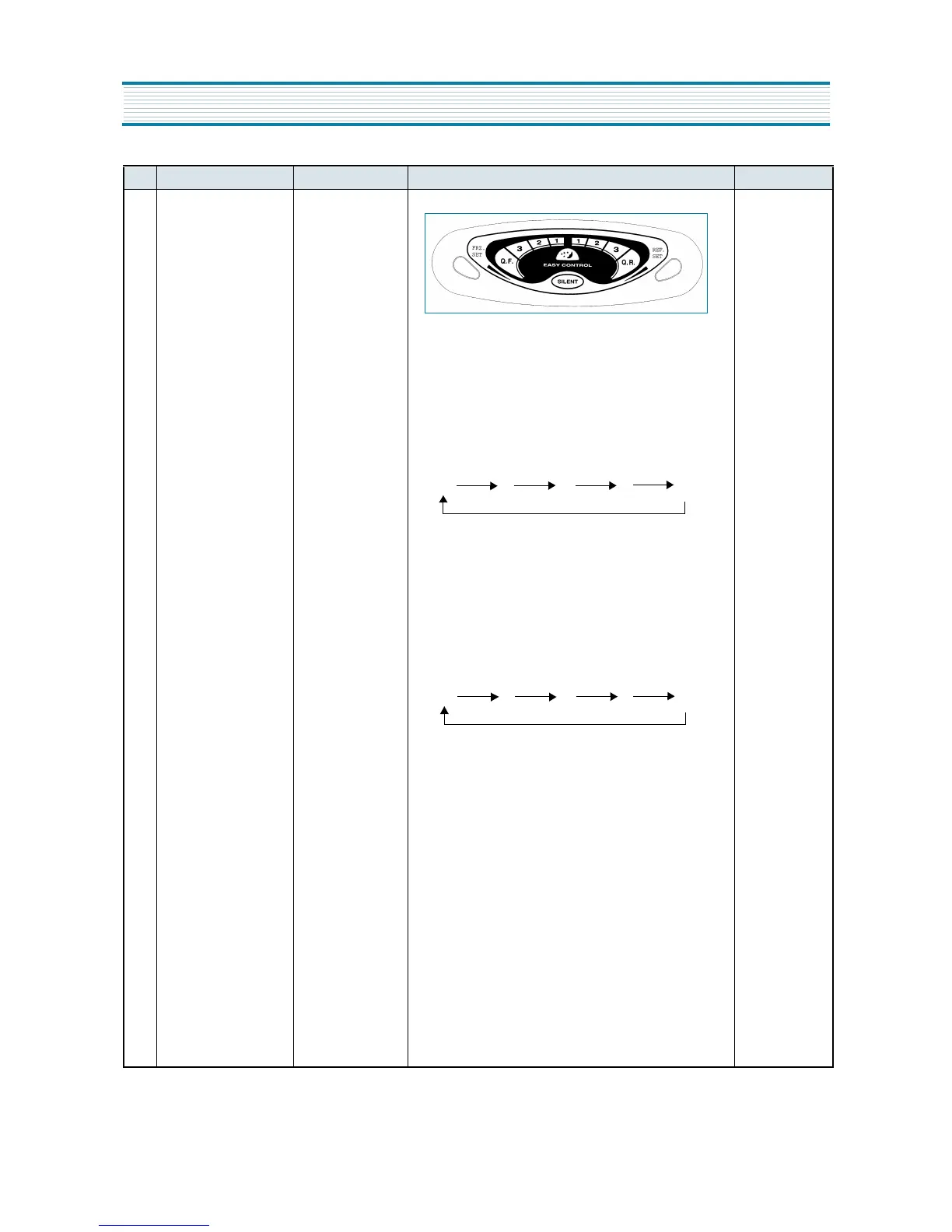
1 DISPLAY CUSTOM LED 1. Normal state
1) SILENT Icon (Amber) is off.
2) Initial State : Both compartment’s icons indicate
Middle-mode (“1”, and “2” are lit..)
2. FRZ.SET Button
1) Temperature Regulation of Freezer Compartment
2) Middle-left Icons are lit by pressing the button.
3) When Q.F Mode is set, Freezer Mode’s Icons
(middle-left) are on and off 3 times, then only Q.F
LED(red) is lit.
3. REF.SET Button
1) Temperature Regulation of Freshfood Compartment.
2) Middle-right Icons are lit by pressing the button.
3) When Q.R Mode is set, Refrigerator Mode’s Icons
(middle-right) are on and off 3 times, the only Q.R
LED(red) is lit.
4. SILENT Button
1) SILENT Mode starts by presssing the button.
- SILENT Icon is LIT.
- All the other LED is off.
2) The mode is finished by pressing the button once again.
- The Icon turns off and it returns to previous[normal]
state.
3) The mode ends by itself in 130minutes after its start.
- The Icon turns off.
- All the other LED is off.
(1) 1 2 3 Q.F
(1) 1 2 3 Q.R


 To Next Page