47
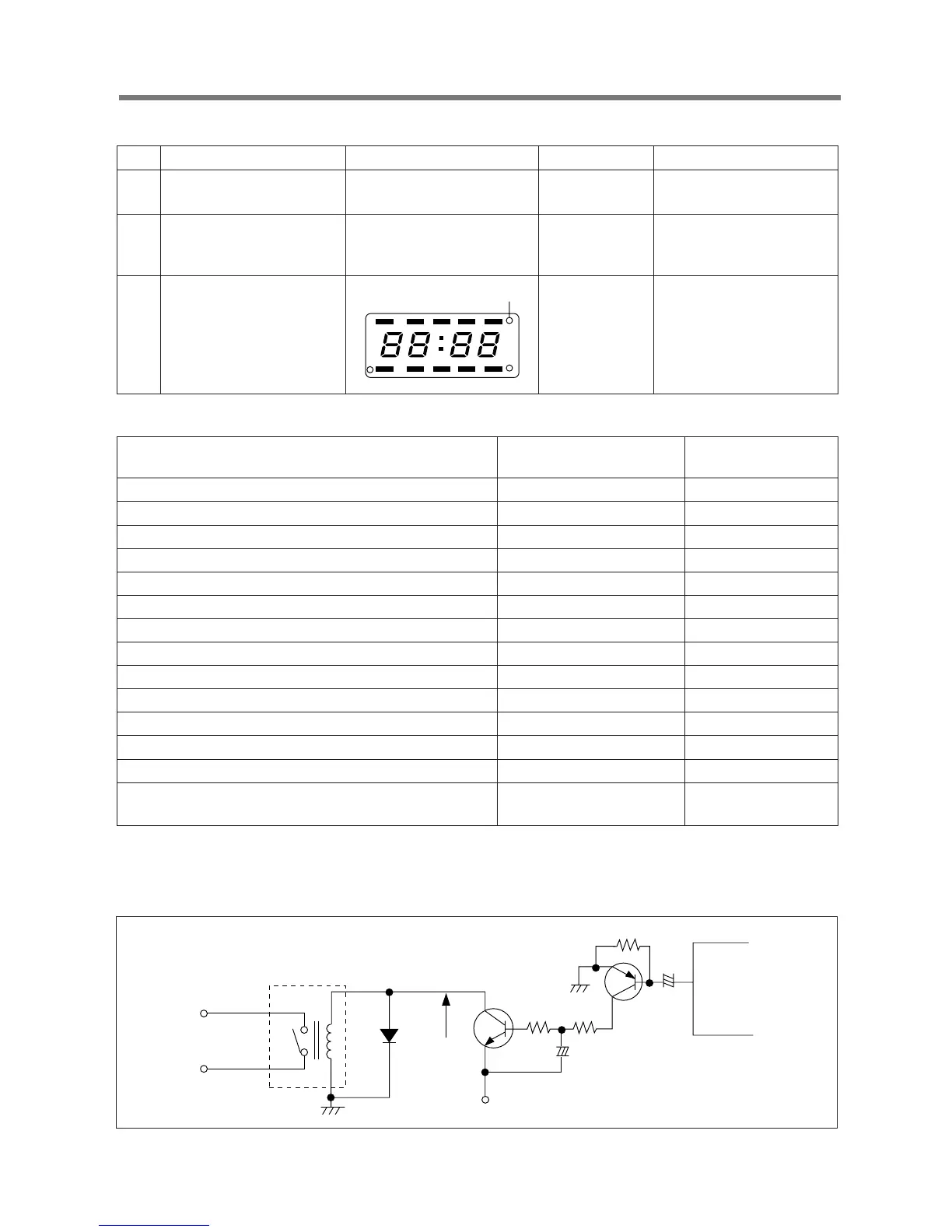
3) When display has some trouble
DISPLAY TOUBLE SHOOTING DATA
4) When there is no microwave oscillation.
(1) When touching START pad, oven lamp does not turn on.
Fan motor and turntable motor do not rotate, but cook indicator in display comes on.
* Cause : RELAY “2” does not operate.
NO. CAUSE MEASUREMENT RESULT REMEDY
1 Poor contact between Check the voltage Fix the PIN 1 & 25
P.C.B. and display filament. of PIN 1 & PIN 25.
2.4 VAC
on the P.C.B.
2 Defective Display Refer to “The display Replace P.C.B. assembly.
trouble shooting data”
below.
3 Loss of vacuum in the white spot White spot is Replace P.C.B assembly.
display generated on
the display.
TROUBLE
DISPLAY NAME MICOM OUTPUT
& PIN NO. IN PIN NO.
STAGE 1, LOCK don’t come on. GRID 1 (G1), 21 30
STAGE 2, NO don’t come on. GRID 1 (G2), 17 29
WEIGHT DEFROST, CUPS doesn’t come on. GRID 3 (G3), 9 26
TIME DEFROST don’t come on. GRID 4 (G4), 10 28
AUTO START, g don’t come on. GRID 5 (G5), 4, 7 27
SEGMENT “a” doesn’t come on from G1 to G5. SEGMENT d, 19 39
SEGMENT “b” doesn’t come on from G1 to G5. SEGMENT e, 18 40
SEGMENT “c” doesn’t come on from G1 to G5. SEGMENT f, 16 41
SEGMENT “d” doesn’t come on from G1 to G5. SEGMENT a, 23 36
SEGMENT “e” doesn’t come on from G1 to G5. SEGMENT b, 22 37
SEGMENT “f” doesn’t come on from G1 to G5. SEGMENT c, 20 38
SEGMENT “g” doesn’t come on from G1 to G5. SEGMENT g, 15 42
LOCK, NO, CUPS, g don’t come on. UPPER BAR h, 5 33
STAGE1, STAGE2, TIME DEFROST, LOWER BAR i, 34
WEIGHT DEFROST, AUTO START don’t come on. 6, 8, 9, 11
RY2
D10
A
-24v
Q5
R18
EC4
R15
R13
IC1
19
Q4
EC3
+
-
+-



 To Next Page