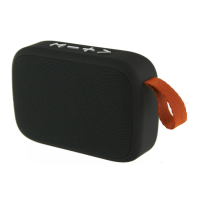
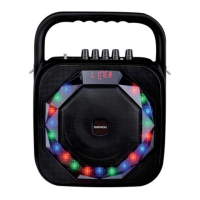
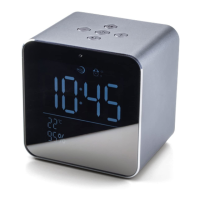
The Daewoo TWS Bluetooth Speakers (models AVS1406, AVS1431, AVS1432) are portable audio devices designed for wireless and wired music playback, as well as hands-free calling. These speakers offer True Wireless Stereo (TWS) functionality, allowing two speakers to be paired together for an enhanced stereo sound experience in Bluetooth mode. They are available in black, blue, and grey colours.
Function Description:
The primary function of these speakers is to play audio from various sources. They support Bluetooth connectivity for wireless streaming from smartphones, tablets, and other Bluetooth-enabled devices. In addition to Bluetooth, the speakers feature multiple wired input options, including an AUX/LINE input for connecting external audio devices via a 3.5mm jack, a USB port for playing music directly from USB memory sticks, and a Micro SD/TF card slot for playing audio files from memory cards. The speakers also include a built-in microphone, enabling them to be used for hands-free telephone calls.
Important Technical Specifications:
- Model Numbers: AVS1406, AVS1431, AVS1432
- Power Supply/Charger: DC 5V @1A
- Total Audio Output Power: 5W
- Speaker Size and Rating: 52mm 4Ω 5W
- Audio Frequency Response: 100Hz - 20KHz
- Aux Input Sensitivity: 300mV
- Unpacked Weight: Approximately 320g
- Dimensions (Approx.): 88mm (diameter) x 107mm (height)
- Operation Temperature: 0°C to +40°C
- Built-in Battery Type: Lithium Ion, 1200 mAh 3.7V
- Bluetooth Frequency Range: 2402 - 2480MHz
- Bluetooth Transmission Power: ≤ -3.325dBm
- USB Port Support: USB 2.0, up to 32GB capacity (for memory sticks)
- Micro SD/TF Card Support: Up to 32GB capacity
- Supported Audio Formats (USB/SD): Mp3, WAV, files etc.
- Compliance: Conforms to Radio Equipment Directive 2014/53/EU
Usage Features:
Controls:
The speakers feature intuitive controls on both the front and rear panels.
-
Front Panel Controls:
- Power Button (1): Press and hold to power up/off and initiate Bluetooth pairing.
- Skip Back / Volume Down Button (2): Press to skip to the previous track; press and hold to decrease volume.
- Skip Forward / Volume Up Button (3): Press to skip to the next track; press and hold to increase volume.
- Play/Pause/Phone Button (4): Press to play/pause music; also used for answering, ending, rejecting, and redialling phone calls.
- LED Indicator (5): Provides visual feedback on power status, charging, Bluetooth pairing, and music playback.
-
Rear Panel Ports:
- MICRO SD (6): Micro SD/TF Card Player slot.
- AUX (7): External 3.5mm input for wired audio devices.
- USB (8): USB Memory Stick Port.
- Micro USB DC Port (9): For charging the internal battery.
- USB Charging Cable (10): Included accessory.
- Micro USB Plug (11): Part of the charging cable.
- 3.5mm Jack to Jack Lead (12): Included accessory for AUX connection.
Charging the Internal Battery:
The speakers are equipped with an internal rechargeable Lithium Ion battery.
- Connect the Micro USB Plug (11) of the USB Charging Cable (10) to the Micro USB DC Port (9) on the speaker's rear panel.
- Insert the large USB plug of the charging cable into a suitable USB charger (5V, 1A minimum).
- The LED Indicator (5) will light red during charging and turn off when fully charged.
- The speaker can be used normally while charging.
Operating Modes:
Telephone Call Handling:
- Answering a Call: When a call comes in, music will mute, and the speaker will ring. Press the Play/Pause/Phone button (4) to answer. Adjust call volume using the Skip Forward (3) (increase) and Skip Back (2) (decrease) buttons. Press the Play/Pause/Phone button (4) again to end the call. The caller's voice will be heard through the speaker, and your voice will be picked up by the built-in microphone.
- Rejecting a Call: Press and hold the Play/Pause/Phone button (4) for two seconds.
- Redialling Last Call: Briefly press the Play/Pause/Phone button (4) twice to redial the last number called. Press it once to end the call.
TWS (True Wireless Stereo) Mode:
This feature allows two Daewoo TWS Bluetooth Speakers to be paired together for stereo sound in Bluetooth mode.
- Power on both speakers by pressing and holding their respective Power buttons (1) for three seconds.
- Press and hold the Play/Pause/Phone button (4) on both speakers for three seconds. The two speakers will automatically pair with each other.
- Connect your device to the speakers via Bluetooth as described in the Bluetooth Mode section.
- Start music playback on your device.
- Use the Play/Pause/Phone button (4) on either speaker to control playback.
- Use the Skip Back (2) and Skip Forward (3) buttons on either speaker to change tracks or adjust volume.
Note: TWS pairing is only available in Bluetooth mode.
Maintenance Features:
General Care and Use:
- Always disconnect the speakers from the USB charging supply before cleaning.
- Clean the exterior of the speakers with a clean, damp cloth. Avoid using harsh or abrasive cleaners.
- Do not submerge the speakers in water or any other liquids.
- Ensure adequate ventilation (at least 100mm clearance) around the speakers.
- Do not cover ventilation openings with items like newspapers or curtains.
- Do not place naked flame sources (e.g., lighted candles) on the speakers.
- Avoid positioning speakers near heat sources (radiators, heaters, other electronic equipment).
- The speakers should not be exposed to dripping or splashing liquids, and no objects filled with liquids (e.g., vases) should be placed on them.
- Do not leave the speakers unattended during use or while connected to a USB supply.
- Close supervision is required when using speakers near children. Keep them out of reach of children.
- Do not use these speakers outdoors.
- Unplug the power supply after use, before cleaning, and during repairs.
- Repairs should only be performed by qualified personnel.
- Do not operate if the appliance malfunctions or is damaged.
- Do not allow the USB cable to hang over sharp edges or contact hot surfaces.
- Do not run the USB charging cable under carpets or rugs.
- This product is intended for household use only.
- Do not push objects into any openings to prevent damage or electric shock.
Disposal:
- Waste batteries should not be disposed of with household waste. Recycle where facilities exist. Check with your Local Authority or retailer for recycling advice.
- Waste electrical products should not be disposed of with household waste. Recycle where facilities exist. Check with your Local Authority or retailer for recycling advice.
Safety Precautions:
- Read all operating instructions before use.
- Visually check the unit for transit damage before plugging into mains.
- Ensure the voltage matches the local network.
- Use on a solid, level, non-flammable surface.
- Children aged 8 and above, and persons with reduced physical, sensory or mental capabilities, or lack of experience and knowledge, can use the appliance if supervised and instructed safely. Children should not play with the appliance. Cleaning and user maintenance should not be done by children without supervision.
- Children under 3 years should be continuously supervised.
Warranty:
The product comes with a twenty-four-month guarantee from the date of original purchase, covering faulty materials or workmanship. A receipt of purchase is required. The guarantee is valid within the country of purchase, requires correct installation and operation per the user manual, and is for domestic purposes only. It is void if the product is re-sold or damaged by inexpert repair. The manufacturer disclaims liability for incidental or consequential damages. The guarantee is in addition to statutory or legal rights.

 Need help?

 To Next Page
 General