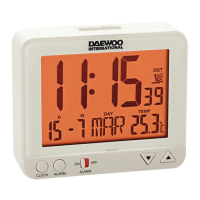
Thank you for your purchase of this quality LCD Alarm Clock with
LED backlight. Please read the instrucƟ on carefully and keep it in a
safe place for future use.
At fi rst, insert 2 x ‘AAA’ size baƩ eries into the baƩ ery compartment
as the polarity indicated.
Note: Do not mix new and old baƩ eries. Do not mix alkaline, standard
(carbon-zinc), or recharge- able (nickel cadmium) baƩ eries.
FUNCTIONS
- Time and Calendar (including display of Year, Month, Date and
Day of the Week)
- Normal Alarm & Snooze Alarm
- Temperature (in selectable oC/oF format)
TIME AND CALENDAR SET
- Move the leŌ switch to T.SET (TIME SET), hour part is blinking;
press UP or DOWN key to set the hour. (Be careful to set AM or
PM correctly. When the PM Ɵ me is set under 12-hour mode, a
‘PM’ mark will be on display.)
- Press MODE key, minute part is blinking; press UP or DOWN key
to set the minute.
- Press MODE key, year part (the iniƟ al year is 2006) is blinking;
press UP or DOWN key to set the year (from 2002-2099).
- Press MODE key, month part is blinking; press UP or DOWN key
to set the month.
- Press MODE key, date part is blinking; press UP or DOWN key to
set the date.
- Move the leŌ switch to NORMAL, the Ɵ me and calendar seƫ ngs
are fi nished.
ALARM SET
- Move the leŌ switch to AL.SET (ALARM SET), hour part is blinking;
press UP or DOWN key to set the alarm hour. (Be careful to set
AM or PM correctly.)
- Press MODE key, minute part is blinking; press UP or DOWN key
DCD-23
EN


 To Next Page