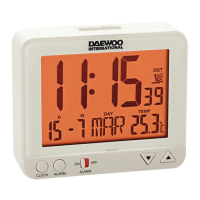
to set the alarm minute.
- Press MODE key again, the snooze interval minute is blinking;
here you can set snooze interval from 1 to 60 minutes by pressing
UP or DOWN key. You can ignore this step; the default snooze
interval is 1 minute.
- Move the switch to NORMAL, the alarm seƫ ng is fi nished.
TURN THE NORMAL ALARM OR SNOOZE ALARM ON/OFF
- Normal Alarm:
Move the right switch to AL.ON (ALARM ON), the clock will alarm
lasƟ ng 1 minute only once when the set alarm Ɵ me is up. (Press
any key to stop alarm sound.)
- Snooze Alarm:
Move the right switch to SNZ.ON (SNOOZE ON), the alarm sound
will start when the set alarm Ɵ me is up;
a) Press SNOOZE key, the clock will stop alarm temporarily; the
alarm sound will start again aŌ er the snooze interval ends. AŌ er
doing so three Ɵ mes repeatedly, the snooze alarm funcƟ on will
stop working.
b) If no buƩ on is pressed manually the alarm will last for 1 minute
per every snooze interval (three Ɵ mes in total). AŌ er that, the
snooze alarm funcƟ on stops working.
c) Press any key except of SNOOZE, the snooze alarm funcƟ on will
stop working.
- OFF:
Move the switch to OFF: The normal alarm or snooze alarm funcƟ on
will stop working.
TEMPERATURE DISPLAY
Under normal state, press oC/oF key to select Celsius or Fahrenheit
on temperature display.
12/24 HOUR MODE
Under normal state, press DOWN key to select 12/24 hour mode.
EN
USER MANUAL


 To Next Page