19
PC Connections
1. Turn on the LCD TV and press on the remote controller.
2. Use to move to "PC".
3. Set the PC video output mode to VGA (640x480)/ SVGA (800x600)/ XGA (1024x768), SXGA
(1280x1024, 60Hz). In the mode higher than SXGA (1280x1024, 75Hz) "Out of Range" message appears.
Be sure to change your PC video format to less than SXGA mode.
How to Use as PC
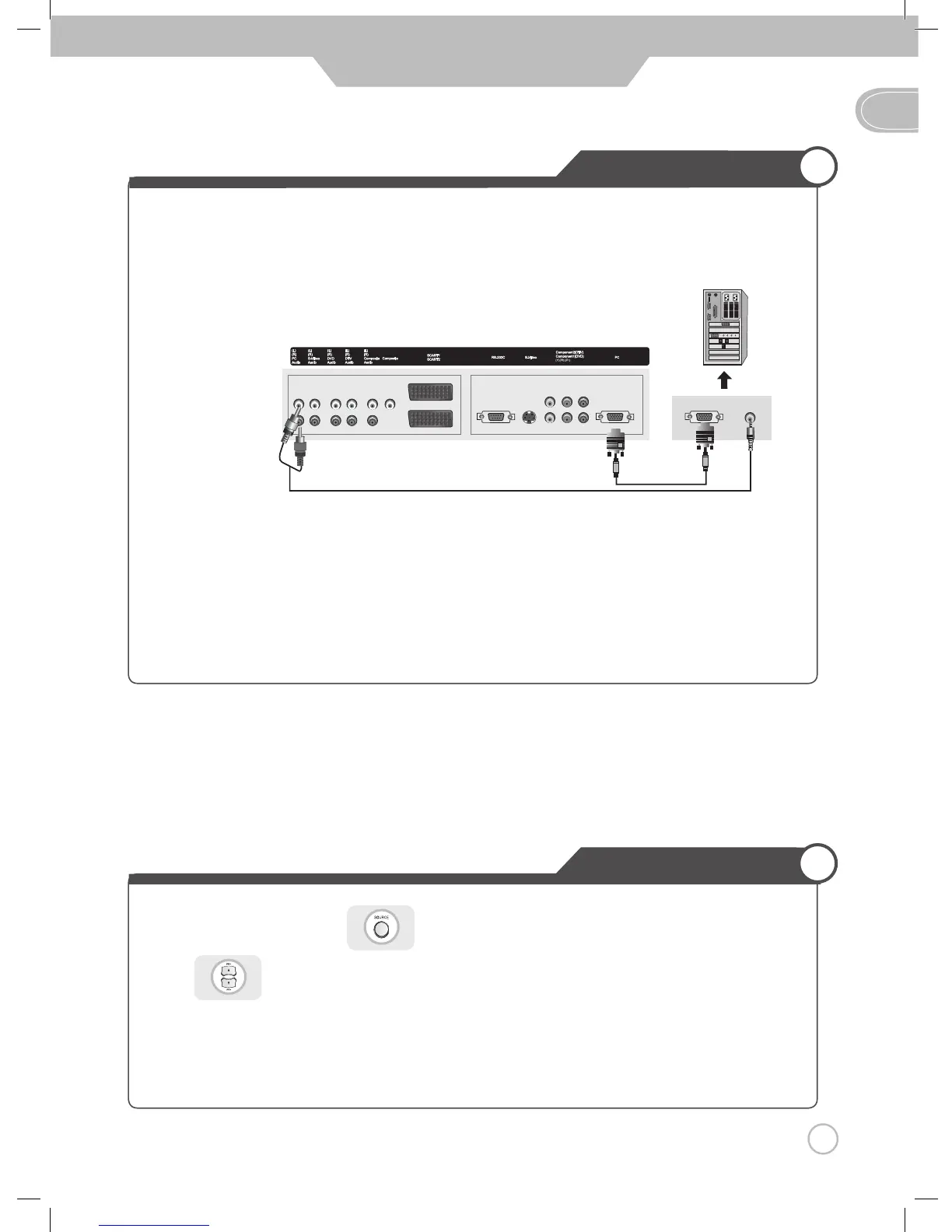
• Connect LCD TV's RGB terminal to PC's RGB terminal using the D-Sub cable.
• Connect LCD TV's PC Audio terminal to PC's Audio terminal using the Audio cable.
(Only possible for PC's with Audio terminal)
Users should buy the PC AUDIO Cable(RCA Jack)
❶
and PC Signal Cable
❷
separately.
❶
❷
< PC >
Connection terminals of other appliances differ by manufacturer and model.
GB
PC Connections
< LCD TV Back view >
Connection


 To Next Page