- 16 -
TV Function
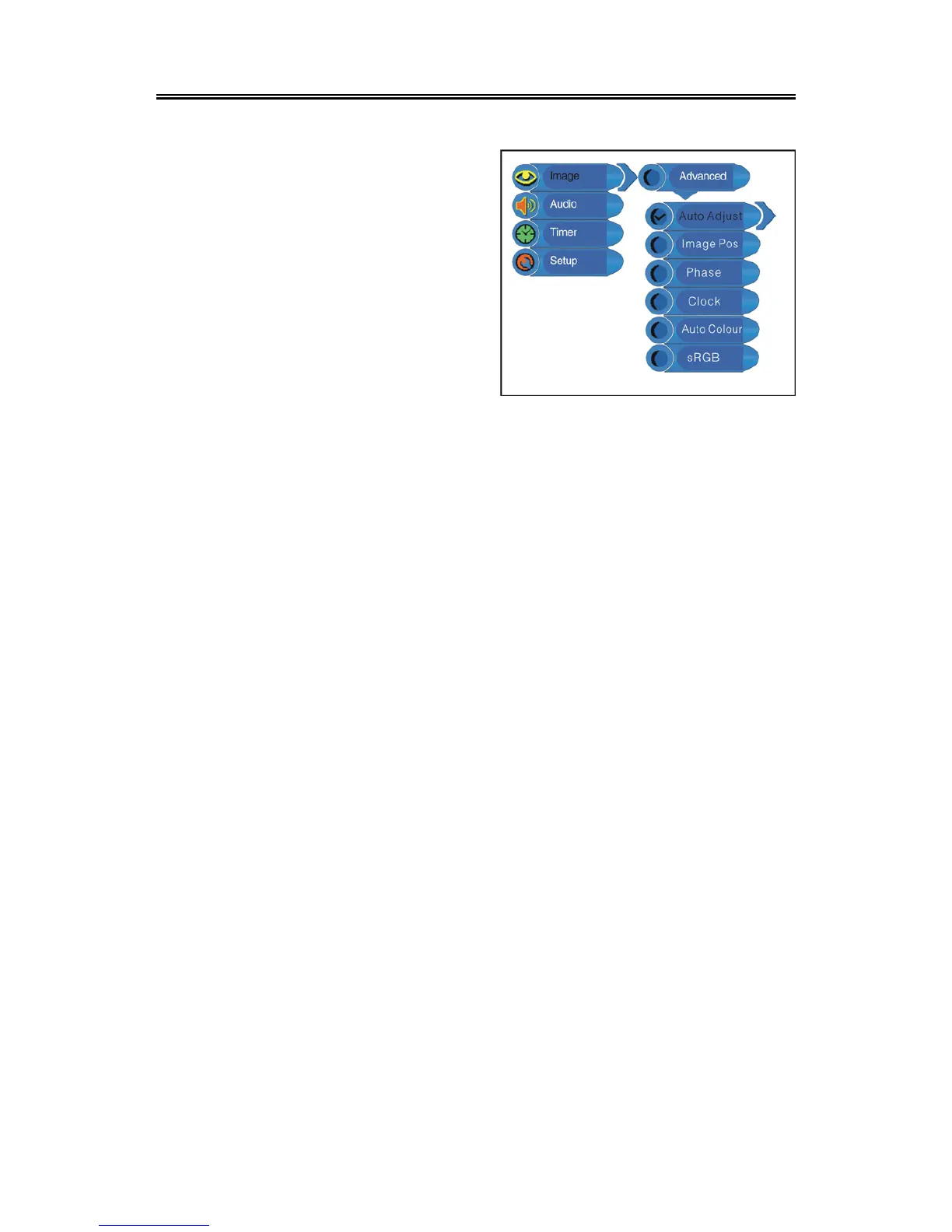
When the VGA signal is connected to the unit, the Advanced setup menu is as shown below:
Auto Adjust:
If the monitor is not clear, you should carry out “Auto Adjust”.
Press the “▲▼” button to select “Auto Adjust” and press the “ENTER” button to enter it’s menu.
Press the “▲▼” button to select “Yes” to activate this function or “No” to cancel. Press the “MENU”
button to return to the previous menu.
Image Pos:
Press the “▲▼” button to select “Image Pos” and press the “ENTER” button to enter it’s menu.
Within the menu, press the “▲▼◄►” button to move the image. Press the “MENU” button to return
to the previous menu.
Phase:
Press the “▲▼” button to select “Phase” and press the “◄►” button to adjust the value. Press the
“MENU” button to return to the previous menu.
Clock:
Press the “▲▼” button to select “Clock” and press the “ENTER” button to enter it’s menu. Press
the “◄►” button to adjust the value. Press the “MENU” button to return to the previous menu.
Auto Colour:
Press the “▲▼” button to select “Auto Colour” and press the “ENTER” button to activate this
function. Press the “MENU” button to return to the previous menu.
sRGB:
Press the “▲▼” button to select “sRGB” and press the “ENTER” button to enter it’s menu. Press
the “▲▼” button to select “On” to activate this function or “Off” to cancel. Press the “MENU” button
to return to the previous menu.
Press the “▲▼” button to select the desired
item and press the “ENTER” button to enter it’s
setup menu. Press the “MENU” button to return
to the previous menu.


 To Next Page