- 4 -
Front Panel
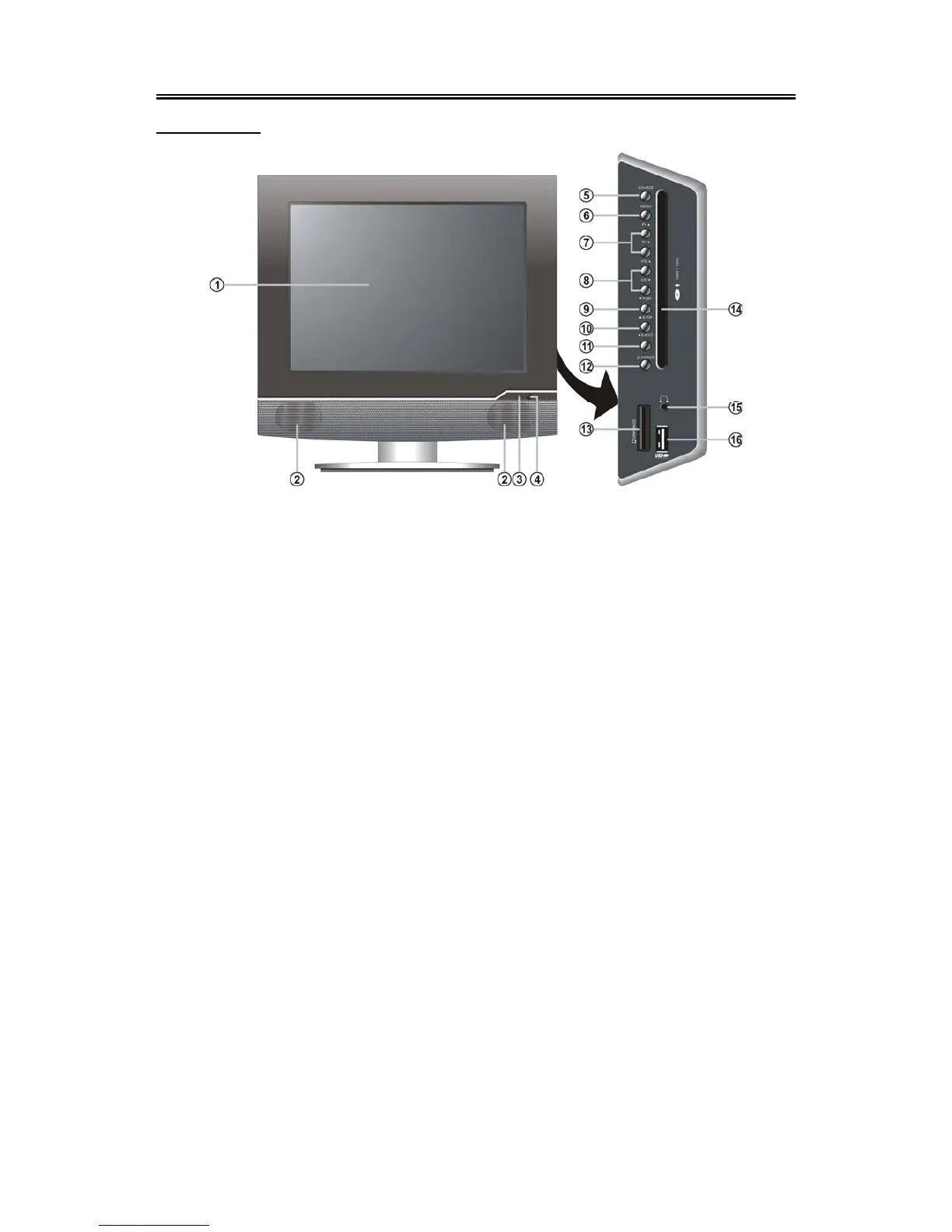
Front View
1. Colour TFT screen
2. Speakers
3. Power Indicator
During normal operation, it is blue; In
standby mode, it is red.
4. Remote Sensor
5. SOURCE button
Press repeatedly to select input, choose
from: TV, SCART, COMPOSITE, S-VIDEO,
Component, VGA or DVD mode.
In setup menu, use the ENTER button for
the same function.
6. MENU button
Press to enter or exit the setup menu.
7. Pr
▲/▼ button
In TV mode, press to select channels.
In setup menu, use the ▲/▼ direction
buttons for the same function.
8. VOL ▲/▼ button
Press to increase or decrease the volume;
In setup menu, use the ◄/► direction
buttons for the same function.
9. PLAY button
Press to play the disc in DVD mode.
10. ■ STOP button
Press to stop disc playback.
11. Eject button
Press to eject the disc out.
12. Power button
Press to enter or exit the standby mode.
13. SD/MS/MMC Card Port
Insert the SD/MS/MMC card into the port.
14. Disc Tray Slot
Used to load disc.
15. Earphone Jack
When connected to earphone, the internal
speakers will automatically turn off.
16. USB Connecting Port
Connect the USB memory.


 To Next Page