10
Daewoo Video Cassette Recorder User’s Guide
3 Connect a pair of audio cables to the AUDIO OUT
terminal on the back of the VCR. If you have a mono
(non-stereo) TV, connect only the white (left)
terminal.
4 Connect the other end of the audio cables to the
AUDIO IN terminals on the TV. If you have a mono
(non-stereo) TV, connect only the white (left)
terminal.
Connecting a cable system
If your cable set-up is not described below, please
contact your cable company for more information.
• If your cable system does not require the use
of a cable box, simply press or screw the incoming
cable onto the ANT IN terminal on the back of your
VCR.
Connecting your VCR,
continued
9
Daewoo Video Cassette Recorder User’s Guide
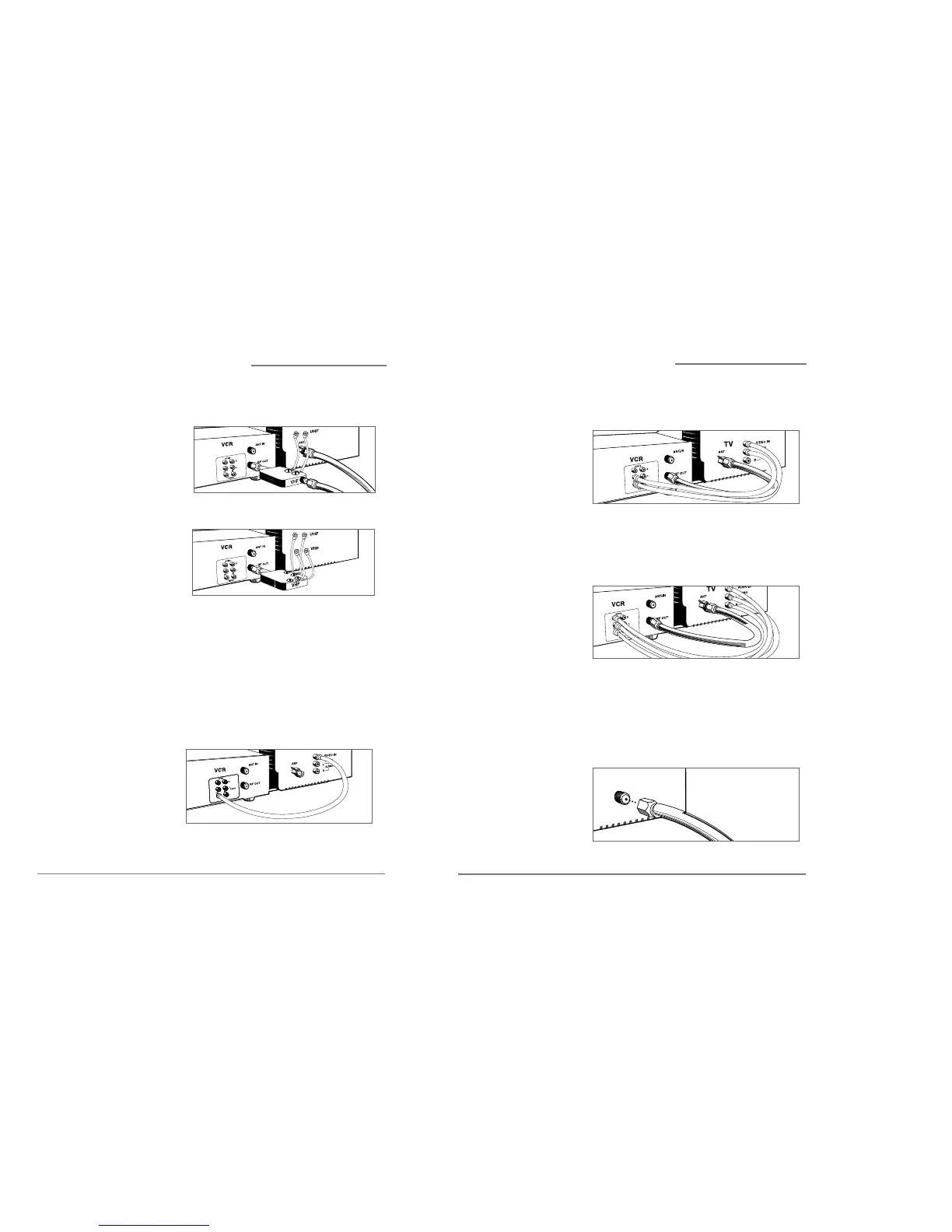
• If you have a coaxial terminal for VHF signals
and twin lead terminals for UHF signals, you
need an adapter(Not supplied) as shown below:
• If you have twin lead terminals for all signals,
you need an adapter(Not supplied) like this:
If your TV does not have Audio/Video inputs, you
have finished connecting your VCR to your TV. If
your TV does have Audio/Video inputs, you may
want to follow the section below.
Connecting to a TV with Audio/Video inputs
1 Connect a video cable to the VIDEO OUT terminal on
the back of the VCR.
2 Connect the other end of the video cable to the
VIDEO IN terminal on the TV.
Connecting your VCR,
continued


 To Next Page