CONNECTIONS SETUP
15
After successfully connecting your DVD Recorder+VCR to your TV and other
devices, this chapter will show you how to complete the initial installation.
1
A ‘Welcome‘ message is displayed on the screen. Make sure the RF cable
from your antenna or cable TV jack is connected.
2
Select the desired language for the on-screen menu using […/†]. Press
[ENTER] to confirm.
3
Select the desired disc menu language using […/†]. Press [ENTER] to
confirm.
4
Select the desired disc playback audio language using […/†]. Press
[ENTER] to confirm.
Initial Installation
Installation
Please select your language to begin auto
install procedure:
English
Spanish
French
Instructions
Enter-Confirm Setup-Exit Move …†
Installation
Please select disc menu language:
Default
English
Spanish
French
Italian
Japanese
Chinese
Instructions
Enter-Confirm Setup-Exit Move …†
Installation
Please select disc play back audio
language:
Default
English
Spanish
French
Italian
Japanese
Chinese
Instructions
Enter-Confirm Setup-Exit Move …†
Installation
Welcome.
Press [Enter] to begin auto channel search.
Ensure antenna is connected.
Instructions
Setup-Exit
• You must follow the initial installation process to set the time, date,
channels, and language preferences for the DVD Recorder+VCR.
14
Connections
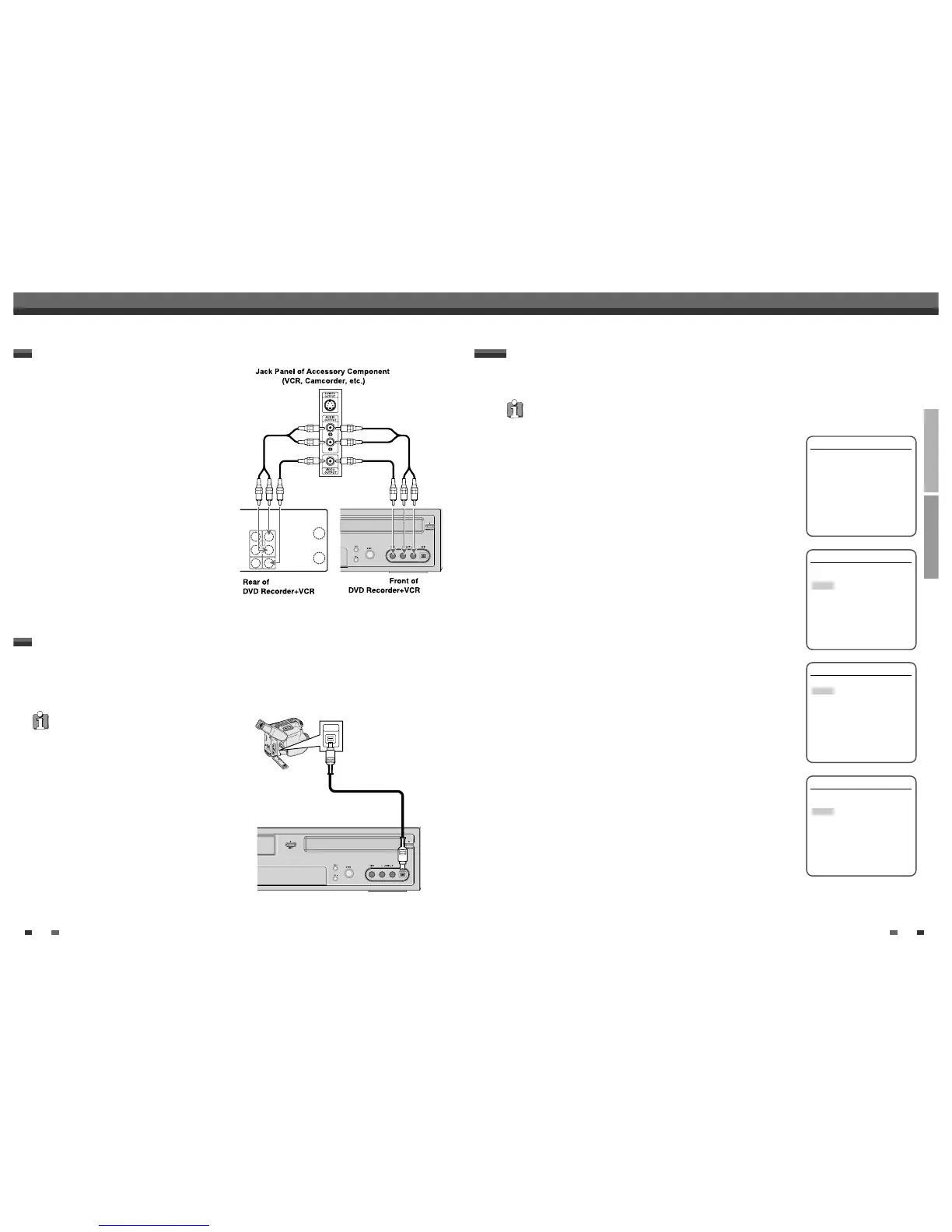
To receive audio/video signals from other equipment,
connect the LINE1 or LINE2 jacks on the DVD
Recorder+VCR to the audio/video out jacks on your
external component, using optional audio/video cables.
Connecting Optional Equipment
Using the front panel DV IN jack, it is possible to connect a DV digital camcorder, video deck or DVD+R/RW
recorder and digitally transfer DV tapes or DVD+R/RW discs to DVD+R/RW.
Use a DV cable (not supplied) to connect the DV In/Out jack of your DV camcorder/video deck to the front panel
DV IN jack of the DVD Recorder+VCR.
Connecting a Digital Camcorder
This jack is for connection to DV equipment only. It is not
compatible with digital satellite tuners or D-VHS video
decks.



 To Next Page